
ReFlex Library: How to implement an Interaction Processor
Table of Contents
- General approach
- Existing processors
- The
IInteractionObserverinterface - The
InteractionObserverBaseimplementation - Step 1: Define the detection strategy
- Step 2: Implement the observer
- Step 3: Register the observer
- Step 4: Verify the behaviour
- Further reading
General approach
An Interaction Processor implements the analysis stage of the ReFlex processing pipeline: it extracts user interactions from the filtered depth point cloud and, optionally, its vector field. This includes detecting candidates, normalising their depth, classifying extrema, and tracking and smoothing touches across frames. Sensor access, point-cloud filtering, calibration of lateral coordinates and broadcasting to clients belong to other parts of the framework.
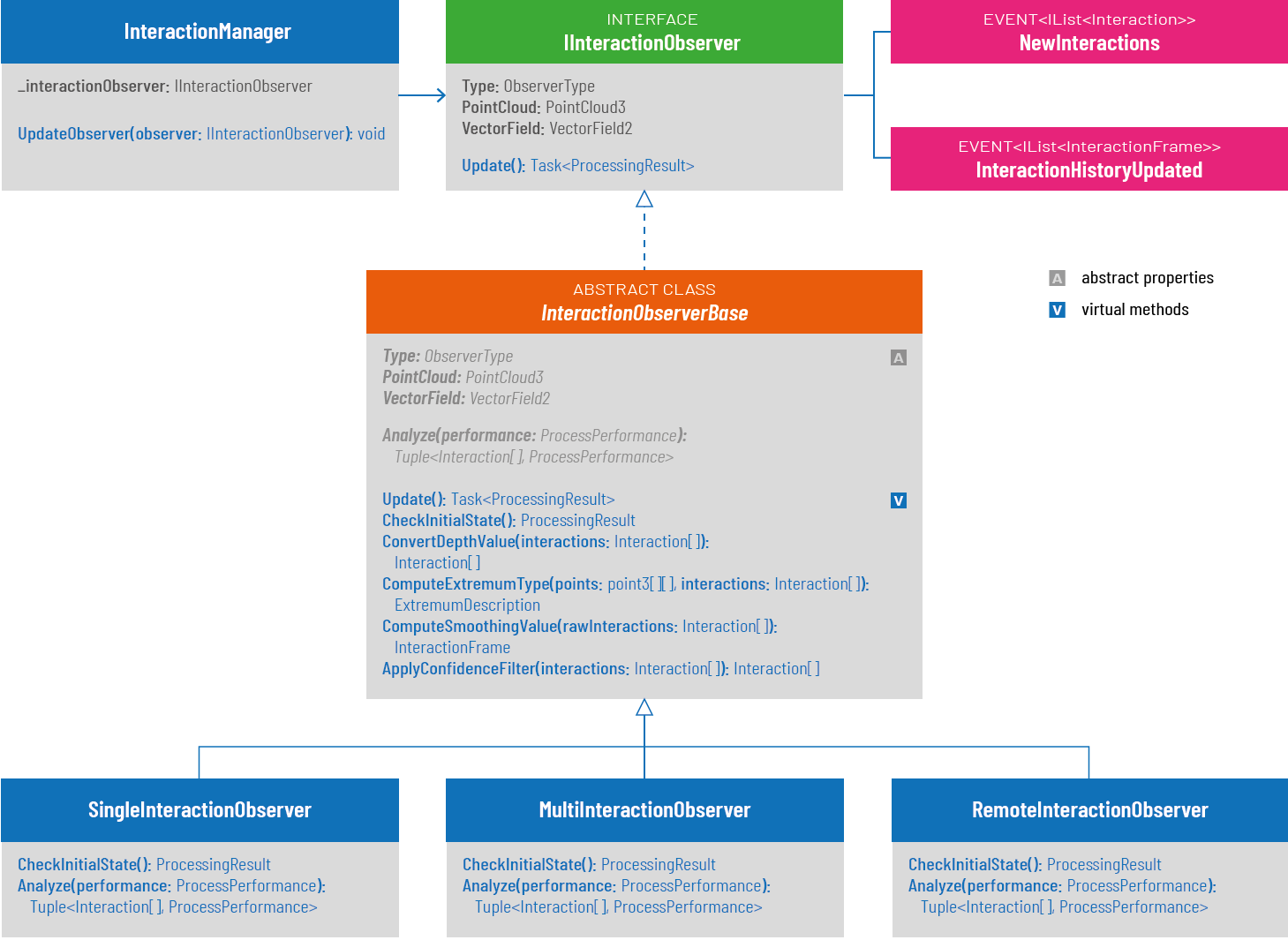
The extension point is IInteractionObserver in ReFlex.Core.Interactivity.Interfaces. The built-in processors derive from InteractionObserverBase in ReFlex.Core.Interactivity.Components. InteractionManager selects one implementation through ObserverType, supplies data and settings, calls Update() and forwards its events. This is a strategy that can be exchanged without changing the sensor implementation.
- Add a local observer to
library/src/Core/Interactivity/Components, or place it in a separate project referencingInteractivity.csprojwhen it requires its own dependencies. - Derive from
InteractionObserverBaseto reuse depth conversion, classification, history and smoothing. Direct implementation ofIInteractionObserveris possible, but requires implementing the complete contract yourself. - Keep the point cloud unchanged. Construct new
Point3instances for interaction candidates: subsequent processing modifies their depth values.
InteractionObserverBase.Update() orchestrates the shared pipeline. A specialised observer implements Analyze() and overrides CheckInitialState() when it needs input or service checks. The base class also owns and raises NewInteractions.
Existing processors
Implementation / ObserverType |
Detection and input | Processing and particularities |
|---|---|---|
SingleInteractionObserver / SingleTouch |
Finds the valid point with the greatest absolute deviation from Distance in the point cloud. The vector field is not used. |
CheckInitialState() checks for a point cloud; Analyze() returns one candidate with initial confidence 1. The shared base pipeline handles all further processing. History can retain earlier touch IDs, but SelectSmoothedInteractions() limits the output to the most recent interaction (highest touch ID on timestamp ties) before confidence filtering. |
MultiInteractionObserver / MultiTouch |
Finds local extrema from neighbouring vectors using VectorField.Stride and MinAngle. Requires both point cloud and vector field; maintains a confidence matrix. |
Checks inputs and processing state before analysis; returns Skipped while busy. Candidate extraction is parallelised and updates per-position confidence. All candidates then pass through the shared base pipeline. |
RemoteInteractionProcessor / Remote |
Delegates candidate extraction to IRemoteInteractionProcessorService, supplied through its constructor. The server’s service implementation uses gRPC. |
CheckInitialState() connects on demand and checks IsBusy; Analyze() awaits the service. Returned candidates pass through the same depth conversion, classification, implicit-extremum removal, smoothing and confidence filtering as local candidates. The service adapter must return lateral array indices and absolute sensor depth. |
NoInteractionObserver / None |
Performs no interaction extraction. | CheckInitialState() returns Skipped, so the base pipeline never calls its Analyze() method. Useful when only depth data is needed, for example for streaming. |
The three detecting processors inherit the same Update() sequence. Their differences are concentrated in readiness checks and candidate extraction. The discussion of touch detection explains why local extrema between actual touch points must be distinguished from user input.
The IInteractionObserver interface
| Method / property / event | Responsibility |
|---|---|
Type |
Read-only ObserverType used by the manager to identify the strategy. This is distinct from an interaction’s Push/Pull InteractionType. |
PointCloud, VectorField |
Current filtered PointCloud3 and derived VectorField2. Validate the inputs needed by your algorithm. |
Distance, MinDistance, MaxDistance |
Sensor distance of the undeformed surface, dead zone around it, and maximum deformation used for depth conversion. Use the same units as the point cloud’s Z values. |
MinAngle |
Angular threshold for vector-field detection, relevant to the multi-touch strategy. |
MinConfidence, MaxConfidence |
Threshold for accepting touches and upper bound for confidence accumulation. |
InteractionHistorySize, NumSmoothingFrames, MaxNumEmptyFramesBetween |
History length, smoothing window and tolerance for missing detections. |
TouchMergeDistance2D, DepthScale, FilterType |
Squared lateral distance threshold for associating touches across frames, depth scaling for smoothing and choice of smoothing filter. |
ExtremumTypeCheckNumSamples, ExtremumTypeCheckRadius, ExtremumTypeCheckFittingPercentage, ExtremumTypeCheckMethod |
Sampling configuration used to distinguish minima, maxima and undefined extrema. |
NewInteractions |
Publish an IList<Interaction> after processing a frame, including an empty list when no interactions remain. |
InteractionHistoryUpdated |
Publish the current IList<InteractionFrame> when the history changes. The base class raises this through its history helpers. |
Update() |
Returns Task<ProcessingResult> describing processing status. When deriving from the base class, inherit its shared pipeline; put local or asynchronous candidate extraction in Analyze(). |
CalculateAverageDistance() |
Estimates the zero-plane distance from valid, unfiltered points. The base class implements it. |
ProcessingResult.ServiceStatus distinguishes successful processing (Available), invalid input or unavailable services (Error) and skipped work (Skipped). No detected touch is a successful frame with an empty result, not an error. Return Error or Skipped from CheckInitialState() to stop before analysis; these paths do not publish NewInteractions. If your implementation maintains a busy flag, use try/finally to reset it.
Coordinates and output: Local observers use array indices for interaction X/Y, not the measured Point3.X/Y world coordinates. Helpers such as ComputeExtremumType() index PointCloud.AsJaggedArray()[x][y] with these values. Candidates initially contain absolute sensor Z; ConvertDepthValue() maps it to [-1, 1]. Negative depth denotes Push, positive depth Pull. Lateral calibration and normalisation to [0, 1] occur downstream; do not normalise X/Y inside the observer.
An Interaction also carries TouchId, Type, ExtremumDescription, Confidence (a float in the current C# model) and Time. The constructor sets Time to DateTime.Now.Ticks: 100-nanosecond intervals since 0001-01-01, not Unix microseconds. History processing reconstructs touch IDs and updates confidence. See the interaction format for the client-facing representation.
The InteractionObserverBase implementation
The base class implements the common configuration properties, the interaction events and IPerformanceReporter. Derived classes provide Type, PointCloud, VectorField and the candidate extractor Analyze(). They can override the readiness check CheckInitialState(); its default implementation returns Available without checking any inputs.
The template method Update() executes the following sequence:
- Await
CheckInitialState(). If the status is notAvailable, report performance data and return immediately. - Await
Analyze(processResult.PerformanceMeasurement)to obtain raw candidates and preparation timings. - Call
ConvertDepthValue()to normalise depth and assign Push/Pull. - Classify with
ComputeExtremumType()and remove implicit extrema withRemoveExtremumsBetweenTouches(). - Update touch IDs, history and smoothing through
ComputeSmoothingValue(). - Call
SelectSmoothedInteractions()to select the output without changing the history. The default retains all points;SingleInteractionObserverselects the most recent point, breaking timestamp ties by highest touch ID. - Apply
ApplyConfidenceFilter(), report performance data and publish the accepted interactions throughOnNewInteractions().
| Hook / helper | Behaviour and usage |
|---|---|
Analyze(ProcessPerformance) |
Abstract hook returning Task<Tuple<IEnumerable<Interaction>, ProcessPerformance>>. Return fresh candidates with array-index X/Y, absolute sensor Z and initial confidence; return an empty sequence when no deformation is detected. Record optional preparation time in Preparation. The base class measures analysis time and the remaining stages. |
CheckInitialState() |
Virtual asynchronous hook returning Task<ProcessingResult>. Validate inputs, configuration and service readiness before the pipeline starts. |
ConvertDepthValue(List<Interaction>) |
Removes candidates inside the configured dead zone, maps absolute Z to signed normalised depth, clamps it to [-1, 1] and assigns Interaction.Type to Push/Pull. Mutates candidate positions. |
ComputeExtremumType(...) |
Classifies extrema using the point cloud and configured fixed or stochastic samples. The single-point overload is protected virtual; the list overload assigns each interaction’s description. Global skips neighbourhood sampling and compares absolute sensor depth with Distance: below is Minimum, above is Maximum, equal or non-finite is Undefined. |
RemoveExtremumsBetweenTouches(...) |
Retains negative-depth minima and positive-depth maxima, removing undefined and opposite extrema. Called automatically after classification. Global follows the same Minimum/Maximum depth convention but does not validate the local neighbourhood. |
ComputeSmoothingValue(IList<Interaction>) |
Updates InteractionSmoothingBehaviour, reconstructs IDs, applies smoothing and raises InteractionHistoryUpdated. Returns an InteractionFrame; the current implementation considers at most 20 input candidates. The template calls it for empty candidate lists as well, allowing history to expire. |
SelectSmoothedInteractions(IEnumerable<Interaction>) |
Virtual output-selection hook after smoothing. The base implementation retains all points. SingleTouch selects at most one before confidence filtering; rejected selections are not replaced by an older candidate. History remains intact. |
ApplyConfidenceFilter(...) |
Retains interactions with Confidence > MinConfidence (strictly greater). Called automatically after selection of the smoothed output. |
UpdateInteractionFrames(...) |
Optional helper to decrease confidence for missing touches, remove exhausted touches from the supplied frame and update the history cache/event. The shared Update() does not call it. |
OnNewInteractions(List<Interaction>) |
Raises the inherited NewInteractions event. The template calls it once per successfully processed frame, including when the accepted list is empty. |
CalculateAverageDistance() |
Averages valid, unfiltered Z values and rounds to two decimal places. Ensure at least one valid, unfiltered point exists before using it for calibration. |
UpdateFrameId(int), UpdatePerformanceMetrics(...) |
Associate profiling data with the frame and raise PerformanceDataUpdated. The template measures stage durations when MeasurePerformance is enabled. |
SelectSmoothedInteractions(), Update(), CheckInitialState() and the single-point ComputeExtremumType() are virtual. Analyze() is abstract; the remaining processing helpers above are non-virtual. Most alternatives only implement Analyze() and readiness checks. For a different classifier, override the single-point overload. Only override Update() when the shared processing sequence itself must change, and preserve history updates, performance reporting and event publication explicitly in that case.
Configuration detail: The current setters of NumSmoothingFrames and MaxNumEmptyFramesBetween forward at least the history length to the smoothing behaviour, even if a smaller value was requested. A value of zero therefore does not reliably disable smoothing through that setter. Use FilterType.None to disable the smoothing filter, and verify disappearance timing with the actual history settings. Set MaxConfidence explicitly; do not rely on all observer defaults being propagated to the internal smoothing behaviour at construction time.
Step 1: Define the detection strategy
The example below implements CentralInteractionObserver: an alternative that searches only the central half of each image axis. It ignores invalid/filtered points and returns at most one candidate with the largest deformation in that region. It reuses the complete base pipeline, including local-extremum validation and history. Previously detected touch IDs can remain temporarily in the output according to the history settings. This strategy is useful when an application deliberately limits input to a central area.
This example derives directly from InteractionObserverBase, so it retains the default unrestricted output selection. To guarantee at most one published point as in the built-in SingleInteractionObserver, also override SelectSmoothedInteractions() with the same timestamp/touch-ID selection. Setting Type alone does not impose this limit.
The strategy reuses ObserverType.SingleTouch and replaces that strategy in the manager in Step 3. This keeps the example usable without changing the enum or client configuration. To offer both implementations independently, follow the additional registration instructions below.
Step 2: Implement the observer
Create CentralInteractionObserver.cs in library/src/Core/Interactivity/Components. The complete class implements candidate extraction and readiness checking; it inherits Update() and both interaction events:
1
2
3
4
5
6
7
8
9
10
11
12
13
14
15
16
17
18
19
20
21
22
23
24
25
26
27
28
29
30
31
32
33
34
35
36
37
38
39
40
41
42
43
44
45
46
47
48
49
50
51
52
53
54
55
56
57
58
59
60
61
62
63
64
65
66
67
68
using System;
using System.Collections.Generic;
using System.Threading.Tasks;
using ReFlex.Core.Common.Components;
using ReFlex.Core.Common.Util;

namespace ReFlex.Core.Interactivity.Components
{
    public sealed class CentralInteractionObserver : InteractionObserverBase
    {
        public override ObserverType Type => ObserverType.SingleTouch;
        public override PointCloud3 PointCloud { get; set; }
        public override VectorField2 VectorField { get; set; }

        protected override Task<ProcessingResult> CheckInitialState()
        {
            // This strategy does not need VectorField.
            var ready = PointCloud != null &&
                PointCloud.SizeX > 0 && PointCloud.SizeY > 0 &&
                float.IsFinite(Distance) && float.IsFinite(MinDistance) &&
                float.IsFinite(MaxDistance) && MinDistance >= 0 &&
                MaxDistance > MinDistance;

            return Task.FromResult(new ProcessingResult(ready
                ? ProcessServiceStatus.Available : ProcessServiceStatus.Error));
        }

        protected override Task<Tuple<IEnumerable<Interaction>, ProcessPerformance>>
            Analyze(ProcessPerformance performance)
        {
            // No input conversion or service request is required here.
            performance.Preparation = TimeSpan.Zero;
            var points = PointCloud.AsJaggedArray();
            Point3 strongest = null;
            var strongestDeviation = MinDistance;

            // Upper bounds are exclusive; X/Y are array indices.
            for (var x = PointCloud.SizeX / 4;
                 x < PointCloud.SizeX - PointCloud.SizeX / 4; x++)
            {
                for (var y = PointCloud.SizeY / 4;
                     y < PointCloud.SizeY - PointCloud.SizeY / 4; y++)
                {
                    var point = points[x][y];
                    if (!point.IsValid || point.IsFiltered ||
                        !float.IsFinite(point.Z)) continue;

                    var deviation = System.Math.Abs(point.Z - Distance);
                    if (deviation <= strongestDeviation) continue;

                    strongestDeviation = deviation;
                    strongest = new Point3(x, y, point.Z);
                }
            }

            var candidates = new List<Interaction>();
            if (strongest != null)
            {
                // The base class assigns Push/Pull and normalises Z later.
                candidates.Add(new Interaction(strongest, InteractionType.None, 1));
            }

            return Task.FromResult(
                new Tuple<IEnumerable<Interaction>, ProcessPerformance>(
                    candidates, performance));
        }
    }
}
The observer returns raw candidates, without normalising depth, assigning touch IDs, calling smoothing or raising events itself. The base template performs those steps exactly once. Returning an empty list still advances history, so older touches can expire. A new Point3 protects the sensor cloud from the depth conversion performed by the base class.
Configure a sampling method such as ExtremumTypeCheckMethod.FixedRadius with positive radius and sample count and a suitable fitting threshold. The shared classifier must accept the detected deformation before it can enter the history. Global recognises both Push and Pull relative to Distance, but cannot reject local intermediate extrema through neighbourhood sampling. For a central single-touch strategy that needs a different classification rule, override ComputeExtremumType(Point3[][], int, int) while keeping the template sequence.
For a multi-touch alternative, replace the central-region search in Analyze() with an extractor returning multiple candidates. Keep absolute sensor Z and lateral array indices; the shared pipeline performs all remaining stages. For an external algorithm, implement IRemoteInteractionProcessorService and use RemoteInteractionProcessor: its service Update(PointCloud3, float zeroPlane, ProcessPerformance, bool) returns Task<Tuple<IEnumerable<Interaction>, ProcessPerformance>>; preserve the explicit ZeroPlane argument when implementing a service. Derive a separate observer if you also need different readiness checks or classification.
Step 3: Register the observer
In library/src/Core/Implementation/Components/InteractionManager.cs (namespace Implementation.Components), replace the SingleTouch branch in the Type setter:
1
2
3
case ObserverType.SingleTouch:
    UpdateObserver(new CentralInteractionObserver());
    break;
UpdateObserver() transfers cached processing settings and current point-cloud/vector-field references, subscribes to the interaction and history events and registers the performance reporter. Use this existing path rather than assigning _interactionObserver directly. New sensor frames are forwarded through the manager’s point-cloud and vector-field change handlers.
Select SingleTouch in the server, or set ProcessingSettings.InteractionType to 1 in the configuration file. InteractionManager.Init(ObserverType.SingleTouch) also selects this branch when embedding the library. Apply the usual zero-plane, depth, confidence and history settings after selecting the observer. In particular, ensure MaxConfidence > MinConfidence, and configure FilterType explicitly after switching; the manager retains and transfers the extremum sampling settings.
To keep both strategies selectable, add a distinct, explicit value to ObserverType in library/src/Core/Common/Util/ObserverType.cs, return that value from the new class and add a matching manager branch. Preserve existing numeric values (None = 0, SingleTouch = 1, MultiTouch = 2, Remote = 3); the manager selects one strategy even though the enum carries a [Flags] attribute. Update the server UI choices, any client-side enum mappings and configuration documentation so the new value can be selected and persisted. A separate observer project also needs a project reference from the implementation project.
Step 4: Verify the behaviour
Use the sensor emulator or a recorded point cloud to make the checks reproducible:
- Input and configuration: A missing point cloud or invalid depth range returns
Error. A valid frame without deformation returnsAvailableand eventually publishes an empty list as history expires. AnErrororSkippedreadiness result stops before analysis and does not raiseNewInteractions. - Detection region: A deformation outside the central region is ignored; one inside it is detected. Invalid or filtered samples do not become candidates. The input cloud’s Z values remain unchanged.
- Depth and type: Test both sides of
Distance, the dead-zone boundary and values beyondMaxDistance. Use an accepted local minimum for Push and a local maximum for Pull with the configured sampling method. Push produces negative Z, Pull positive Z, and output stays within [-1, 1]. - Tracking: A stationary touch keeps its ID across frames and exceeds
MinConfidenceafter enough observations. Check disappearance timing with empty frames and the configured history; also test moving from one candidate to another. - Integration: Select the strategy through the server configuration, observe
NewInteractions/history updates and check that clients receive calibrated X/Y in [0, 1]. Enable performance measurement to inspect analysis timings.
Further reading
- Processing pipeline, especially the analysis layer and downstream coordinate conversion.
- Touch detection, including classification of implicit extrema.
- Interaction format and server configuration.
- Framework description, Sections 7.4.5 (interaction extraction) and 7.4.6 (interaction data format): conceptual background; API details above follow the integrated shared observer pipeline. The PDF calls the remote class
RemoteInteractionObserver; the source name isRemoteInteractionProcessor. Its timestamp example is labelled as Unix microseconds, whereasInteraction.Timecontains .NET ticks as described above.