

Template: Angular
Table of contents
- Basic example
- Setup and configuration
- Receiving interaction data
- Visualization, status and history
- Shared types and components
Basic example
- location:
examples/basic-angular/ - technology: Angular + TypeScript, native WebSocket communication and RxJS observables
- preconfigured websocket address (for setup in
Server):ws://localhost:40001/ReFlex - development server:
http://localhost:4201/ - Features:
- automatically connects to the ReFlex server when the application starts
- visualizes interaction points with their
touchId; position and depth control the position and size of each circle - displays the connection state, websocket address, received frame count and current number of touches
- displays received interactions as JSON in a message history
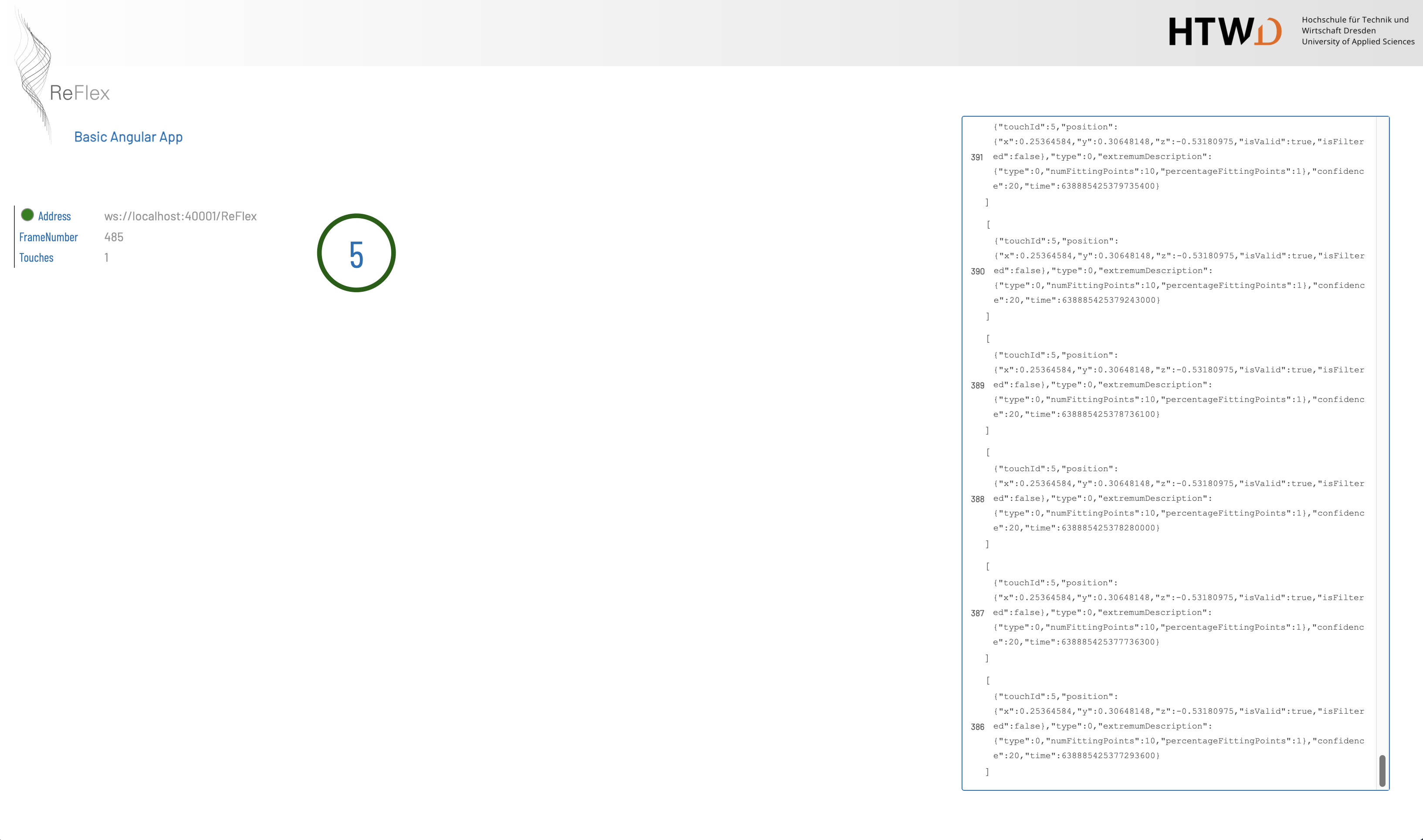
Like the Plain HTML template, this example demonstrates how to connect to ReFlex and receive interaction data. It provides a starting point for an Angular client: websocket communication is encapsulated in a service, and components consume the data through observables. The templates reduce the initial setup effort by extracting the essential integration code from earlier projects and presenting it with a consistent visual design.
Setup and configuration
The example is part of the repository’s npm workspaces. With Node.js and npm installed, run the following commands from the repository root to install dependencies, build the shared type definitions and start the development server:
1
2
3
npm install
npm run build:shared-types
npm run start:example-angular
Open http://localhost:4201/ in a browser. To create a production build, run npm run build:example-angular from the repository root.
Start the ReFlex server and enable websocket broadcasting with an address matching the template. The development server only serves the Angular application; it does not provide interaction data. The configured websocket endpoint must be reachable from the browser.
The address is defined in examples/basic-angular/src/environments/environment.ts:
1
2
3
4
export const environment = {
  production: false,
  websocketUrl: 'ws://localhost:40001/ReFlex'
};
For production builds, set the address in src/environments/environment.prod.ts as well. The production configuration in angular.json replaces the development environment file with this file. Both currently use the same websocket address.
In src/main.ts, the address is registered under the WEBSOCKET_URL injection token and passed to Angular when bootstrapping AppModule:
1
2
3
4
5
6
const providers = [
  { provide: 'WEBSOCKET_URL', useValue: environment.websocketUrl, deps: [] }
];

platformBrowserDynamic(providers).bootstrapModule(AppModule)
  .catch(err => console.error(err));
Receiving interaction data
The central class is TouchPointService in src/services/touch-point.service.ts. It is registered with providedIn: 'root', so the components share one service instance and websocket connection. Its constructor receives the configured address, creates a native WebSocket and registers the event handlers:
1
2
3
4
constructor(@Inject('WEBSOCKET_URL') private _address: string) {
    this._wss = new WebSocket(this._address);
    this.subscribeWebSocketEvents();
}
For each onmessage event, the service increments a local frame counter, parses the JSON array of interactions and publishes the resulting data. Before parsing, it converts the first character of JSON property names to lowercase so that server properties such as TouchId and Position match the TypeScript fields touchId and position. The following excerpt shows this conversion:
1
2
3
4
5
6
const lowerCaseStart = evt.data.replace(/"([^"]+)":/g,
  ($0: string, $1: string) => {
    return ('"' + $1.charAt(0).toLowerCase() + $1.slice(1) + '":');
  });

var points = JSON.parse(lowerCaseStart);
The service exposes the following methods:
| Method | Result | Purpose |
|---|---|---|
getTouchPoints() |
Observable<Interaction[]> |
Publishes the current interaction points, including an empty array when no interactions are present. |
getHistory() |
Observable<InteractionFrame[]> |
Publishes the received message history. Each entry contains a local frameId and its interactions. |
getFrameNumber() |
Observable<number> |
Publishes the number of received websocket messages. This is a client-side counter, not a server frame identifier. |
getAddress() |
string |
Returns the configured websocket address. |
isConnected() |
boolean |
Checks whether the websocket’s readyState is OPEN. |
Internally, RxJS Subject instances distribute the updates. Connection opening and closing are logged to the browser console. The example keeps connection handling minimal: it has no reconnect control, automatic reconnection or dedicated onerror handler. Reload the page to establish a new connection after the server becomes available again.
Visualization, status and history
Interaction points
AppComponent obtains TouchPoints$ from TouchPointService.getTouchPoints(). Its template uses Angular’s async pipe and *ngFor to render one circle per interaction. The essential bindings in src/app/app.component.html are:
1
2
3
4
5
6
<div *ngFor="let tp of TouchPoints$ | async">
  <div class="touchPoint" [style]="'transform: translate('+tp.position.x * this.Width+'px, '+tp.position.y * this.Height+'px) scale('+Math.abs(tp.position.z)+');'">
    <div class="touchPoint__outerCircle {{tp.position.z < 0 ? ' push' : ' pull'}}"></div>
    <div class="touchPoint__innerCircle"><p>{{tp.touchId}}</p></div>
  </div>
</div>
position.xandposition.yare treated as normalized coordinates and multiplied by the visualization area’s width and height to obtain pixel positions. The component measures this area after view initialization and on window resize.Math.abs(position.z)scales the circle, so its size represents the magnitude of the depth value. At zero depth, the circle has zero scale.- The sign of
position.zselects the CSS class: negative values usepush(green), while non-negative values usepull(red). These colors are defined insrc/app/app.component.scssand differ from the HTML example. The Angular visualization uses the depth sign rather than thetypefield to choose the color. - The center of each circle displays its
touchId.
Connection status
StatusComponent in src/app/status/ displays the websocket address, frame counter and touch count. It subscribes to the frame and interaction observables and checks the connection state every 500 ms. A green indicator denotes an open connection; a red indicator denotes a connection that is not open.
Message history
HistoryComponent in src/app/history/ subscribes to getHistory(). It displays each frame’s local identifier and serializes its interactions with JSON.stringify. The message container uses flex-direction: column-reverse, placing newer messages at the bottom.
The service includes a history limit of 100 entries in the branch handling non-empty interaction arrays. Empty arrays are also recorded, but that branch returns before applying the limit. Consequently, a sequence of empty frames can grow the history beyond 100 entries. This is an in-memory display of incoming data; the Angular template does not send messages to the logging backend used in the extended HTML example.
Shared types and components
Shared TypeScript definitions
The package @reflex/shared-types in packages/reflex-shared-types/ provides reusable TypeScript definitions corresponding to the framework’s data structures. The Angular template references this local package through its workspace dependency and imports Interaction and InteractionFrame for the service and components.
Interaction contains touchId, position (Point3 with x, y and z), type, extremumDescription, confidence and time. InteractionFrame groups an array of interactions with a frameId. These interfaces make received data available to TypeScript code with consistent field names; they do not validate websocket payloads at runtime.
Angular component library
The separate package @reflex/angular-components in packages/reflex-angular-components/ provides reusable interface elements extracted from the server frontend, together with shared styles and assets. Its public components include PanelHeaderComponent, SettingsGroupComponent, OptionCheckboxComponent, ValueSelectionComponent, ValueSliderComponent and ValueTextComponent.
See the component documentation for the available interface elements and the style guide for the shared visual design.
The basic-angular template implements its own visualization, status and history components and does not import this library. For an interactive demonstration of the shared components, their setup and the style guide, use the separate project in examples/shared-components-demo/. After installing the workspace dependencies, run these commands from the repository root:
1
2
npm run build:shared-components
npm start --workspace examples/shared-components-demo
The component demo is served at http://localhost:4203/.