
Requirements Analysis
Table of Contents
The ReFlex framework evolved through the conception, implementation, and demonstration of Elastic Display case studies. Each application exposed requirements that existing tools did not yet meet. The tools were extended for that scenario, followed by a consolidation step: reusable functionality was integrated into the main framework, more specific mechanisms were generalized, and application-specific components remained outside the core.
This process distinguishes three kinds of contribution:
- Functional requirements define the capabilities needed to capture, process, configure, and communicate surface deformation.
- Non-functional requirements define the expected responsiveness, reliability, architectural flexibility, and sustainability of the software.
- Development tools support prototyping, testing, integration, and the creation of new applications.
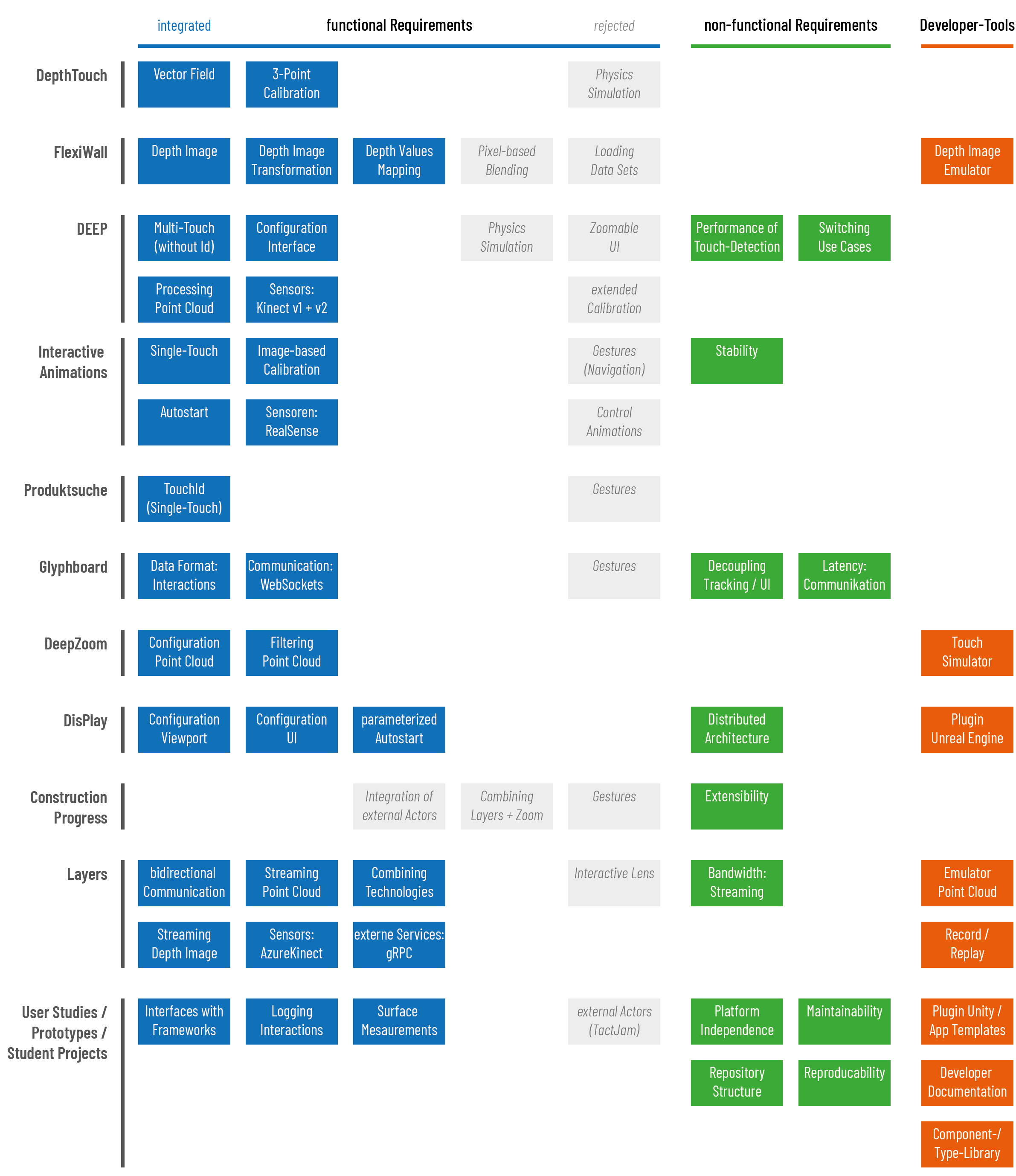
The following figure traces these contributions across the case studies and subsequent research projects. It records the origin of requirements and consolidation decisions rather than the complete feature set of each prototype.
Functional Requirements
The progression began with direct use of surface-wide depth data, added discrete contact detection, and eventually separated tracking from visualization through a distributed architecture. The resulting framework needed to expose both continuous surface representations and individual interactions, with configuration and communication independent of a particular application technology.
| Case study | Functional contribution |
|---|---|
| DepthTouch | + Calculate vector field from surface deformation + Three-point calibration to map sensor coordinates to screen coordinates - physics simulation (application-specific) |
| FlexiWall | + access to depth image + transform depth image coordinates between sensor and projection spaces + adjust depth values interaction range - Pixel-based layer blending was not included in the framework - Layer data management (application-specific) |
| DEEP | + Processing of point cloud derived from depth image + Multi-touch detection without persistent Touch IDs + Definition of resting plane and deformation thresholds + Sensor abstraction: Switch between Kinect 1 and 2 - Physics simulation (application-specific) - Zoomable UI - Extended calibration (no siginicant improvement, too complicated) |
| Interactive Animations | + Single-touch detection as generic functionality + Calibration based on matching projected image + Sensor abstraction: Intel RealSense support + Automatic sensor and application startup - Navigation gestures (application-specific) - Animation control (no general approach) |
| Zoomable Product Browser | + Multi-touch with persistent IDs - Gesture recognition (application-specific) |
| Glyphboard | + Definition of common format for streaming interaction data + Communication via WebSockets - Gesture recognition (application-specific) |
| DeepZoom | + Point-cloud configuration (thresholds, distances, limits) + Point-cloud filtering (smoothing, outliers) |
| DisPlay | + Viewport coordinate mapping + user interface for server configuration (point cloud configuration, filtering, interaction processing) + Persisting server settings and parameterizes server on startup by client applications |
| Construction Progress Visualization | No new core functions integrated into framework |
| Layers | + Sensor abstraction: Azure Kinect support + Web-based configuration UI + configuration and pipeline control via REST-interface + Interaction streaming via WebSockets + Streaming surface data (point cloud, vector field) via SignalR + Concurrent interaction and depth-image streams - Interactive lenses |
| Further studies, prototypes, and student projects | + Interfaces with other frameworks (TUIO, gRPC) + Interaction logging (e.g. for user studies) + Surface measurements (for reproducction of exact surface streching behaviour ) - External actuator control (TactJam) |
The main architectural consequence was a clear division of responsibilities: the framework captures and processes deformation and exposes the resulting data and configuration interfaces; applications interpret these inputs and derive how they affect content, simulated forces, gestures, and interface state. Persistent identifiers support gestures that require the history of individual contacts.
Development Tools
The tools evolved alongside the input representations and architecture. A synthetic depth image suited FlexiWall’s shader-based rendering, but was insufficient for applications expecting extracted contact data. Later tools therefore simulated contacts or a point cloud and supported recording and playback.
| Case Study | Tool Description |
|---|---|
| FlexiWall | Depth-image emulator: Develop and prepare layered content without requiring the physical installation. |
| DeepZoom | Touch-point simulator: Test application behaviour using synthetic interaction points independently of the tracking hardware. |
| DisPlay | Unreal Engine plugin: Integrate surface interactions with a game-engine client and support reuse across technologies. |
| Layers | Point-cloud emulator: Generate synthetic surface data Recording/playback: replay captured data for development, testing, and repeatable investigation. |
| Further studies and student projects | Application templates for different frontend technologies (HTML/JS, Angular, Vue.js, React, WPF, .NET MAUI, Unity, Unreal Engine): Reduce the effort needed to create clients Unity Plugin: Integrate external technologies Developer documentation: Facilitating Open Source contributions Class, type, and component libraries: Maintainability, ensuring consistent behaviour, look and feel |
Feedback from these case studies student projects and also established requirements for platform-independent development, a repository structure that supports collaboration, continuous integration with tests, and the preservation of study-specific builds. The student-project experiences illustrate how missing templates, incomplete documentation, emulator limitations, and integration problems informed subsequent improvements.
Non-Functional Requirements
The non-functional requirements fall into three groups: responsiveness and reliable use; architectural properties; and sustainable collaboration as an open-source research tool.
| Group | Requirement | Target / measure |
|---|---|---|
| Usability | Performance | Processing in < 50 ms, with a 30 ms target; depth-image streaming with little additional impact on latency. |
| Usability | Availability | Failure-free operation for at least 4 hours. |
| Usability | Robustness | Stable memory usage. |
| Architecture | Decoupling UI and tracking | Distributed architecture. |
| Architecture | Configurability | Adaptation through suitable interfaces. |
| Architecture | Extensibility | Modular structure. |
| Architecture | Installability | Installers for tools and applications. |
| Open Source / Open Science | Portability | Use on common desktop operating systems. |
| Open Source / Open Science | Maintainability | Continuous-integration pipeline and tests. |
| Open Source / Open Science | Reusability | Reusable classes and components; application templates. |
| Open Source / Open Science | Suitable repository structure | Monorepository with integrated documentation. |
| Open Source / Open Science | Reproducibility | Specific releases and data repositories. |
Responsiveness and Streaming
The latency budget uses approximately 100 ms for the complete interaction-to-response path as a design reference for direct manipulation. The source analysis contrasts this with the more permissive reference of approximately one second for navigation where users can see that an operation is being performed. For an Elastic Display’s continuous deformation feedback, the stricter reference motivates the framework’s processing target.
Three components contribute to the overall delay: sensor acquisition, framework processing and delivery, and application-side processing and presentation. The sensors considered in the analysis operate at up to 30 Hz, corresponding to an interval of approximately 33 ms between frames. The initial budget allocates approximately another 33 ms to the application, leaving roughly 33 ms for framework processing and delivery. From this, the preferred framework target is set to 30 ms.
The analysis assumes that transfer from the physically connected sensor adds less than 10 ms and does not budget it separately. This is a simplifying assumption, and the frame interval should not be treated as a measurement of total sensor latency. The < 50 ms processing limit is a relaxed bound, motivated by the expectation that client processing is generally less complex than point-cloud analysis. Meeting this bound alone does not guarantee a 100 ms overall response: the sensor, transport, and client delays still need to fit within the remaining budget. Processing and delivery times must therefore be distinguished from the complete interaction-to-response time when validating the system.
Depth images and point clouds contain much more data than lists of interactions. Their streaming consequently adds a bandwidth requirement as well as a latency requirement. The objective is to keep delivery of surface data as close as possible to the latency of interaction events, including when both streams are active. Layers made this requirement explicit by consuming interaction data and depth images simultaneously. Request-based configuration through the REST API remains separate from continuous data delivery.
Availability and Robustness
Exhibitions require the system to operate predictably for extended periods. The target of at least four hours without failure makes this expectation more concrete than a general demand for stability. Automatic initialization and restoration of configuration support installation setup, while reliable runtime behaviour is required throughout the session.
Stable memory usage is a prerequisite for such operation. Depth-image and point-cloud processing involve copying sensor values, and parallel pipeline steps can retain several representations at once. Avoiding memory leaks and uncontrolled accumulation of data is therefore important for both sustained performance and failure-free use. A successful short demonstration does not by itself establish that these longer-duration requirements are satisfied.
Architecture and Configurability
The central architectural requirement is the decoupling of tracking from the user interface. Applications should be able to use the tools across different scenarios and client technologies without requiring scenario-specific changes to the tracking core. A distributed architecture provides the communication boundary needed for this separation.
Configurability allows applications and development tools to adapt sensor selection, processing, calibration, viewport mapping, and communication through defined interfaces. This also supports reproducible startup and the transition between scenarios without rebuilding the tracking implementation.
Extensibility requires a modular structure in which sensors, processing steps, and integration components can be added or exchanged. This follows the open-closed principle: extend functionality through suitable boundaries while limiting changes to established components. Installers complement these architectural measures by making tools and applications easier to deploy.
Open Source and Open Science
Portability targets use of the framework and tools on Windows, Linux, and macOS desktop systems. The purpose is to support research and development in different environments. This remains a requirement for the software; compatibility of individual sensors and their SDKs must also be considered when choosing a setup.
Maintainability and collaborative integration depend on automated builds and tests, supported by the continuous-integration pipeline. Reusable libraries, shared components, and application templates reduce duplicated work and help new applications adopt the same interfaces.
A monorepository with integrated documentation keeps the framework, related tools, and their usage information together. Clear structure and documentation support both reuse and contributions. For Open Science, reproducibility additionally requires identifying and preserving the software build associated with a study, together with the relevant data. Specific releases, archived builds, and data repositories make it possible to distinguish the version used for an experiment from later development.