
Template: Unreal Engine
Table of contents
- Basic example
- Setup and configuration
- Plugin architecture and interaction data
- Connecting Blueprints
- Development widgets
- Creating a custom connection actor
- Troubleshooting
Basic example
- location:
examples/ue5-websockets/ - technology: Unreal Engine 5, C++ plugin, Blueprints and Unreal Motion Graphics (UMG)
- project file:
UE4_WebSockets.uproject(the historical project name is retained) - plugin:
Plugins/ReFlex_WebSockets/ - default websocket address in the C++ connection actor:
ws://127.0.0.1:8001/ReFlex - Features:
- connects directly to the ReFlex server using Unreal Engine’s built-in WebSockets module
- exposes connection functions, websocket events and interaction data to Blueprints
- includes a connection/settings panel and a debug overlay for visualizing interaction points
- provides reusable plugin code and assets for integration into other Unreal projects
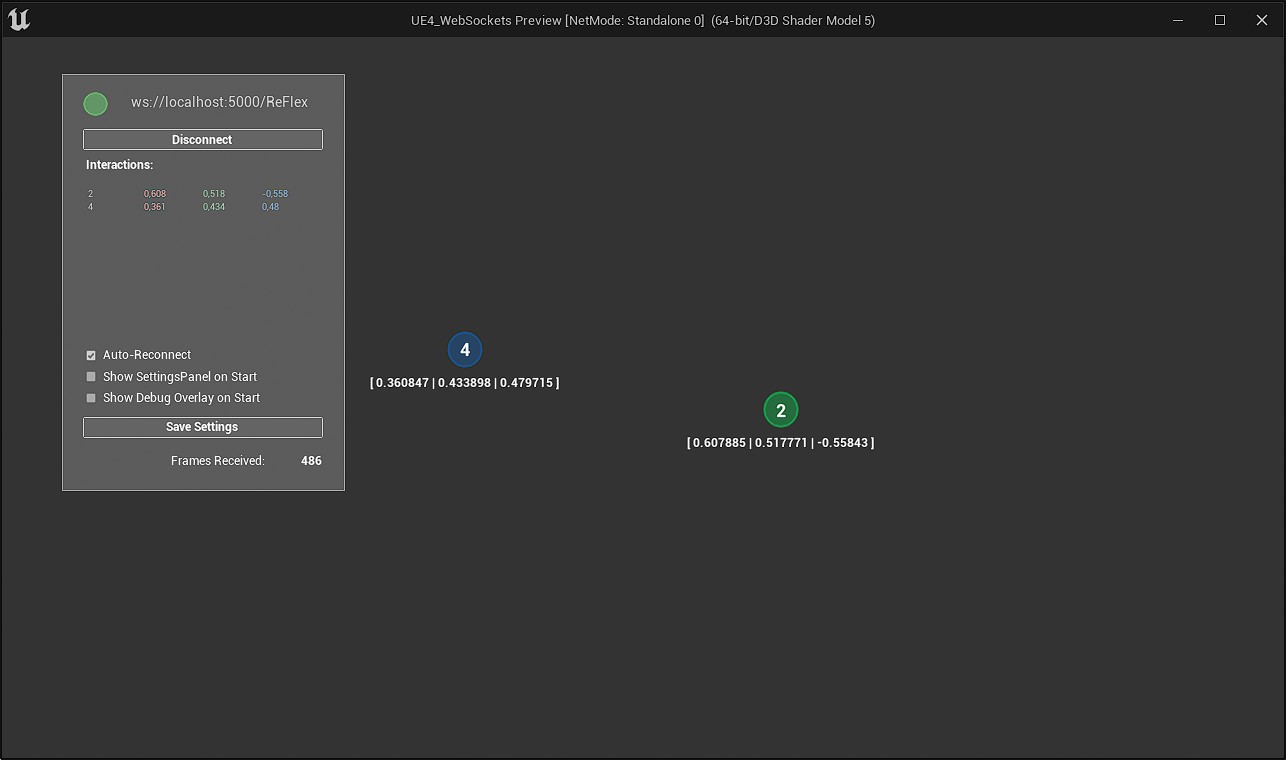
The plugin originated in the DisPlay case study. The original integration used an external Socket.IO plugin and an intermediate web application to translate messages from the dSense framework. The ReFlex version replaces this bridge with Unreal Engine’s native WebSocket interface. It packages the connection actor, JSON deserialization and Blueprint data types together so that application logic can also be implemented entirely in Blueprints.
Setup and configuration
Requirements
The supplied example targets Unreal Engine 5.2.1, and the project file associates the project with engine version 5.2. The Windows development setup uses:
- an editor, such as JetBrains Rider
- Visual Studio 2022 Build Tools with:
- C++ 2022 Redistributable Update
- MSVC v143 - VS 2022 C++ x86/x64 build tools
- Windows 10 SDK (10.0.18362.0)
These versions describe the supplied example; compatibility with other engine or toolchain versions needs to be checked when migrating the project.
Starting the example
- Open
examples/ue5-websockets/UE4_WebSockets.uprojectwith the matching Unreal Engine installation and build the C++ modules if prompted. - Start the ReFlex server and enable websocket broadcasting. See the server networking view for its configuration.
- Open the plugin’s
Maps/MainMapexample map. Enable Show Plugin Content in the Content Browser if the plugin assets are hidden. - Set the connection address in the settings panel or on the
BP_WebSocketactor to match the server’s websocket endpoint. Blueprint defaults and saved settings may override the C++ default address given above. - Run the level and use the connection panel to establish the connection. Enable the debug canvas to inspect received interactions.
The keyboard shortcuts provided by the example are:
| Key | Action |
|---|---|
S |
Toggle settings panel |
D |
Toggle debug canvas |
Esc |
Exit application |
Reusing the plugin
Copy examples/ue5-websockets/Plugins/ReFlex_WebSockets/ into the Plugins/ directory of the target Unreal project, enable the plugin and build it for the target engine and platform. The plugin contains C++ source as well as Blueprint and UMG assets; using Blueprint application logic still requires a compiled plugin. Add the connection actor and register any consuming Blueprints as described below.
Plugin architecture and interaction data
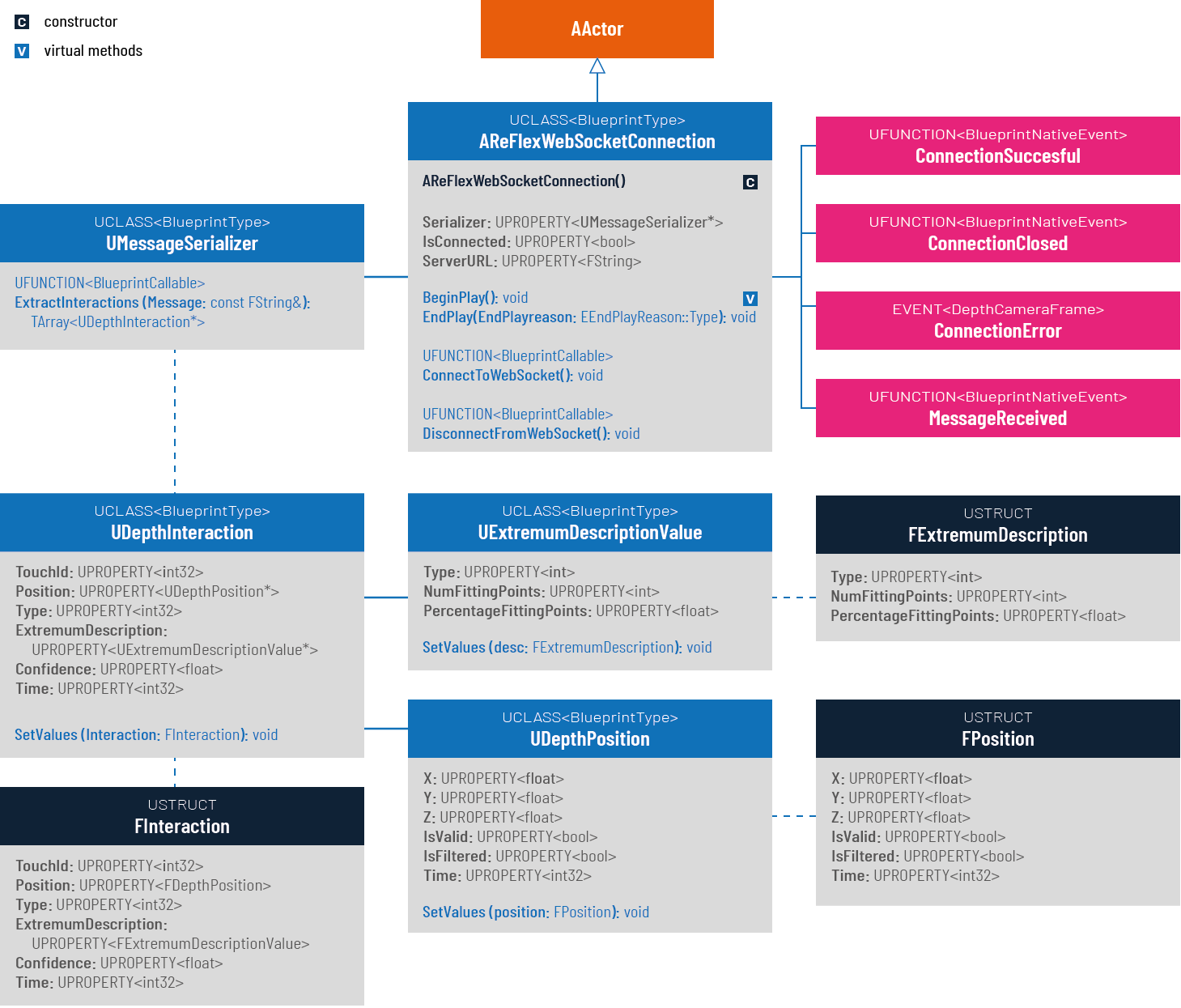
The plugin separates websocket communication, deserialization and application logic:
| Component | Purpose |
|---|---|
AReFlexWebSocketConnection |
C++ actor exposing the server address, connection functions and websocket callbacks to Blueprints. |
UMessageSerializer |
Converts a received JSON array into an array of UDepthInteraction objects through the Blueprint-callable ExtractInteractions function. |
UDepthInteraction, UDepthPosition, UExtremumDescriptionValue |
Blueprint-accessible objects containing the received interaction data. |
FInteraction, FPosition, FExtremumDescription |
Internal structs used to deserialize the JSON payload before creating the Blueprint objects. |
BP_WebSocket |
Blueprint connection actor that exposes ConnectionStateChanged and InteractionsUpdated events to consuming Blueprints. |
IWebSocketObserver |
Blueprint interface for passing a reference to the connection actor to other Blueprints through RegisterWebSocket. |
Serializer is created in the connection actor’s BeginPlay. For each incoming text message, the websocket callback invokes MessageReceived. The C++ default implementation only logs the message; the Blueprint layer uses the serializer to extract interactions and notify consumers. Custom actors must implement this processing themselves.
The Blueprint type DepthInteraction exposes these read-only properties:
| Property | Contents |
|---|---|
TouchId |
Identifier used to associate updates with an interaction point. |
Position |
X, Y, Z, IsValid and IsFiltered. |
Confidence |
Confidence value received from the server. |
Type |
Legacy interaction type, retained for compatibility (deprecated in the original example documentation). |
ExtremumDescription |
Type, NumFittingPoints and PercentageFittingPoints. |
Time |
Timestamp field received from the server. The plugin currently stores this as int32, whereas the server sends .NET ticks as a 64-bit value; it cannot preserve the full server timestamp. |
The complete server-side message format is documented under Interactions Format.
Coordinate mapping
X and Y are normalized to [0, 1] relative to the configured viewport; Z is normalized to [-1, 1]. Zero depth denotes the undeformed surface, negative depth a push and positive depth a pull. These are screen/depth coordinates, so mapping them to a 3D world is part of the client application.
To map a normalized position to a viewport with a pixel offset, use pixelX = leftMargin + X * width and pixelY = topMargin + Y * height. For example, [X, Y] = [0.5, 1] in an 800 × 600 viewport with a left margin of 75 and top margin of 50 maps to [475, 650]. Match the viewport and margins to the ReFlex server configuration.
Connecting Blueprints
Blueprint-Class (Header-File) that handles the connection between Unreal and the ReFlex-Framework:
  #pragma once

  #include "CoreMinimal.h"
  #include "GameFramework/Actor.h"

  #include "IWebSocket.h"
  #include "MessageSerializer.h"

  #include "ReFlexWebSocketConnection.generated.h"

  UCLASS()
  class REFLEX_WEBSOCKETS_API AReFlexWebSocketConnection : public AActor
  {
    GENERATED_BODY()

    protected:

    virtual void BeginPlay() override;
    virtual void EndPlay(EEndPlayReason::Type EndPlayReason) override;

    public:

    // Sets default values for this actor's properties
    AReFlexWebSocketConnection();

    virtual void Tick(float DeltaTime) override;

    // use to convert recevied JSON messages to UDepthInteraction
    UPROPERTY(BlueprintReadOnly, Category="ReFlex|Data")
    UMessageSerializer* Serializer;

    // Blueprint Property for connection state
    UPROPERTY(BlueprintReadOnly, Category="ReFlex|Websockets")
    bool IsConnected;

    // Blueprint Variable for specifying the websocket address
    UPROPERTY(EditAnywhere, BlueprintReadWrite, Category="ReFlex|Websockets")
    FString ServerURL = TEXT("ws://127.0.0.1:8001/ReFlex");

    // Blueprint Event triggered after connection is established
    UFUNCTION(BlueprintCallable, BlueprintNativeEvent, Category="ReFlex|Websockets")
    void ConnectionSuccessful();

    virtual void ConnectionSuccessful_Implementation();

    // Blueprint event for receiving Interactions
    UFUNCTION(BlueprintCallable, BlueprintNativeEvent, Category="ReFlex|Websockets")

    void MessageReceived(const FString& Message);
    virtual void MessageReceived_Implementation(const FString& Message);

    // Blueprint event triggered when connection is closed
    UFUNCTION(BlueprintCallable, BlueprintNativeEvent, Category="ReFlex|Websockets")
    void ConnectionClosed(int32 StatusCode, const FString& Reason, bool bWasClean);

    virtual void ConnectionClosed_Implementation(int32 StatusCode, const FString& Reason, bool bWasClean);

    // Blueprint event for connection errors
    UFUNCTION(BlueprintCallable, BlueprintNativeEvent, Category="ReFlex|Websockets")

    void ConnectionError(const FString& Error);
    virtual void ConnectionError_Implementation(const FString& Error);

    // Blueprint function to establish connection
    UFUNCTION(BlueprintCallable, Category="ReFlex|Websockets")
    void ConnectToWebsocket();

    // Blueprint function to close connection
    UFUNCTION(BlueprintCallable, Category="ReFlex|Websockets")
    void DisconnectFromWebsocket();

  };
Add the connection actor
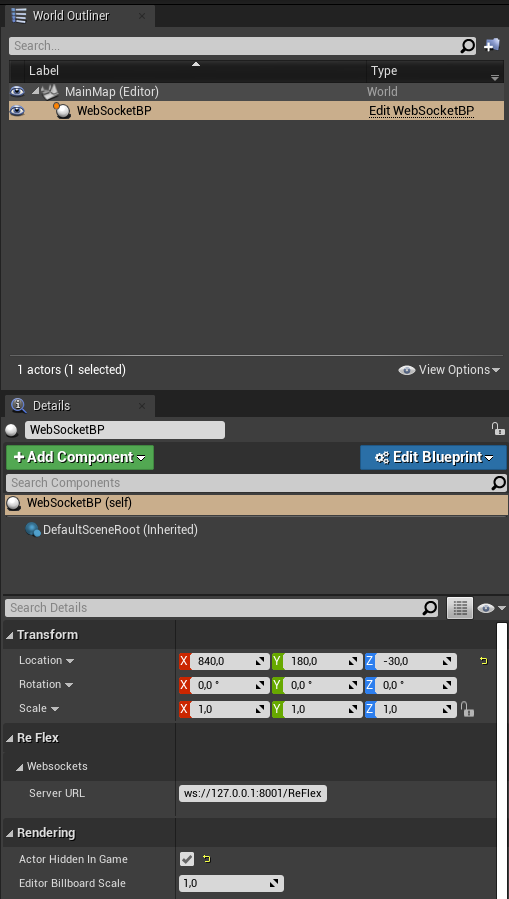
The supplied assets are located in the plugin’s Content/ directory. Drag Blueprint/BP_WebSocket into the level, or integrate it into the character or game mode. Configure its server address and subscribe to its events:
ConnectionStateChangedreports connection, closure and error state changes.InteractionsUpdatedprovides updates when interaction data is received.
Implement an observer
- Create a Blueprint implementing
Interface/IWebSocketObserver. - Pass the level’s
BP_WebSocketreference to it throughRegisterWebSocket, for example from the level Blueprint. - In the
RegisterWebSocketevent, store the reference in a Blueprint variable and bind toInteractionsUpdatedand/orConnectionStateChanged. - Implement the event handlers with the application’s interaction logic.
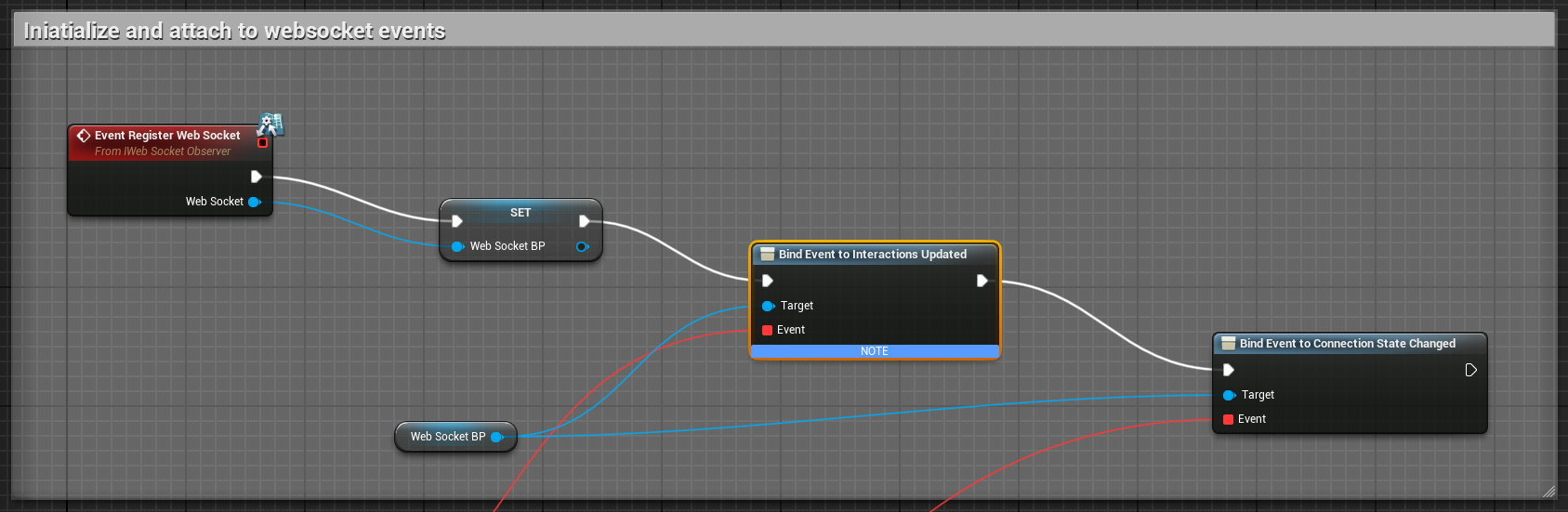
The event graphs of UI/WebsocketState and UI/DebugCanvas provide examples of extracting and using the interactions. Implementing the observer interface alone does not subscribe to events; registration and event binding must also take place.
Development widgets
The plugin includes two UMG widgets for development and as examples for integrating the connection and interaction data:
| Widget | Purpose |
|---|---|
UI/WebsocketState |
Displays connection status, lets the user connect or disconnect, and shows received interaction data when connected. It also exposes application settings that can be stored as a SaveGame. |
UI/DebugCanvas |
Displays a 2D overlay of interaction points with coordinates, touch identifiers and interaction type. |
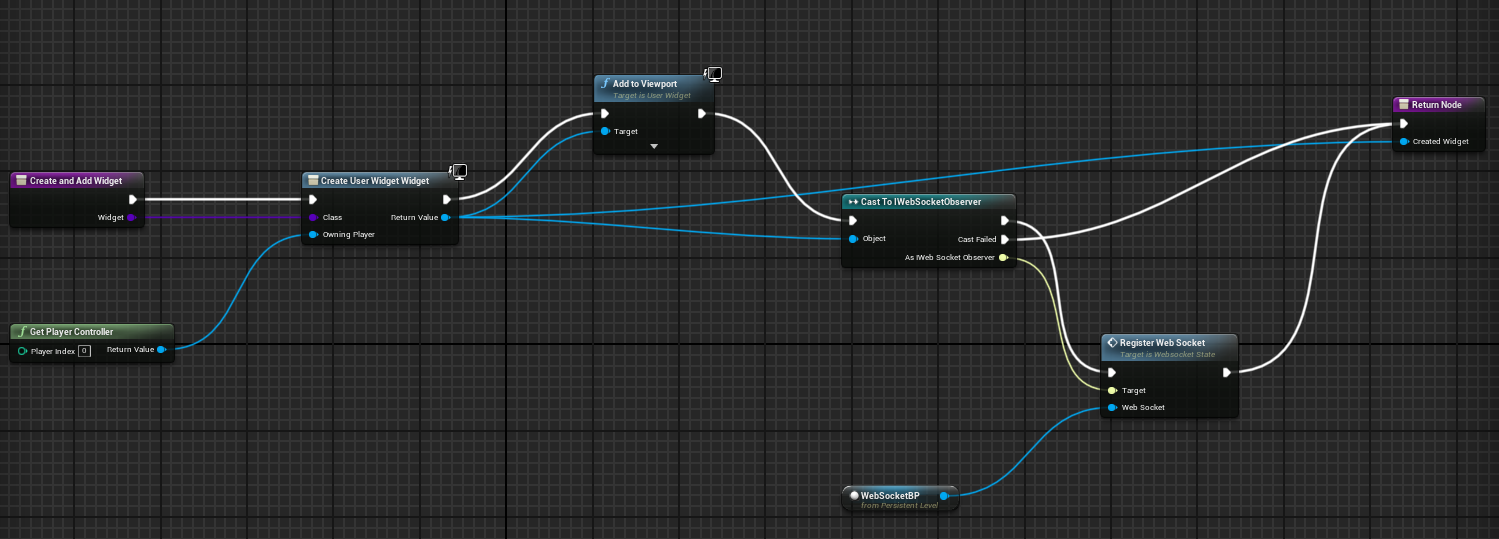
Both widgets implement IWebSocketObserver and need a reference to BP_WebSocket after initialization:
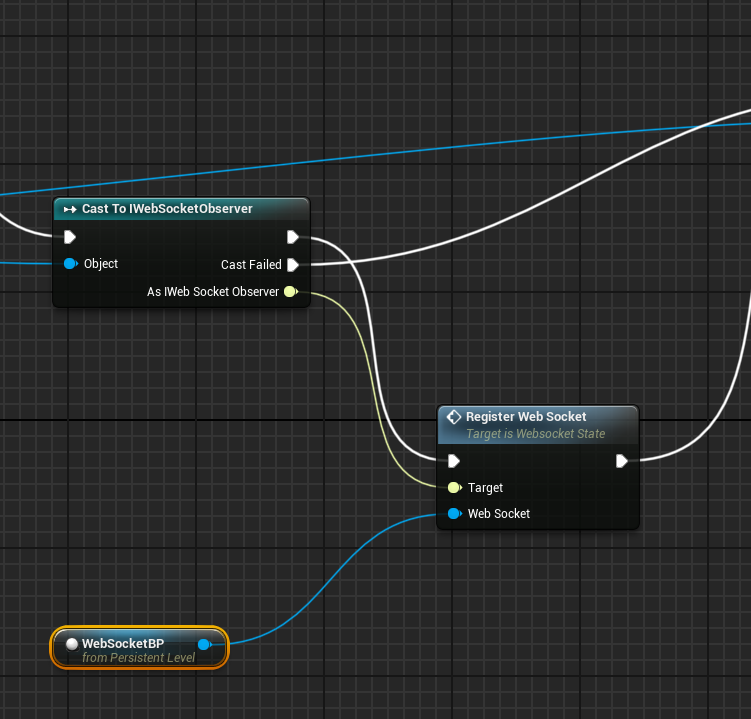
Create the widgets and add them to the viewport so that they initialize correctly. They can be removed afterwards if they should initially remain hidden. Register the websocket actor and bind the relevant events as shown above.
Creating a custom connection actor
Create a Blueprint class derived from ReFlexWebSocketConnection to use the C++ websocket layer directly. The main API in ReFlexWebSocketConnection.h is:
| Name | Type | Description |
|---|---|---|
ServerURL |
FString, read/write |
Address of the ReFlex server’s websocket endpoint. |
Serializer |
UMessageSerializer*, read-only |
Provides ExtractInteractions for converting incoming JSON into interaction objects. Available after BeginPlay. |
IsConnected |
bool, read-only |
Connection state updated by the websocket callbacks. |
ConnectToWebsocket |
Method | Establishes the connection. |
DisconnectFromWebsocket |
Method | Closes the connection. |
ConnectionSuccessful |
Event | Connection has opened. |
ConnectionClosed |
Event | Connection has closed; supplies status code, reason and whether closure was clean. |
ConnectionError |
Event | Connection error; supplies the error message. |
MessageReceived |
Event | Text message received; supplies the JSON string to deserialize. |
RawMessage |
Event | Reports binary message size and remaining bytes; does not expose the binary payload to Blueprints. |
MessageSent |
Event | Reports an outgoing text message. |
For a minimal receiver, set ServerURL, call ConnectToWebsocket after initialization, and handle MessageReceived by calling Serializer.ExtractInteractions(Message). Use the returned interactions in the Blueprint or forward them through a custom event. The higher-level InteractionsUpdated and ConnectionStateChanged events belong to the supplied BP_WebSocket Blueprint.
Troubleshooting
Compiler memory limits during building or packaging
The original example notes errors such as fatal error C1076: compiler limit: internal heap limit reached; use /Zm to specify a higher limit or error C3859: virtual memory range for PCH exceeded.
Closing other memory-intensive programs may resolve the problem. If necessary, regenerate the build artifacts:
- Close the editor and back up project settings and saved data, especially anything needed from
Saved/. - Remove generated folders such as
Binaries/,Build/,DerivedDataCache/,Intermediate/and, if appropriate,Saved/, plus the generatedUE4_WebSockets.slnfile. Preserve any custom packaging resources inBuild/. - Right-click
UE4_WebSockets.uproject, select Generate Visual Studio project files and rebuild.
Packaged game crashes on startup
Build in Development configuration and inspect Saved/Logs/. In a custom game module, a possible cause is that the WebSockets module has not been loaded before the first connection attempt. Load it before BeginPlay, for example in the module’s StartupModule:
1
2
3
4
5
6
7
8
9
#include "Modules/ModuleManager.h"

void FYourModule::StartupModule()
{
    if (!FModuleManager::Get().IsModuleLoaded("WebSockets"))
    {
        FModuleManager::Get().LoadModule("WebSockets");
    }
}
The supplied plugin already performs this initialization in FReFlex_WebSocketsModule::StartupModule() and declares its WebSockets dependency in ReFlex_WebSockets.Build.cs. Retain both when adapting the integration.