
Case Study: Construction Progress Visualization
Table of Contents
| Profile field | Description |
|---|---|
| Title | Layered Maps |
| Year | 2020 |
| Focus | Concept, Implementation |
| Format | Elastic Display wall |
| Framework | dSense |
| Sensor | Microsoft Kinect 2 |
| Architecture | Client-server (.NET Core / WPF) |
| Scenario | Construction progress visualization |
| Features | - combining layered data with zoomable user interfaces - mode switching through an external foot switch - gesture development |
| Publication | Müller, M., Lier, E., Groh, R. & Hannß, F. (2020): A Tangible Concept for Layered Map Visualizations: Supporting on-site Civil Engineering Construction Consultations using Elastic Displays. In: C. Hansen, A. Nürnberger & B. Preim (Eds.): Mensch und Computer 2020 - Workshopband. Bonn, Germany: Gesellschaft für Informatik e. V. (GI). DOI: 10.18420/muc2020-ws121-368. |
The eighth case study explored combining zoomable maps and layered information for construction planning and consultation. The profile describes the historical dSense implementation, following the conventions in the case study overview.
Research Questions
Earlier studies suggested that layered content and zoomable user interfaces could complement one another. DeepZoom had taken an initial step by adding information overlays to magnified images. Layered Maps investigated this combination in a practical civil-engineering scenario, using zoom and layer navigation as separate interaction modes.
The study addressed four main questions:
- How can users switch smoothly between magnifying a map and exploring its semantic layers?
- How can a selected view persist across mode changes, and what happens when its virtual state no longer corresponds to the physical deformation?
- Does the surface’s return to rest still provide a meaningful natural reset when the application retains earlier interaction states?
- How can maps, schedules, and cost information support discussion of construction progress and the resolution of conflicts between dependent tasks?
A retained maximum zoom level on an undeformed surface illustrated the tension between physical and virtual state. At the same time, retaining a view could let users step back from the wall and inspect it without continuing to press.
The scenario was informed by a detailed requirements and data analysis. The analysis and initial concepts were discussed with a domain expert to align the design with civil-engineering problems.
Features and Limitations
Extending the Existing Zoom Client
The implementation followed DeepZoom’s WPF/.NET client-server approach, using dSense and a Microsoft Kinect 2 to capture surface deformation. Only minor adaptations were made to the framework and server. Most changes were on the client, where the existing zoom implementation was extended to handle layered data.
An external foot switch provided a dedicated mode-switching input. Alternatives used a specific surface gesture or the number of detected contacts. Gesture recognition took place on the client, so the case study did not establish a general gesture-recognition component in the framework.
Context-Dependent Depth Interaction
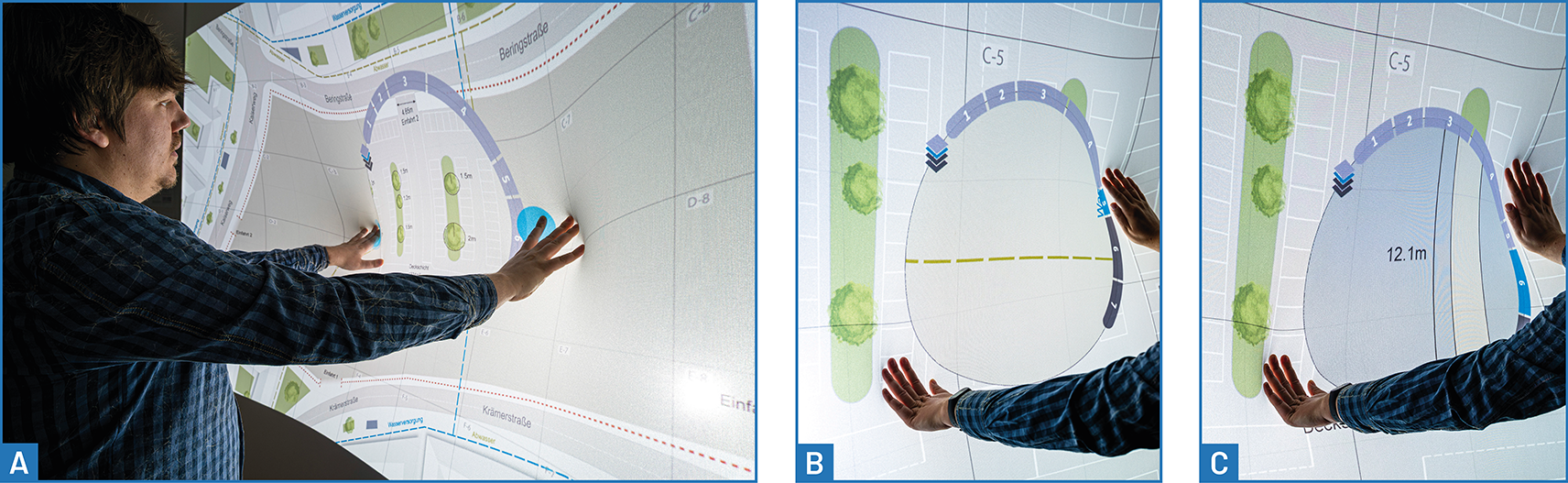
Deformation depth controlled either the map’s magnification or the selected data layer, depending on the active mode. Zooming and panning affected the full map; layer navigation used a local magic lens. The lens supplied feedback about the active mode and context, including the zoom level and/or current process layer.
The two-hand lens used a fixed size. Early trials found that continuously changing its diameter while users pressed the surface interfered with layer selection and made the lens appear unstable. Alternative size controls remained proposals for further development.
Scope of the Application
The study focused on construction execution, particularly progress monitoring, schedule updates, and cost control within a Building Information Modeling (BIM) context. It developed a map-based visualization and interaction concept rather than addressing the full project lifecycle.
Its layer model related construction phases to their physical depth. This suited the chosen civil-engineering scenario, but constrained transfer to projects with simultaneous work at different heights. The case study focues on map interaction, gesture development, planning visualizations, and mode switching.
Scenario
Supporting Construction Consultations
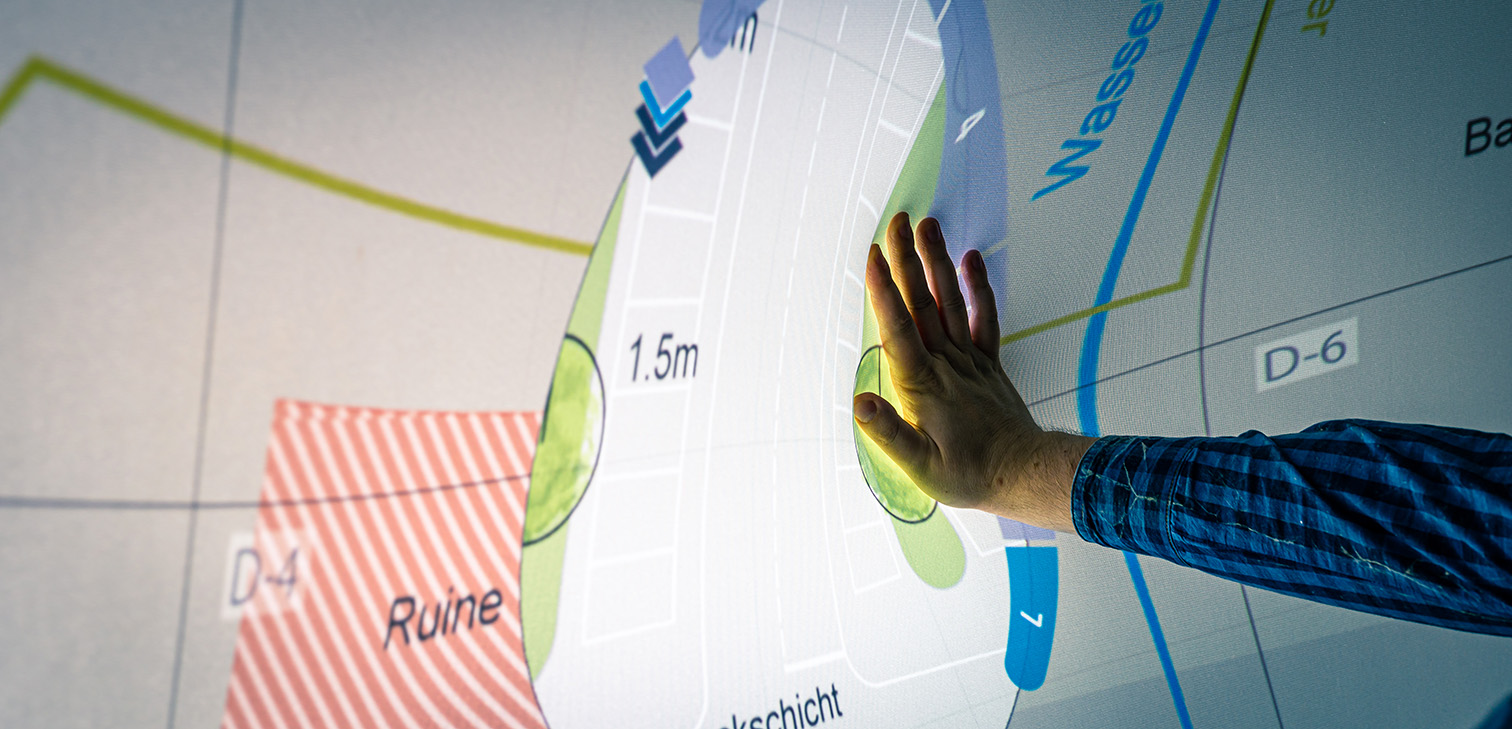
The application was intended to help participants communicate project status, examine dependent processes, and negotiate responses to delays or conflicts. The construction plan occupied the centre of the display, with compact schedule and cost summaries along the top and left edges. Expanding these summaries provided access to detailed planning views.
The visualization concept combined semantic zoom, interactive lenses, and an extended Gantt chart. The PlanningLineGlyph approach provided a basis for representing task hierarchies, dependencies, temporal tolerances, shifts, and delays.
Navigating Maps and Construction Layers
Semantic zoom kept the initial map uncluttered and progressively revealed more detail as users pressed into the surface. Pressing near the map’s edges panned the view.
Semantic layers filtered the map by construction process. In the selected scenario, work in deeper ground layers generally preceded work above them; completed layers were sealed before subsequent work began. The ordering of underground services, road construction, and landscaping therefore allowed physical depth and process sequence to share a layer representation.
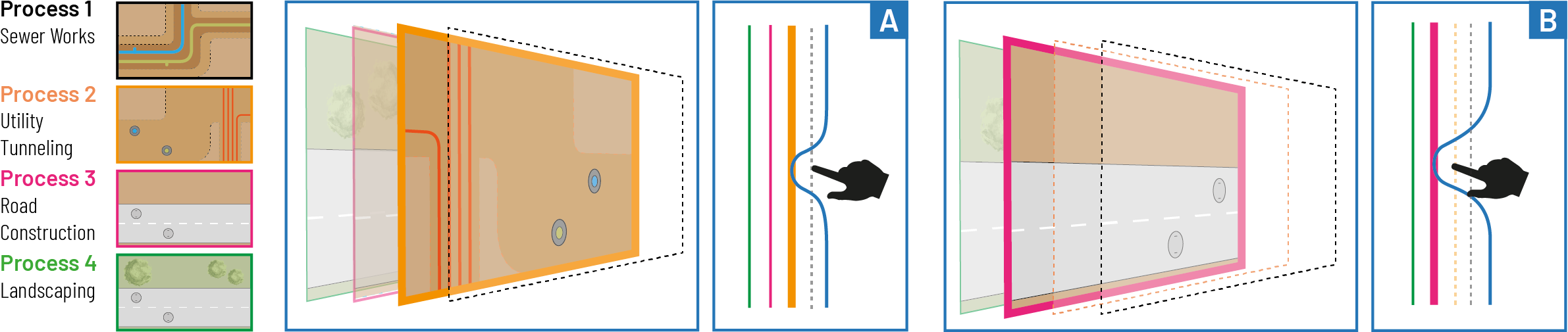
Full-map navigation and local layer inspection were separated visually: the map could be magnified and moved, while the magic lens exposed a selected process layer within its surrounding context. Deformation depth selected the layer displayed inside the lens.
Three ways of switching between these interactions were explored:
| Mode-switching variant | Interaction |
|---|---|
| Foot switch | Use a separate physical control to switch between map and lens interaction. |
| Number of contacts | Navigate the map with one hand; adding a second hand opens the layer lens between the hands and redirects input to layer navigation. |
| Together-and-Apart | Bring the hands together and move them apart again within a short interval, using shallow deformation, to open or close the lens. |
Schedule and Cost Views
The compact timeline showed deviations from the original schedule for individual tasks and the project phase as a whole. It also related current progress to the planned state and showed a forecast completion date. Blue indicated time savings; red indicated delays. Start and end markers restricted the period shown in the map.
Pressing the timeline expanded it into a hierarchical Gantt chart with three levels, allowing processes to be expanded or collapsed. Dependencies were represented using the critical-path method. PlanningLineGlyph features communicated temporal tolerances and changes, including critical changes that caused dependency conflicts or delayed the overall project.
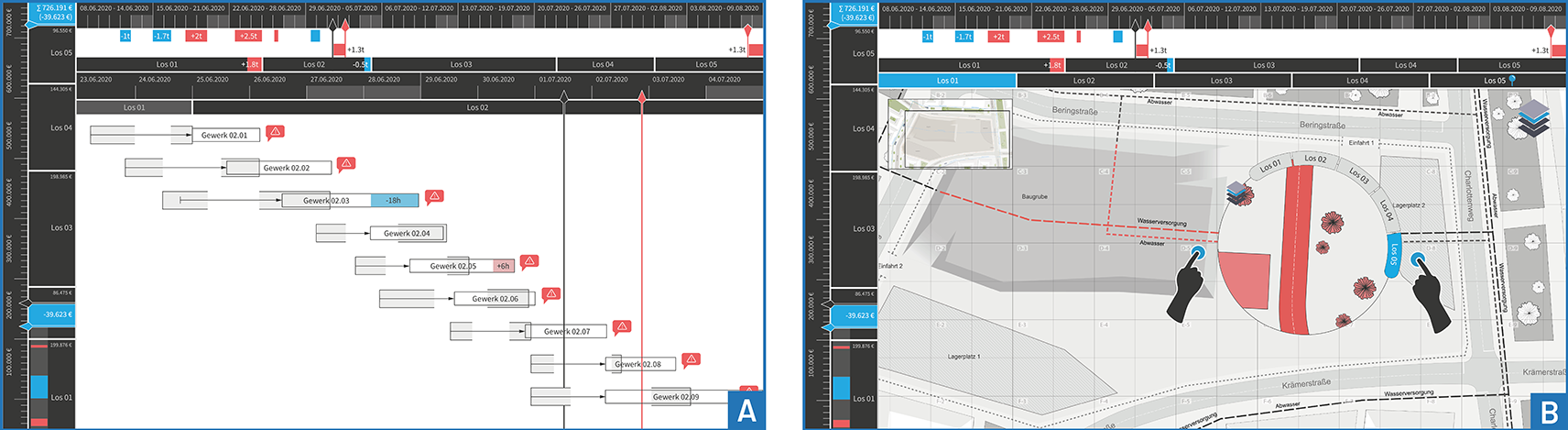
Pressing a task provided semantic zoom through three information levels:
| Detail level | Information shown |
|---|---|
| Default | Task identifier and name |
| Intermediate | A short label, quantities such as material or working hours, or prices |
| Maximum | A detailed description |
The cost concept followed a similar structure with a vertical layout and cost bars. Its overview compared planned and actual costs, task-level and overall savings or overruns, and the projected total. Map elements likewise used blue for savings or earlier completion and red for additional costs or delays.
Cost ranges were omitted because, in the scenario, these figures were not normally communicated between clients and contractors. Interaction development concentrated on schedule adjustment; the cost overview supported assessment of alternative conflict resolutions.
Manipulating Tasks and Resetting the Application
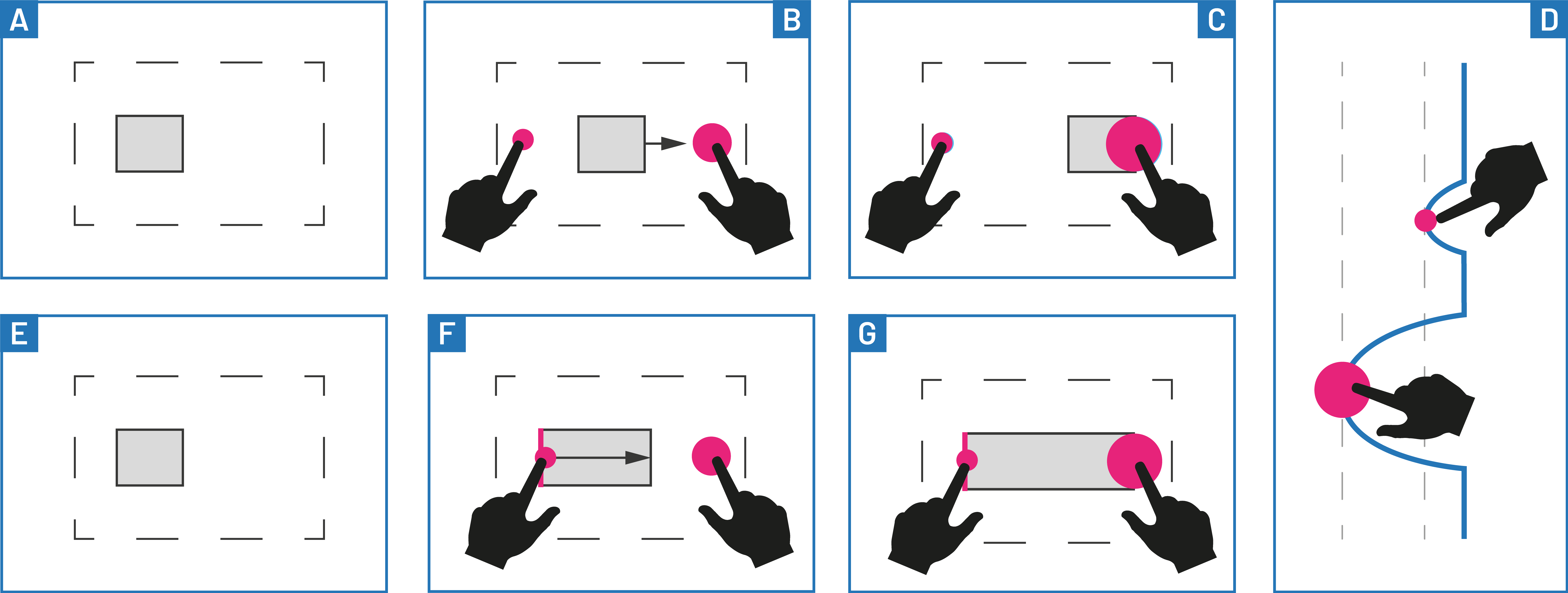
The Shift gesture adapted the two-contact translation concept from Glyphboard. Contacts near a task bar were interpreted according to their positions relative to it:
- Move a task: Press on either side of the bar. It moves towards the deeper contact, as though sliding into the depression.
- Change its duration: Place one hand on the bar to fix that side. Pressing with the other hand extends the bar towards that hand; pulling outward shortens it.
This context-sensitive interpretation distinguished moving an entire interval from changing its length. A separate Pull-and-Release gesture, implemented by pulling the surface outward and releasing it shortly afterwards, reset the application.
Findings and Discussion
Persistent Views and Physical State
A dedicated mode switch offered a further benefit: retaining the current view allowed users to step away from the wall and see the complete visualization. This addressed the difficulty of inspecting a large display while holding a deformation.
Persistence also complicated the direct correspondence between surface shape and application state. Returning to a saved view could restore a zoom level that the current deformation did not express. The study raised this issue alongside the limits of the natural reset and introduced an explicit reset gesture, but did not establish a general solution for reconciling physical and retained virtual states.
Two-Hand Roles and Collaborative Use
Using contact count to select a mode constrained collaboration. Detected pressure points could not be assigned explicitly to individual users, so simultaneous input from several people automatically activated the lens. This prevented other combinations of collaborative actions, such as zooming and marking.
Both user tests and observations indicated that future concepts should consider distinct roles for the two hands. The number of detected contacts alone did not reliably express users’ intended tasks, especially when several people shared the display.
Lens Size and Independent Spatial Navigation
Users repeatedly requested adjustable lens size. Two alternatives were proposed to avoid the instability of continuous resizing: switching between predefined sizes only after a substantial change in hand spacing, or setting the diameter from the initial distance between the hands when entering lens mode. Neither was reported as the implemented solution in this study.
The coupling of construction phase and physical depth also had a clear boundary. Multi-storey buildings can involve different trades working simultaneously on different floors. Supporting such projects would require spatial navigation independent of process sequence, extending the chosen layer concept.
Implications for Framework Development
For the forthcoming requirements analysis, the study provides evidence for the following areas:
- Combining input sources: Allow surface interaction to work alongside external controls such as a foot switch.
- Application-specific gesture interpretation: Expose multiple contact positions and deformation depths so clients can interpret gestures according to their current mode and target objects.
- Explicit interaction state: Support clear mode feedback, retained views, and deliberate reset behaviour when releasing the surface no longer restores the complete initial state.
- Two-hand and collaborative interaction: Account for contact roles and the ambiguity between one person’s two hands and input from several people.
- Stable parameter control: Separate layer selection from lens-size adjustment when simultaneous mappings interfere with one another.
- Independent data dimensions: Avoid assuming that spatial depth and temporal process order always coincide when generalizing layered navigation.
These implications connect the prototype and its observed limitations to later design decisions. They do not imply that framework-level gesture recognition, user identification, or independent spatial and temporal navigation were implemented in this case study.