
Case Study: Zoomable Product Browser
Table of Contents
| Profile field | Description |
|---|---|
| Title | Zoomable Product Browser |
| Year | 2017 |
| Focus | Concept |
| Format | Elastic Display tabletop |
| Framework | FlexiWall |
| Sensor | Microsoft Kinect 2 |
| Architecture | Monolithic (.NET, WPF) |
| Scenario | Similarity-based product search |
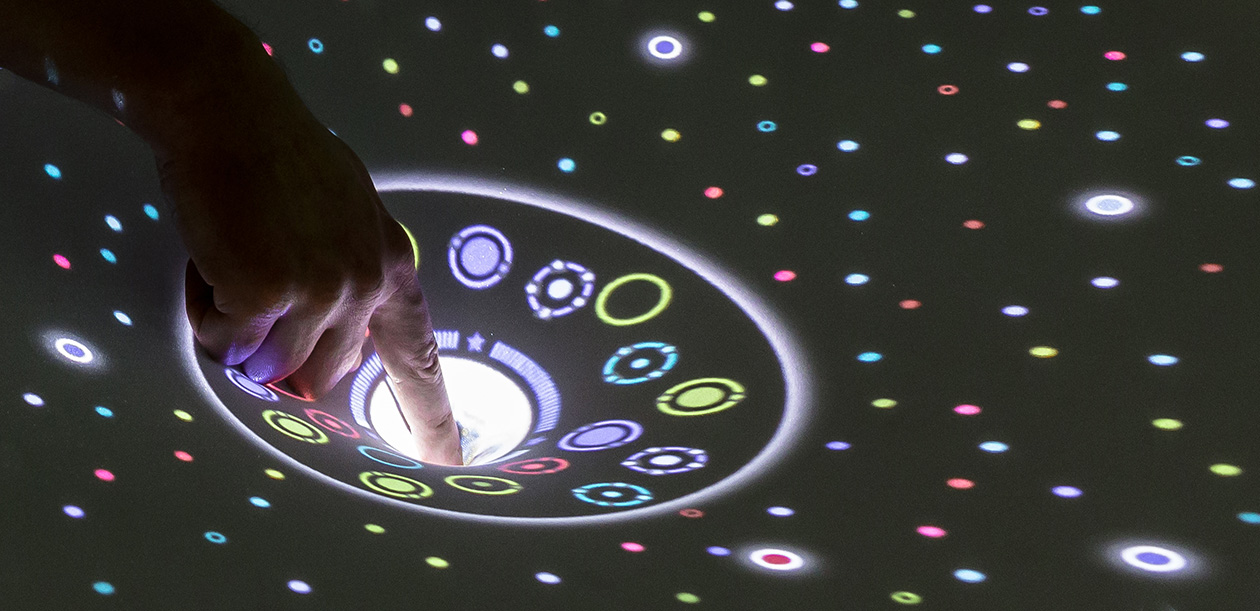
| Features | - glyph-based visualization with semantic zoom - physics-based filtering and fuzzy selection - gestures for selection and persistent focus regions |
| Publication | Müller, M., Keck, M., Gründer, T., Hube, N. & Groh, R. (2017): A Zoomable Product Browser for Elastic Displays. In: L. Ribas, A. Rangel, M. Verdicchio & M. Carvalhais (Eds.): xCoAx 2017: Proceedings of the Fifth Conference on Computation, Communication, Aesthetics and X, pp. 127–136. Paper. |
The profile describes the historical FlexiWall-based prototype, following the conventions in the case study overview. The study focused on the visualization and interaction concept; gesture recognition was only partially implemented.
Research Questions
The Zoomable Product Browser developed ideas from DEEP into a more familiar application context. Earlier observations suggested that experimenting with tag weights encouraged playful exploration and helped users understand relationships. However, selecting individual results was difficult: tracking inaccuracies and deformation-dependent projection distortion caused detected finger positions and visible objects to diverge. Continually moving results and the lack of persistent filters also interfered with detailed inspection.
Similarity-based product search offered a setting in which users could explore relationships without needing a precise search target. Two questions guided the study:
- How can fuzzy selection, which does not depend solely on an exact current touch position, support the selection of small objects?
- How can physics-based selection and filtering be separated from details on demand, preserving a result set for inspection while allowing a simple transition between modes?
The aim was to retain the playful, physical character of Elastic Display interaction while accommodating its imprecision and transience. The concept used a tabletop format and interaction patterns suited to deforming the surface.
Features and Limitations
Prototype and Technical Basis
The concept was implemented as a high-fidelity prototype using the FlexiWall framework, Microsoft Kinect 2, and a monolithic .NET/WPF application. It reused single-touch detection from earlier case studies to favour precision and low latency. It did not introduce independent multi-touch control.
Surface deformation controlled both simulated forces and changes in detail. Shallow deformation supported collecting and moving products; crossing a depth threshold suspended the gravity simulation so that objects remained stationary during inspection. Deeper deformation created a persistent focus region or increased detail within it.
Implemented Gestures and Conceptual Boundaries
The prototype demonstrated the central ideas with a reduced gesture vocabulary:
- Removing products: The proposed flick gesture was implemented as simply pushing an item out of a focus region.
- Resetting and rearranging products: Resetting positions and switching layouts used keyboard input. The corresponding gestures, including a swirling movement for changing layouts, remained conceptual because recognition was difficult and offered limited additional benefit.
- Input precision: Reusing single-touch detection supported the demonstration but did not eliminate tracking inaccuracies or latency when manipulating individual products.
The implementation explored a limited product collection and small focus regions. It was intended to demonstrate and try out the interaction concept, rather than provide a complete product-search application.
Scenario
Product Data and Initial Layout
The source dataset contained 548,552 Amazon products in four categories: books, DVDs, music CDs, and videos. The prototype used 600 products, selecting 150 per category through similarity searches starting from a reference product. Metadata included product group, sales rank, overall rating, individual reviews, and review helpfulness. Each product was linked to its five most similar products.
Three layouts were explored: random placement, four quadrants organized by product category, and five radial sectors organized by rating. Rearranging the overview left existing focus regions and their associated products intact. The proposed swirl gesture evoked rummaging through a shop’s bargain bin; in the prototype, layout changes were triggered by keyboard.
Glyphs and Semantic Zoom
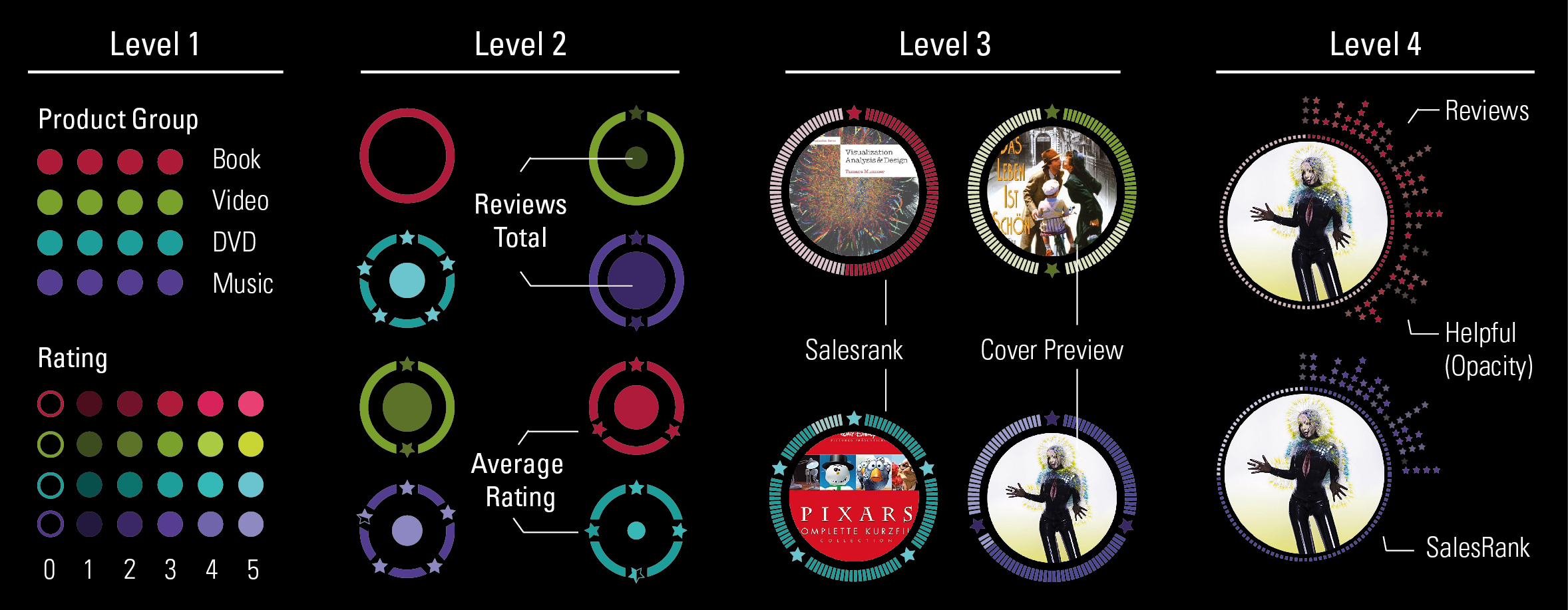
Each product was represented by a circular glyph. Semantic zoom progressively exposed more attributes for a smaller set of products, while geometric enlargement provided space to read them.
| Detail level | Product representation |
|---|---|
| 1: Overview | Small circles represented all products. Colour identified the category, and brightness encoded average rating: brighter colours indicated higher ratings. Products without reviews used an outline only. |
| 2: Focus preview | Stars around the outer circle showed the average rating. Gaps in the contour preserved a cue to the star count at low projection resolution; unrated products had an unbroken contour. Brightness retained the redundant rating cue, while the inner circle’s radius encoded the number of reviews. |
| 3: Product identification | A cover preview and product title identified the item. Cover size encoded review count, the fill of the outer contour represented sales rank, and average rating retained the level-2 encoding. |
| 4: Review details | Individual ratings appeared clockwise around the circle. Stars expressed each rating and opacity indicated its helpfulness. The cover and sales-rank representation were retained from level 3. |
Collecting and Moving Products
The interaction used a bargain-bin metaphor: users could browse without a predetermined target, treating products as small balls rolling over the surface, as in DepthTouch.
| Surface interaction | Effect on products |
|---|---|
| Pull outward | Separate products and disperse groups. |
| Press lightly | Attract nearby products towards the deepest point. |
| Move laterally while maintaining light pressure | Move the collected group and gather additional products along the way. |
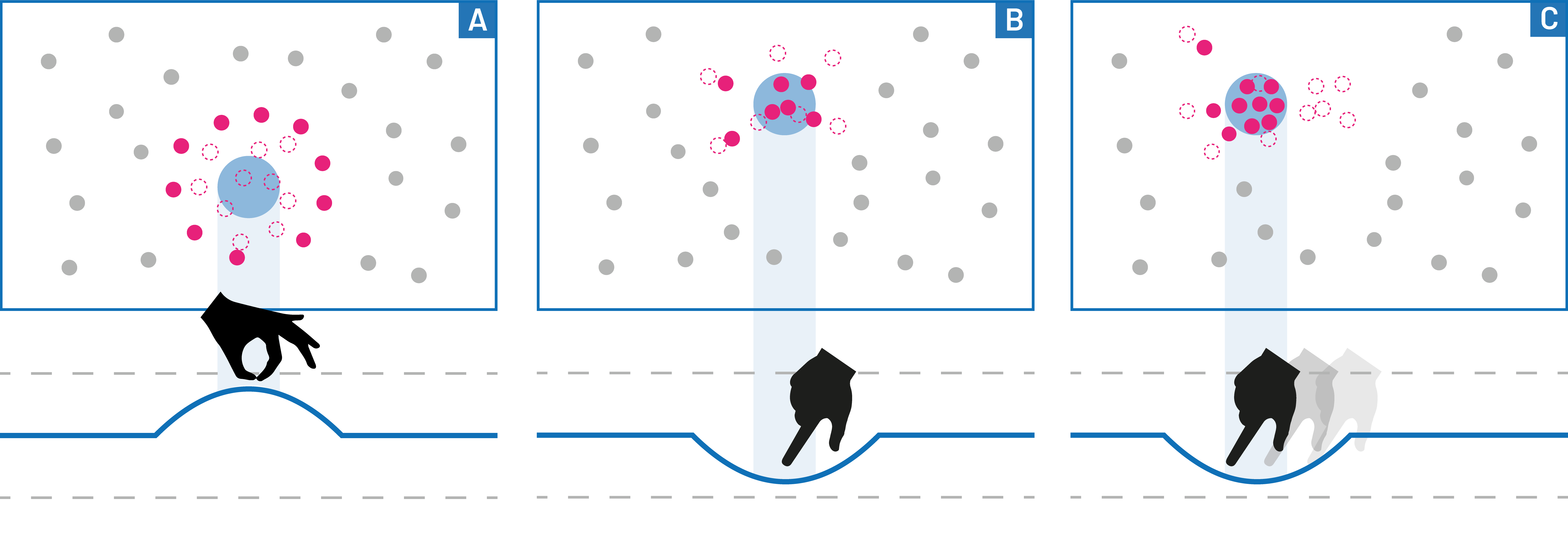
These operations supported spatial sorting and filtering through simulated forces. Selection therefore developed through gathering a neighbourhood of products, reducing dependence on precisely hitting a single small glyph.
Previewing and Preserving a Focus Region
Pressing beyond the gravity-simulation threshold froze product positions and opened a zoom preview. The lens showed nearby products at detail level 2 and followed the hand, allowing users to choose a group without attracting more objects. Pressing deeper created a persistent focus region, preserving the selection after the surface was released.
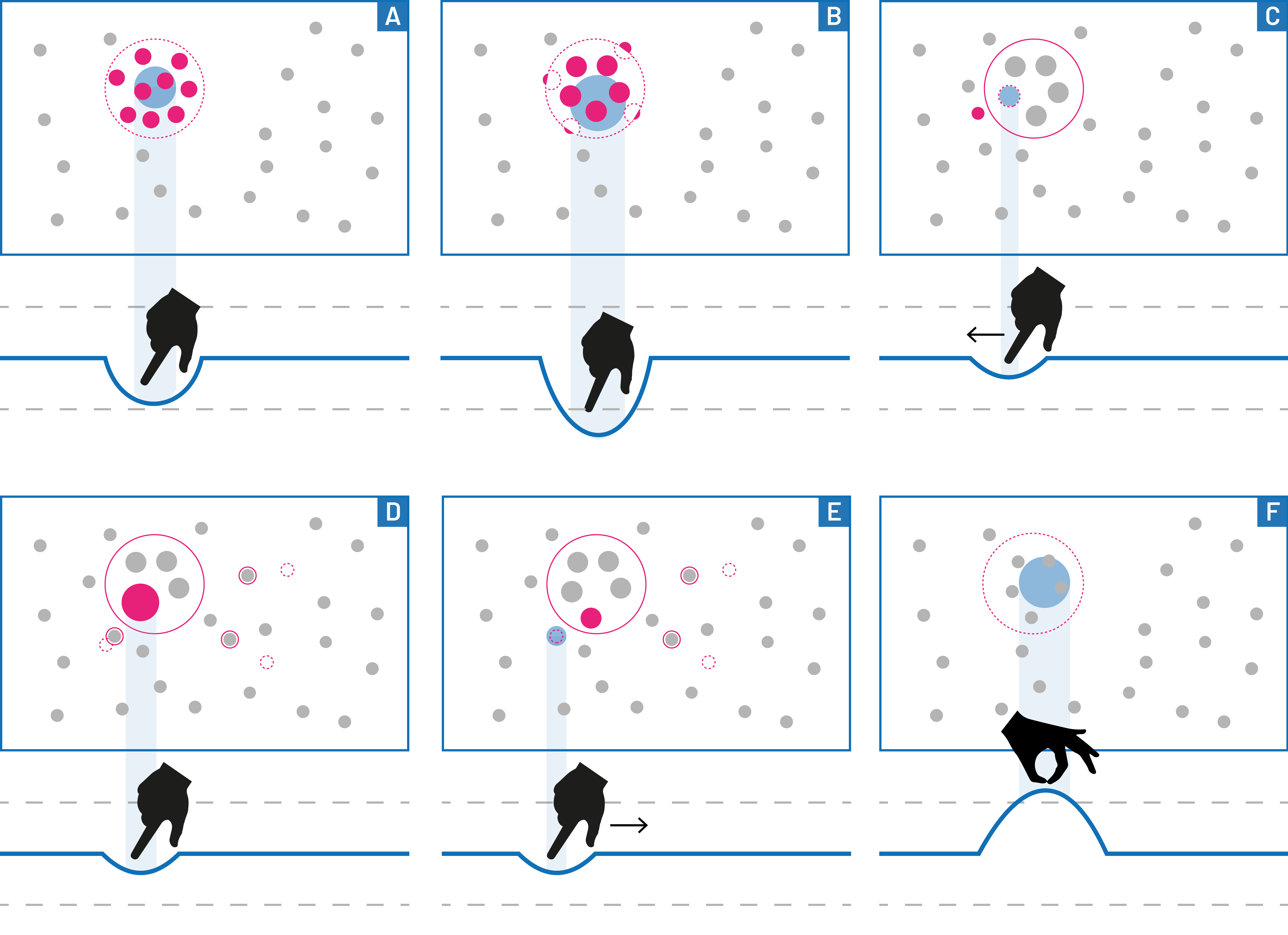
A focus region held at most 20 products. If too many products were included when it was created, those furthest from its centre were excluded. Further deformation within the region increased detail to levels 3 and 4.
Inspecting a product also highlighted similar products outside the region. They moved towards its boundary and became anchored there; their highlighting remained after release. Users could refine the selection by pushing products out and drawing related products in, provided the region had not reached its capacity.
Pulling the surface outward at a focus region deleted that region. Its products returned to detail level 1 while retaining their current positions. Together, these operations connected exploratory filtering, persistent selection, and detailed inspection without requiring users to maintain constant pressure.
Findings and Discussion
The following section provides exploratory observations about the interaction concepts and implementation.
Exploration and Selection Efficiency
Collecting products through simulated forces fitted the playful interaction concept and made similarity-based search a suitable application context. Adding and removing related products also matched the metaphor. However, tracking inaccuracies and latency made this refinement less efficient than alternatives such as lasso selection or tapping individual items. The study therefore supports the concept’s exploratory value without establishing a performance advantage.
Persistent State and Depth Feedback
Focus regions and the suspension of simulated motion addressed DEEP’s difficulty with inspecting transient results. They combined physics-based filtering with an interaction lens that preserved a manageable selection.
This transition needed clear visual feedback about the current deformation depth and the threshold for creating a focus region. The physical gesture alone did not sufficiently communicate the change of state.
The 20-product limit constrained more complex decisions, and automatically excluding excess products could be confusing. A fisheye-like alternative that enlarged products near the lens centre was proposed, but would still require a policy for displaced items.
Gesture Usability and Scaling
Pulling outward was less usable than pressing because the fabric was difficult to grasp. An alternative deletion gesture was therefore needed. A fixed focus region that collected products through simulated forces up to its capacity was suggested as another direction, with individual products removed through targeted pulling.
Two further extensions remained open:
- Richer product information: A hover effect within a focus region could expose a detailed product description beyond the existing glyph levels.
- Larger collections: The 600-product subset was appropriate for the prototype’s display but too small for realistic product search. Possible extensions included zoom and pan, or an initial keyword or reference-product query followed by dynamic loading of similar products.
These alternatives were proposals for further work, rather than demonstrated capabilities of the prototype.
Implications for Framework Development
Although the prototype was developed using single-touch detection, the application context highlighted the importance of multi-touch input with persistent touch identifiers for collaboration and complex gestures. Supporting multiple contacts and tracking each contact across frames therefore emerged as a central requirement for this type of application.
For the forthcoming requirements analysis, the study provides evidence for several areas:
- Interaction data and precision: Expose position and deformation depth with sufficient stability and low latency for both continuous manipulation and threshold-based actions.
- Application state: Allow applications to suspend dynamic behaviour and preserve selections independently of continued physical deformation.
- Feedback and thresholds: Support visible previews and transitions between collecting, inspecting, and committing a selection.
- Separation of responsibilities: Keep detected interactions distinct from application-specific gestures, simulation behaviour, and visualization detail levels.
- Selection and content limits: Make capacity, overflow behaviour, and dataset size explicit when designing focus regions and navigation.
These implications are derived from the prototype’s capabilities and limitations. They establish a basis for later design decisions without implying that a general gesture system or scalable product-search infrastructure was implemented in this study.