
Case Study: DeepZoom - Gigapixel Visualizations
Table of Contents
| Profile field | Description |
|---|---|
| Title | DeepZoom |
| Year | 2018 |
| Focus | Integration, Framework |
| Format | Elastic Display wall and tabletop |
| Framework | dSense, ReFlex |
| Sensor | Intel RealSense |
| Architecture | Client-server (.NET/WPF), communicating via TCP |
| Scenario | Visualization and exploration of gigapixel imagery |
| Features | - magic lens for magnification - additional information layers during zoom - efficient display of high-resolution images |
| Publication | Müller, M., Lier, E. & Gründer, T. (2018): Zoomable User Interfaces für Elastic Displays. In: R. Dachselt & G. Weber (Eds.): Mensch und Computer 2018 - Workshopband. Bonn, Germany: Gesellschaft für Informatik e. V. (GI). DOI: 10.18420/muc2018-ws05-0502. |
| Repository | reflex-deepzoom |
The sixth case study explored zoomable image visualizations across multiple application contexts. The profile covers the historical dSense and ReFlex iterations, following the conventions in the case study overview. The published repository may include later adaptations. Although gigapixel imagery motivated the study, the implementation’s image-size limit kept the displayed images below one gigapixel.
Research Questions
DeepZoom continued the investigation of zoomable user interfaces begun with Glyphboard. Glyphboard concentrated on one information-visualization scenario and continuous movement through a data space. DeepZoom broadened the application contexts and explored other ways of relating an overview to a magnified detail view.
The study addressed four main questions:
- How can surface deformation control magnification in high-resolution images, using alternatives to continuous movement through a data space?
- How can local lenses and full-screen views support navigation and preserve spatial orientation?
- How can images from different sources be prepared and displayed efficiently, and which limits arise from their representation and storage?
- How can magnification reveal additional information or alternative image layers, combining geometric and semantic zoom?
Interactive lenses offered a central alternative to immersive navigation. Like a magnifying glass on a map table, a lens could expose detail while preserving the surrounding overview.
Features and Limitations
Separating Tracking and Visualization
The implementation used .NET and WPF in a client-server architecture. Despite sharing the same technology platform, the visualization client remained strictly separate from the server responsible for hardware access and surface-interaction detection. The applications exchanged data through a TCP interface, and the original prototype captured surface deformation with an Intel RealSense sensor.
This continued Glyphboard’s separation of tracking from application logic, while applying it to a native desktop visualization client.
Tracking Configuration and Development Tools
Framework development optimized depth-image analysis and introduced configurable parameters for creating and filtering the point cloud. These changes allowed processing to be adjusted to the tracking needs of the visualization independently of its image-rendering implementation.
A simple touch-point simulator provided synthetic contact input for application development without the physical display. Unlike FlexiWall’s depth-image emulator, it simulated detected interaction points rather than a complete surface representation.
Mapping Deformation to Magnification
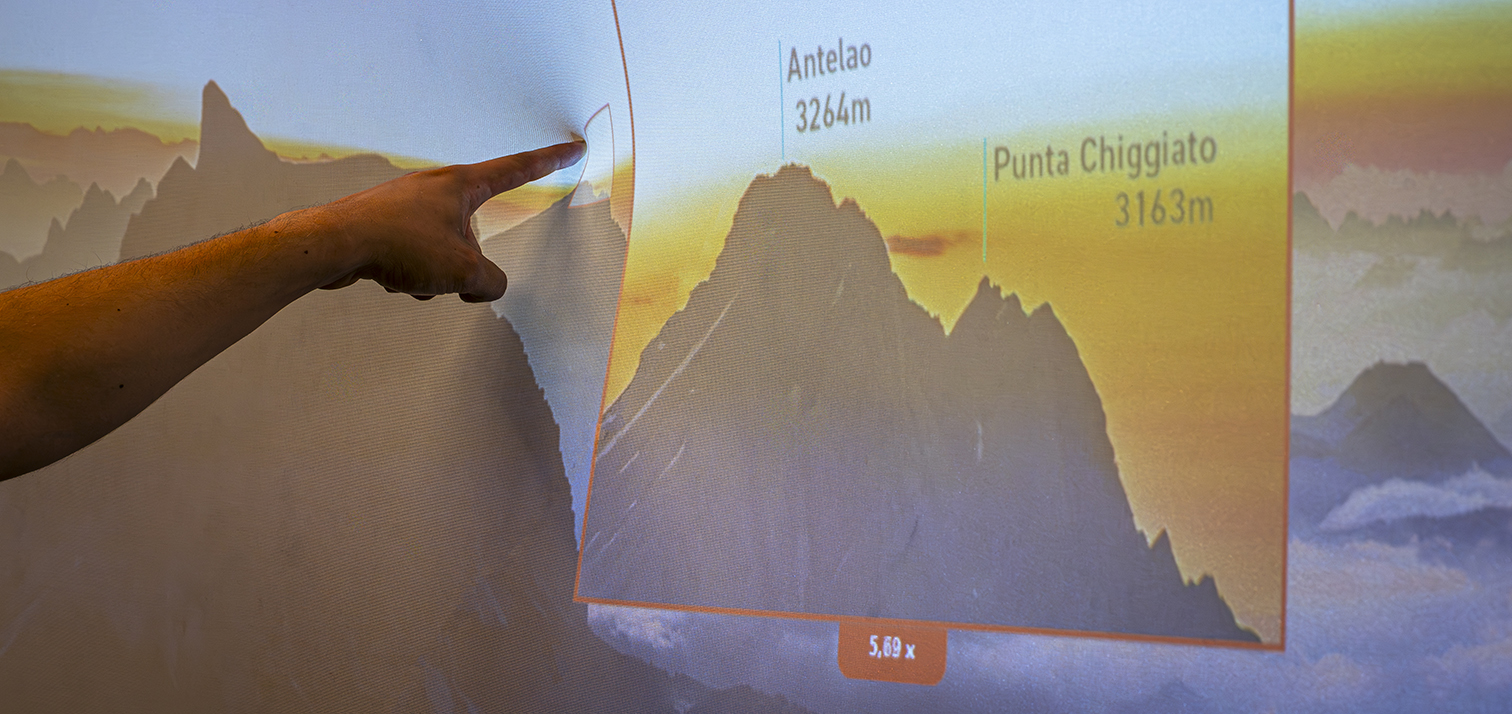
The visualization combined two images: a preview at the application’s native resolution, typically 1920 × 1080 pixels, and a high-resolution detail image. The magnified view was centred on the detected finger position. Deformation depth determined how far the detail image was scaled down from its full resolution: maximum deformation exposed the full available detail, while shallower deformation reduced magnification.
Depth therefore controlled the magnification level directly, whereas Glyphboard used depth to control zoom speed. DeepZoom implemented both full-screen magnification and a local lens with a configurable offset from the contact position. A mini-map provided overview context in the full-screen presentation.
An optional third image supplied annotations. It matched the detail image’s resolution and was composited through its alpha channel. In the final iteration, the overlay’s overall opacity also depended on magnification, allowing annotations to appear gradually.
Image Size and Memory Limits
The implementation stored pixel colour values in a byte array. Due to technological constraints, these arrays are limited to a size of 2,147,483,591 elements, corresponding to approximately 30,893 × 17,377 pixels for a 16:9 image with four RGBA channels. These dimensions remained below one gigapixel but provided approximately 16-fold magnification relative to the preview, which was sufficient to demonstrate the interaction concepts.
This was a limit of the implementation described in the study. Loading complete detail images also constrained possible extensions: in that implementation, a second independent lens would load another copy of the entire detail image into memory. Effective multi-touch use and collaborative viewing with multiple lenses were not addressed.
Scenario
Lens Placement and Overview Context

The case study considered five presentation concepts:
| Presentation | Relationship between detail and context |
|---|---|
| Lens at the contact position | Keeps the magnified region close to its original location, but the hand obscures content and deformation introduces projection distortion. |
| Fisheye view | Could blend magnification into its surroundings according to the actual surface deformation; the benefit of this direct mapping remained an open question. |
| Offset lens | Reduces hand occlusion and deformation-related projection distortion, but makes it harder to relate enlarged elements to their surroundings. |
| Dedicated detail region | Would reserve a separate area for magnification, combining aspects of local lenses and full-screen zoom. |
| Full-screen view with mini-map | Uses the main display for detail while retaining a small overview for orientation. |
The implemented modes were a lens with configurable offset and full-screen zoom. The fisheye and dedicated detail-region concepts were alternatives considered during design, rather than implemented results reported by the study.
Panoramas, Maps, and Event Plans
Several kinds of content tested the same interaction approach:
- Astronomical imagery: A high-resolution view of the Milky Way from ESA’s Gaia project supported exploration of large-scale structure and local detail (Source images).
- City panoramas: A Dresden panorama assembled from photographs taken for the project provided a familiar setting for inspecting buildings and landmarks.
- Maps and aerial imagery: Pre-rendered Google Maps satellite images at different resolutions and historical aerial photographs of Dresden from 1953 connected a city-wide overview with individual streets and buildings.
- Event plans: Exhibition plans supplied as vector graphics were used for OUTPUT and Fit4Congress. The overview showed room and stand silhouettes; the detailed image added room names and event information.

The event plans combined geometric zoom, enlarging the image, with semantic zoom, revealing additional content. They suggested an information-terminal scenario in which visitors could explore both a venue’s layout and its programme. However, embedding all labels in the detail image made small text appear at low magnification, where it was difficult to read and could distract from the overview.
Comparing Different Image Layers
Another variation returned to the Ghent Altarpiece restoration example explored in FlexiWall. Here, overview and detail represented different states of the same artwork: the base image showed the inner altarpiece before restoration, while the detail image showed it afterwards.
The lens made colour changes and alterations to pictorial elements visible within the surrounding pre-restoration image. This demonstrated a connection between zoomable interfaces and layered content: magnification could reveal another state of an object as well as more pixels.
Gradually Revealing Annotations
The final iteration addressed the readability problem by separating annotations from the underlying detail image. A semi-transparent information layer became progressively more opaque as magnification increased, keeping fine detail unobtrusive at low zoom levels.

For the Dresden panorama, the overlay labelled significant buildings at their image positions, resembling an augmented-reality view. The same approach was tested with other panoramas and with traffic information overlaid on maps. It worked in both the full-screen and lens presentations.
Findings and Discussion
The following section provides exploratory observations about the interaction concepts and implementation.
Combining Zoom and Information Layers
The restoration comparison and fading annotations demonstrated two ways to enrich zoomable images with additional information. Maps could support multiple semantic overlays, while restoration imagery suggested opportunities to explain or document changes to an artwork. Developing interaction concepts that combine zoom with navigation through several information layers remained a central research question.
Lens placement also exposed a practical trade-off: keeping detail at its source position supported spatial context, while moving it away reduced hand occlusion and projection distortion. The appropriate presentation depended on the content and viewing task.
Navigation and Feed-Forward
Feedback on map exploration identified panning as a natural extension. Glyphboard’s two-contact panning gesture was a candidate, but efficient loading of additional image data would also need to be addressed.
A hover effect inspired by Glyphboard was proposed to provide feed-forward before zooming. This raised a content-design question: which information should appear as an overlay during magnification, and which should be shown as a separate hover annotation? Neither panning nor hover was reported as an implemented DeepZoom capability.
Multi-Touch and Collaboration
Collaborative use suggested a second zoom lens, but duplicating complete detail images made this technically demanding. Other proposed uses of a second hand included controlling lens size or overlay opacity, navigating between information layers, or revealing an overlay during full-screen zoom, potentially as a local or context-sensitive lens.
These proposals expanded the possible interaction vocabulary without establishing an implemented multi-touch solution. They also showed that application memory management would need to evolve alongside interaction capabilities.
Implications for Framework Development
For the forthcoming requirements analysis, the study provides evidence for the following areas:
- Independent tracking and application layers: Maintain a clear communication boundary so that surface input can drive a separately implemented visualization client.
- Configurable point-cloud processing: Expose parameters for point-cloud creation and filtering so tracking can be tuned independently of the visualization.
- Simulated interaction input: Support application development through synthetic touch points without requiring the sensor and physical display.
- Continuous parameter mappings: Make position and deformation depth available for direct control of magnification, alongside mappings to speed such as those used in Glyphboard.
- Configurable presentation and feedback: Allow applications to adjust lens offset and provide overview context while accounting for occlusion and projection distortion.
- Layered content and annotation visibility: Support application concepts that relate magnification to alternative imagery and gradual information disclosure.
- Resource-aware interaction design: Account for image-size limits, memory duplication, and data-loading costs when extending navigation or adding simultaneous lenses.
- Extensible gesture interpretation: Provide a basis for exploring panning and second-hand controls while keeping proposed gestures distinct from demonstrated functionality.
These implications are derived from the prototype’s capabilities and limitations. They connect the case study to later framework decisions without implying that image streaming, multiple lenses, or general navigation through information layers were implemented here.