
Case Study: Layers - Layered Data on Elastic Displays
Table of Contents
| Profile field | Description |
|---|---|
| Title | Layers |
| Year | 2022 |
| Focus | Concept, Framework |
| Format | Elastic Display wall and tabletop |
| Framework | ReFlex |
| Sensor | Microsoft Azure Kinect |
| Architecture | Client-server (ASP.NET Core + Angular) |
| Scenario | Layered data: maps, MRI data, and paintings |
| Features | - multiple lenses and layer annotations - layer blending modes - streaming of sensor data |
| Repository | reflex-layers |
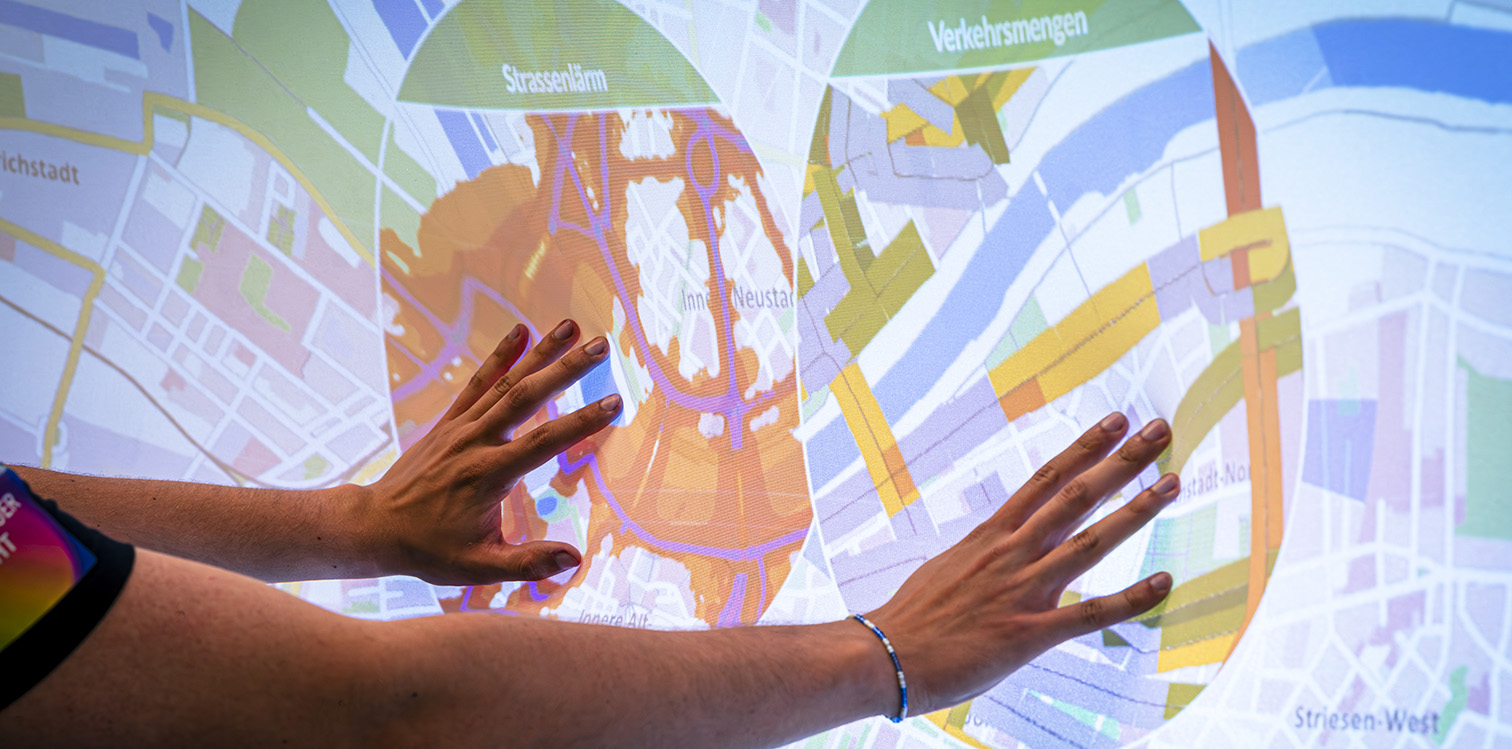
The ninth case study combined layer blending, multi-touch detection, and interactive lenses in a web-based successor to the FlexiWall experimentation environment.
This account documents the research questions, interaction concepts, and findings. Dataset configuration, texture conversion, controls, and development instructions are maintained in the Layers application documentation.
Research Questions
Layers revisited FlexiWall’s exploration of layered content using ReFlex and web technologies. Its contribution went beyond porting the earlier visualization: detecting individual pressure points made it possible to combine direct depth-image blending with lenses and contextual information about the selected layers.
Two technical questions guided the work:
- How can datasets with substantially more depth layers be loaded dynamically, overcoming the restrictive limits of individually supplied shader textures?
- How can the depth image be streamed to a separate visualization client with sufficiently low latency for continuous interaction?
The study also aimed to retain FlexiWall’s usefulness as an experimentation environment, particularly the simple addition of content and configuration at runtime. Conceptually, it investigated simultaneous lenses, information displayed at each lens, and visual guidance that helps users locate their current position within a data volume.
Features and Limitations
Web Client and Rendering Approaches
The implementation used ReFlex’s client-server architecture, combining an ASP.NET Core server with an Angular application and Microsoft Azure Kinect sensing. The client used three.js for graphics and could optionally be packaged as an Electron desktop application.
Two rendering approaches offered different capabilities: native web technologies and CSS for image-based lenses, and WebGL pixel shaders for per-pixel blending and texture-array lenses. These differences affected both the supported interaction modes and the available lens annotations.
Development in the Layers context used the ReFlex emulator tool that generated a synthetic point cloud and extended it with recording and playback of point-cloud data. The application used this shared development tool instead of reimplementing FlexiWall’s integrated emulator. Embedding the tool in a frame allowed it to be used as an overlay, supporting development and repeated testing with simulated or previously captured surface input.
Layer Formats and Capacity
The study supported two usable representations of layer content:
| Representation | Purpose and limitations in the reported implementation |
|---|---|
| Texture2D | Individual JPG or PNG images could be loaded without conversion and displayed through web elements or a shader. Pixel Blending supported a maximum of 15 separately supplied layer textures; this was a restriction of the shader path, not a general limit on image-based lens navigation. |
| TextureArray | Equal-sized layers were packaged as raw data or a KTX2 texture array. Arrays made many more layers accessible to the shader. Raw data support retained compatibility with existing datasets; a workflow using the KTX Software Tools prepared new arrays. |
The raw-data representation is limited to a maximum of 256 layers. KTX2 avoides that particular restriction, but usable array sizes still depended on the graphics implementation, hardware, and available resources. The goal of supporting an arbitrary number of layers should therefore be understood as removing the earlier small fixed limit, rather than providing unlimited capacity.
3D textures were investigated but not retained as a usable option, because support in the three.js implementation used by the study was not reliable. Existing FlexiWall datasets stored as 3D textures consequently required conversion. Texture arrays and 3D textures are distinct representations, even when both hold volumetric content.
Streaming and Server Control
Retrieving depth images through individual REST requests offered a simple interface, but its latency was too high for the study’s real-time visualization. Continuous transmission used separate interfaces according to the data being delivered: WebSockets streamed interaction data, while SignalR streamed larger data volumes, namely depth images and point clouds.
Clients could obtain different representations according to their needs: an unprocessed depth image encoded in grayscale, a point cloud in spatial coordinates, or a calibrated point cloud mapped to screen coordinates. Pixel Blending used a grayscale depth texture derived from the selected input, while lens interaction used detected pressure points.
The framework’s SignalR interface also supported streaming vector-field data. Within Layers, the central advance was the first simultaneous use of interaction data and depth-image streaming in one application. This combination placed additional demands on bandwidth and on keeping the latency of the larger surface-data stream comparable to that of the interaction stream.
The REST API was also extended to exchange configuration data, start and stop the sensor, and let clients explicitly enable or disable streams. Layers thus exercised both continuous data delivery and application-driven control of the tracking server.
Scenario
Three Presentation Concepts
Layers provided three ways to explore the same content. Magic Lens had separate single-touch and multi-touch variants:
| Mode | Mapping from deformation to visualization |
|---|---|
| Pixel Blending | Each display pixel showed content selected or blended according to the corresponding value in the depth texture, reproducing FlexiWall’s direct relationship between surface shape and data layers. Optional smoothing softened transitions. |
| Magic Lens | A local lens revealed the layer associated with a detected contact’s depth. Single-touch used the contact furthest from the surface’s resting plane. Multi-touch displayed a lens for each contact, subject to a configurable maximum per dataset. |
| Layer Navigation | The maximum deformation selected one layer for the entire display, carrying forward the frame-navigation concept from Interactive Animations. |
In Pixel Blending, the grayscale values corresponding to the resting plane and maximum deformation were configurable. This allowed the dataset to be mapped, for example, entirely to the depth range reached by pressing inward.
The modes were not available in every combination. Texture2D supported all four selectable variants, whereas TextureArray supported Pixel Blending, a single Magic Lens, and Layer Navigation. Multiple texture-array lenses were not implemented in the reported case study.
Lens Appearance and Orientation
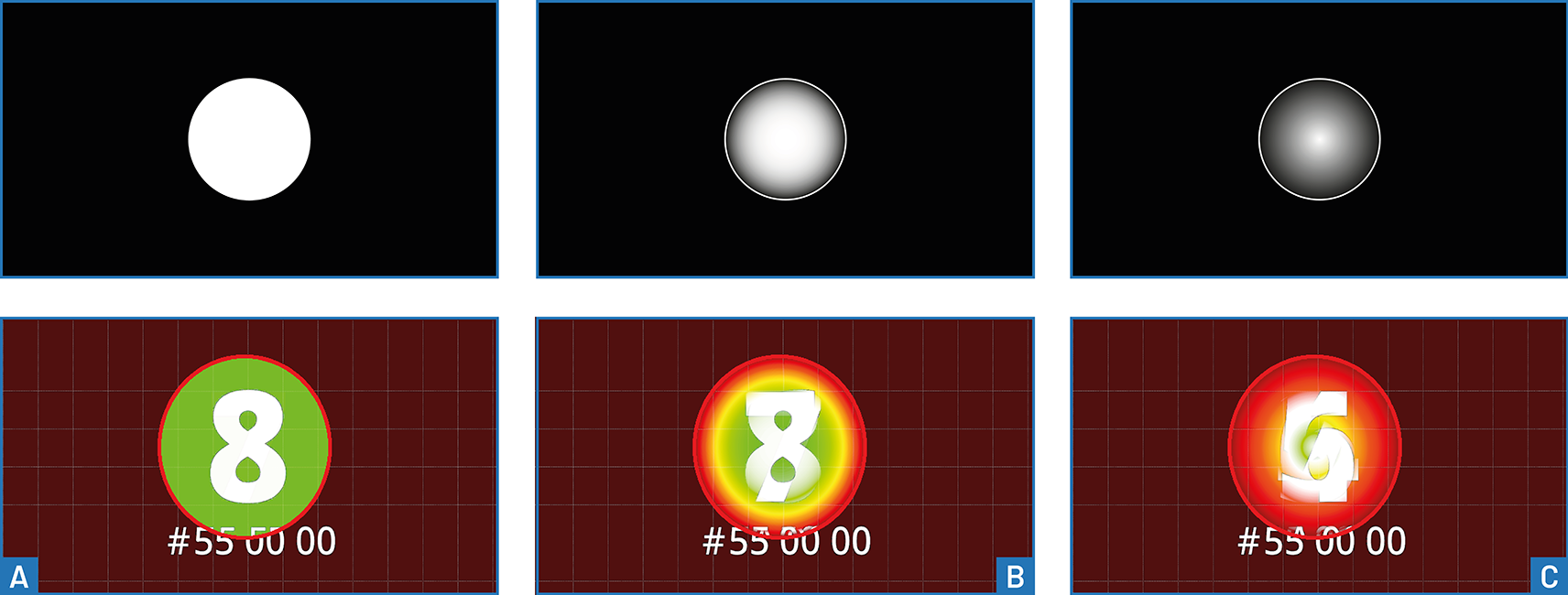
Lens size and horizontal and vertical offset were configurable for both data representations, extending ideas from DeepZoom. Other options depended on how the lens was rendered:
| Lens option | Texture2D | TextureArray |
|---|---|---|
| Size and offset | Supported | Supported |
| Grayscale blending mask | Not implemented | Supported |
| Lens widget with layer information | Supported | Not implemented |
| Layer widget at the display edge | Supported | Supported |
For texture arrays, a grayscale mask interpolated between the layer at the current pressure point and the resting view. Linear and exponential gradients produced different transitions, including a fisheye-like appearance. This combined local lens interaction with layer blending; it did not reproduce the measured surface relief inside the lens.
For image-based lenses, the implemented metadata consisted of a configurable layer title. Richer annotations, relationships between layers, and highlighting of related elements are possible extensions.
A separate layer widget represented the available depth range as a vertical axis, marking the layers and the depths of detected contacts. It was particularly useful for lenses and full-screen navigation, where it showed the current position in the layer stack. During Pixel Blending, contact markers indicated how far users had deformed the surface into the data volume, but did not describe the complete distribution of visible layers.
Datasets and Application Contexts
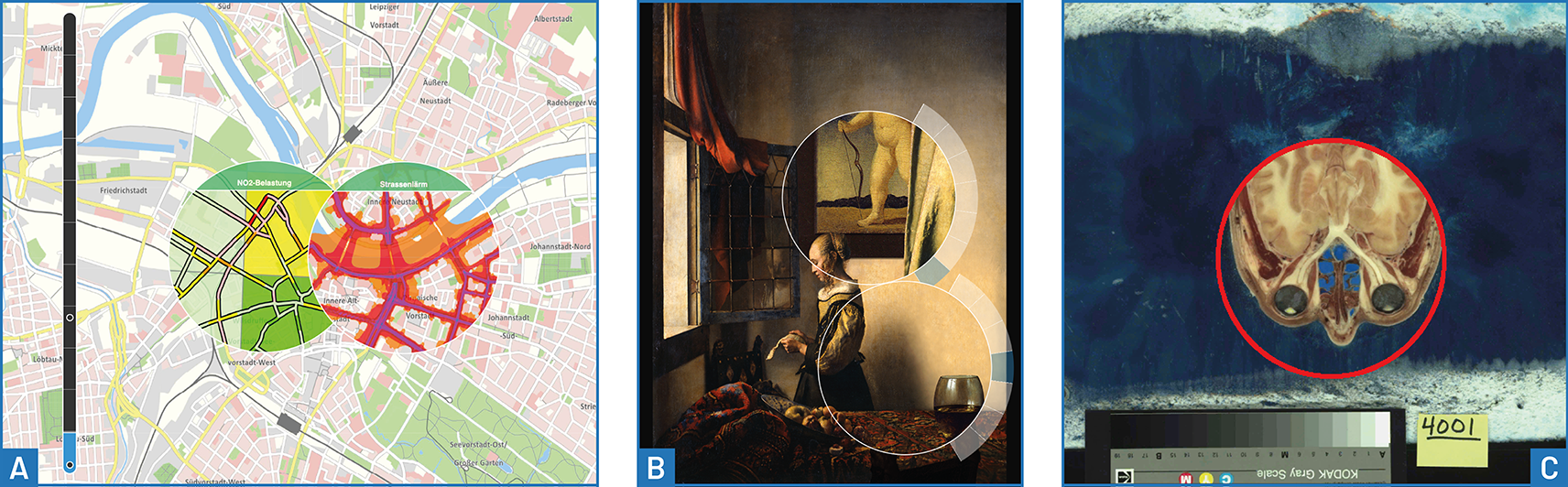
The experimentation environment adapted earlier FlexiWall content and explored larger layer stacks:
| Content | Exploration supported by the study |
|---|---|
| Thematic maps | Simultaneous lenses exposed different map layers while preserving the surrounding map as context. Layer titles helped identify the content of each lens. (Data Source) |
| Paintings | Alternative image layers could be inspected locally, with lens widgets providing context about the selected layer. |
| Scientific animation | The Cahn-Hilliard visualization from Interactive Animations was ported to the new environment, linking deformation to progression through an image sequence. |
| MRI volume | The dataset identified as Bruce Goochs Brain comprised 156 layers at 256 × 256 pixels each (Data Source). |
| Anatomical sections | A head subset from the National Library of Medicine’s Visible Human Project comprised 217 layers at 4096 × 2700 pixels each (Data Source). The exploration concept drew on the Visible Human Explorer by North, Shneiderman and Plaisant. |
| Historical maps | A sequence of 47 layers represented Europe between 1500 and 2008 (Data Source), making time accessible through depth navigation. |
These examples illustrate semantic, spatial, and temporal interpretations of a layer stack. The medical datasets demonstrated exploration of volumetric content.
Configuration for Reusable Demonstrations
JSON configuration described datasets, their formats, and their resources. Optional dataset-specific presets selected the interaction mode and associated presentation settings automatically when content was loaded. Separate configuration supplied keyboard shortcuts, lens-mask textures, and fallback settings for datasets without their own presets.
Global options also covered depth-range mapping, calibration, debugging views, and an idle mode with an optional logo. Together with runtime controls, these settings made it possible to adapt the same application to different content and demonstration contexts. The application reference documents the configuration details.
Findings and Discussion
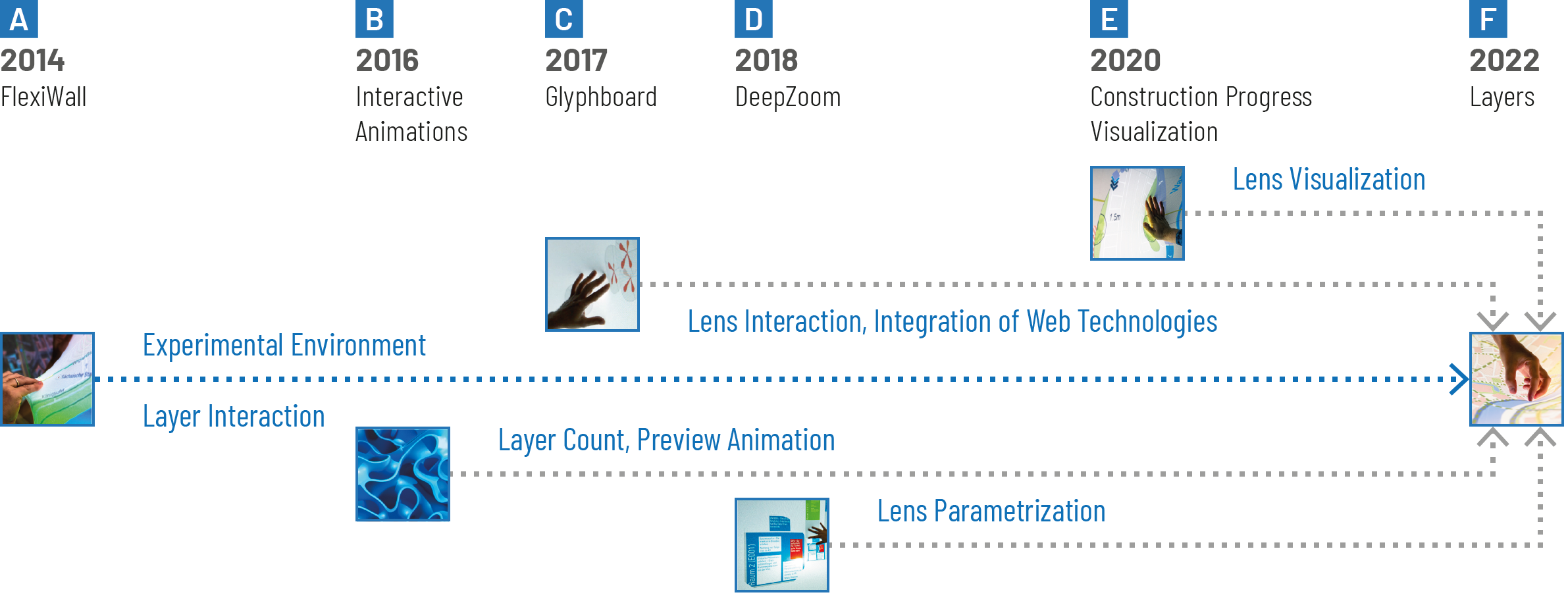
Combining Earlier Results
Layers brought together several strands of the preceding studies:
- FlexiWall: Layer interaction and a configurable experimentation environment.
- Interactive Animations: Longer image sequences and preview animation.
- Glyphboard: Web integration and lens-interaction concepts.
- DeepZoom: Configurable lens size and offset.
- Construction Progress Visualization: Layer annotations and contextual information.
The following section provides exploratory observations about the interaction concepts and implementation.
Layer Context and Multiple Lenses
The main conceptual advance was connecting detected pressure points with information beyond the layer image itself. Layer titles and a visible position in the stack made the selected content explicit, while simultaneous lenses allowed different layers to be inspected together.
Each lens could be controlled through its contact’s lateral position and deformation depth. This simultaneous depth control represents a distinctive opportunity of Elastic Displays relative to conventional multi-touch interaction. Comparing map layers demonstrated the concept; further combinations of lenses and richer metadata remained opportunities for future work.
Rendering Trade-offs
The two rendering paths exposed a practical trade-off. Image-based web elements supported multiple lenses and interface widgets, while texture arrays enabled larger shader-accessible layer stacks and blending masks. Their capabilities were complementary, so choosing a data format also meant choosing an interaction feature set.
A histogram of visible layers was proposed as a richer overview for Pixel Blending. It was not implemented: the existing shader computed output independently per pixel on the GPU and did not provide a global summary. Moving those calculations to the CPU would compromise real-time performance. This is a limitation of the chosen implementation, not evidence that such summaries are generally impossible.
Implications for Framework Development
Layers provided an application-level validation of the ReFlex architecture by simultaneously consuming interaction data and streamed depth images, alongside calibration and server settings in one client, with configuration also communicated back to the server. For the forthcoming requirements analysis, it provides evidence for the following areas:
- Multiple input representations: Expose both surface-wide depth data and discrete contacts so applications can combine blending with lenses and annotations.
- Low-latency streaming: Support concurrent interaction and surface-data streams with sufficient bandwidth and comparable latency, independently of request-based configuration and control.
- Calibration and coordinate mapping: Make raw, processed, and screen-mapped data available according to the visualization’s needs.
- Bidirectional server integration: Allow clients to retrieve and change configuration, control sensor operation, and select active streams.
- Reusable configuration: Separate content and dataset-specific interaction presets from application code, enabling rapid changes between scenarios.
- Multiple contacts and contextual feedback: Provide the position and depth information needed for independently controlled lenses and orientation within a layer stack.
- Reusable development tools: Support application testing through the shared point-cloud emulator and recording/playback tools instead of duplicating their functionality in each client.
These implications connect the implemented capabilities and their limits to framework design. Texture preparation, GPU rendering, and the choice of lens widgets remained application responsibilities.