
Case Study: DEEP
Table of Contents
| Profile field | Description |
|---|---|
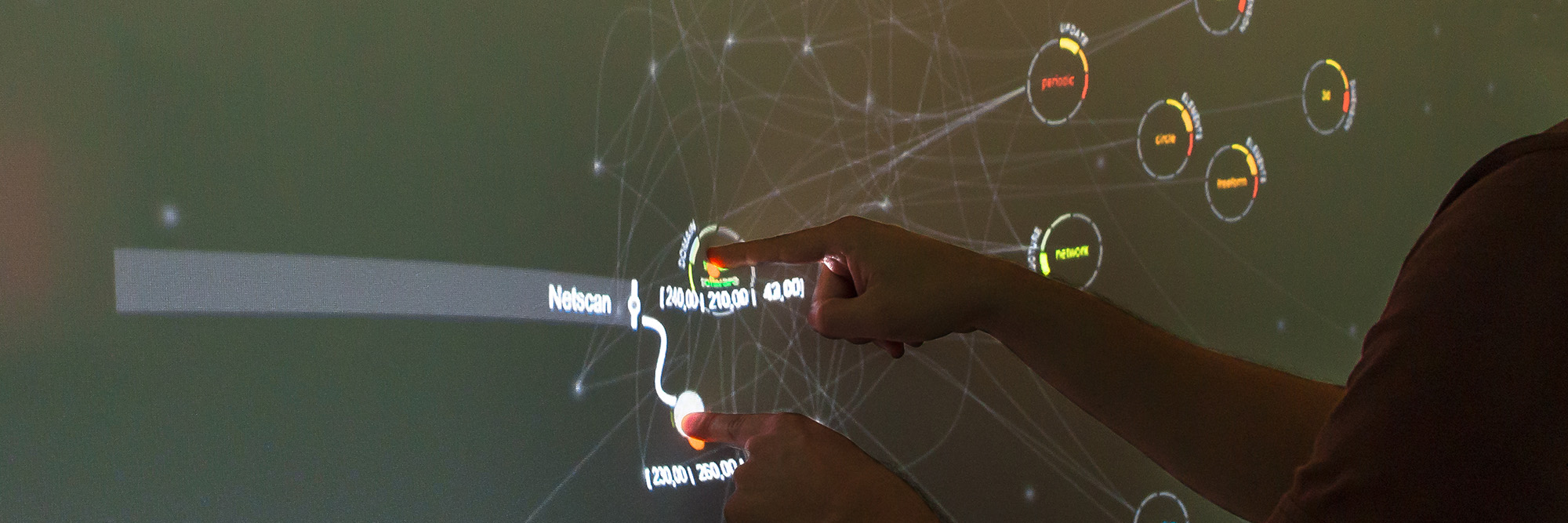
| Title | DEEP - Data Exploration on Elastic Projections |
| Year | 2015 |
| Focus | Concept, Framework |
| Format | Large vertical Elastic Display wall |
| Framework | FlexiWall |
| Sensor | Microsoft Kinect, Microsoft Kinect 2 |
| Architecture | Monolithic (.NET, WPF) |
| Scenario | Tag-based search and exploration of visualization projects |
| Features | - physics-based search and filtering - semantic zoom - multi-touch detection |
| Publication | Müller, M., Gründer, T. & Groh, R. (2015): Data Exploration on Elastic Displays using Physical Metaphors. In: A. Clifford, M. Carvalhais & M. Verdicchio (Eds.): xCoAx 2015: Proceedings of the Third Conference on Computation, Communication, Aesthetics and X, pp. 111–124. Proceedings. |
| Repository | reflex-deep-legacy-wpf |
The profile describes the historical DEEP implementation using the FlexiWall framework. As explained in the case study overview, the published repository may include later adaptations.
Research Questions
DEEP investigated how physics-based interaction metaphors could support the exploration of abstract data. It transferred the attraction and repulsion demonstrated by the DepthTouch prototype to relationships between data items: surface deformation controlled simulated forces for selecting and filtering content, while the resulting movement made relationships visible.
The study addressed two needs identified during the FlexiWall case study: extracting individual pressure points and exploring abstract datasets beyond image layers. Its main questions were:
- How can depth-image analysis expose multiple pressure points with lateral positions and deformation depths relative to the surface at rest?
- Can familiar physical behaviour help users understand relationships within an abstract dataset and control the weighting of search criteria?
- How can deformation depth also control semantic zoom, progressively revealing information about individual items?
- Which technical and conceptual limitations arise when combining these interaction techniques?
The concept drew on reality-based interaction: familiar physical responses, immediate visual feedback, and the resistance of the elastic surface were intended to help users form a mental model of the system. The study retained the large vertical FlexiWall display without changing its physical construction.
Features and Limitations
Extending the FlexiWall Framework
The application retained the monolithic .NET/WPF architecture but substantially extended the FlexiWall framework iteration. A separate library implemented the physics simulation, and additional functionality supported data loading and caching. Forces and visualization parameters were configurable so that the simulation could operate independently of its visual representation and be adapted to other datasets.
During development, the sensor changed from the original Microsoft Kinect to Kinect 2. This prompted an initial hardware-independent sensor layer capable of processing depth data from different sensors.
Surface configuration generalized FlexiWall’s depth-range mapping by explicitly defining the physical resting plane of the elastic surface and thresholds for minimum deformation. These parameters established the reference from which inward and outward deformation could be interpreted and small deviations excluded from interaction detection.
Extracting and Stabilizing Pressure Points
The implementation processed the point cloud derived from the depth image to detect local extrema along both horizontal and vertical directions. Differences between neighbouring depth samples approximated partial derivatives, forming a vector field in which sign changes indicated candidate extrema. For performance, the depth image was downscaled to a quarter of its original resolution.
Each frame produced a list of extrema. Persistent touch identities were not implemented, because the scenario did not require them. Multi-touch detection therefore exposed simultaneous pressure points without uniquely tracking each interaction over time.
Preprocessing smoothed noisy depth data, and two filters stabilized the detected extrema:
- Distance filter: Merged extrema within a predefined neighbourhood.
- Confidence filter: Increased or decreased a confidence value according to whether an extremum was detected in successive frames, suppressing outliers and short-lived peaks.
Confidence filtering delayed initial detection. Without persistent tracking, lateral hand movement could also trigger delayed redetection. Already established extrema did not incur this additional confirmation delay. The sensor’s maximum rate of 30 frames per second and the processing pipeline already caused perceptible latency, so no additional temporal smoothing of depth images or touch points was applied.
Calibration and Development Boundaries
Calibration used more reference points to improve spatial accuracy at different deformation depths. It partially accounted for projective distortion and reduced drift between detected and displayed positions. Residual errors remained, especially under stronger deformation and away from the projection centre.
Technical limitations prevented transferring this calibration to the existing layer-rendering component. In the subsequent consolidation, the extended calibration was also excluded from the main framework because its limited added value did not justify the effort required to perform it. This decision concerned general adoption of the procedure, rather than its implementation in the DEEP prototype.
The earlier depth-image simulation was also incompatible with DEEP, exposing the need for a different approach to interaction emulation as a development tool.
Scenario
Exploring Visualization Projects through Tags
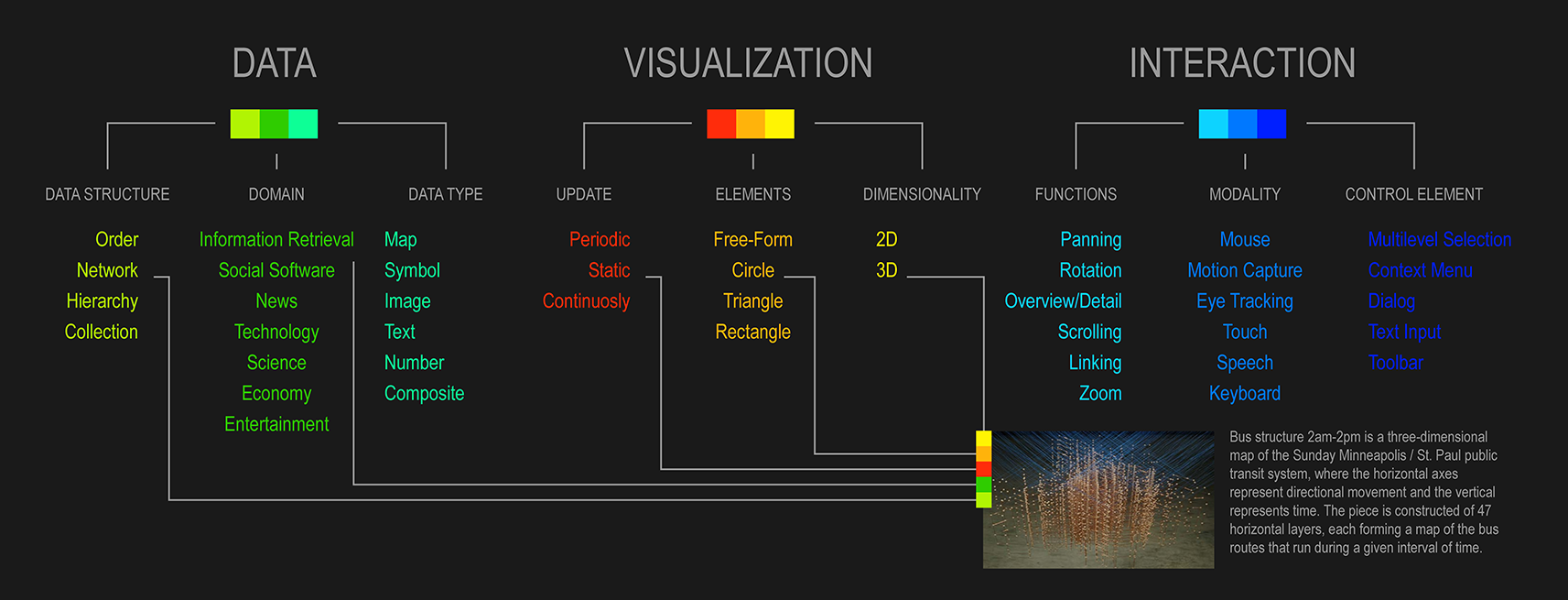
The example dataset contained more than 700 visualization projects from the DelViz prototype. Its classification scheme had three levels: categories (Data, Visualization, and Interaction), dimensions such as data structure or data type, and individual tags describing a project’s characteristics. Projects could carry multiple tags across these dimensions.
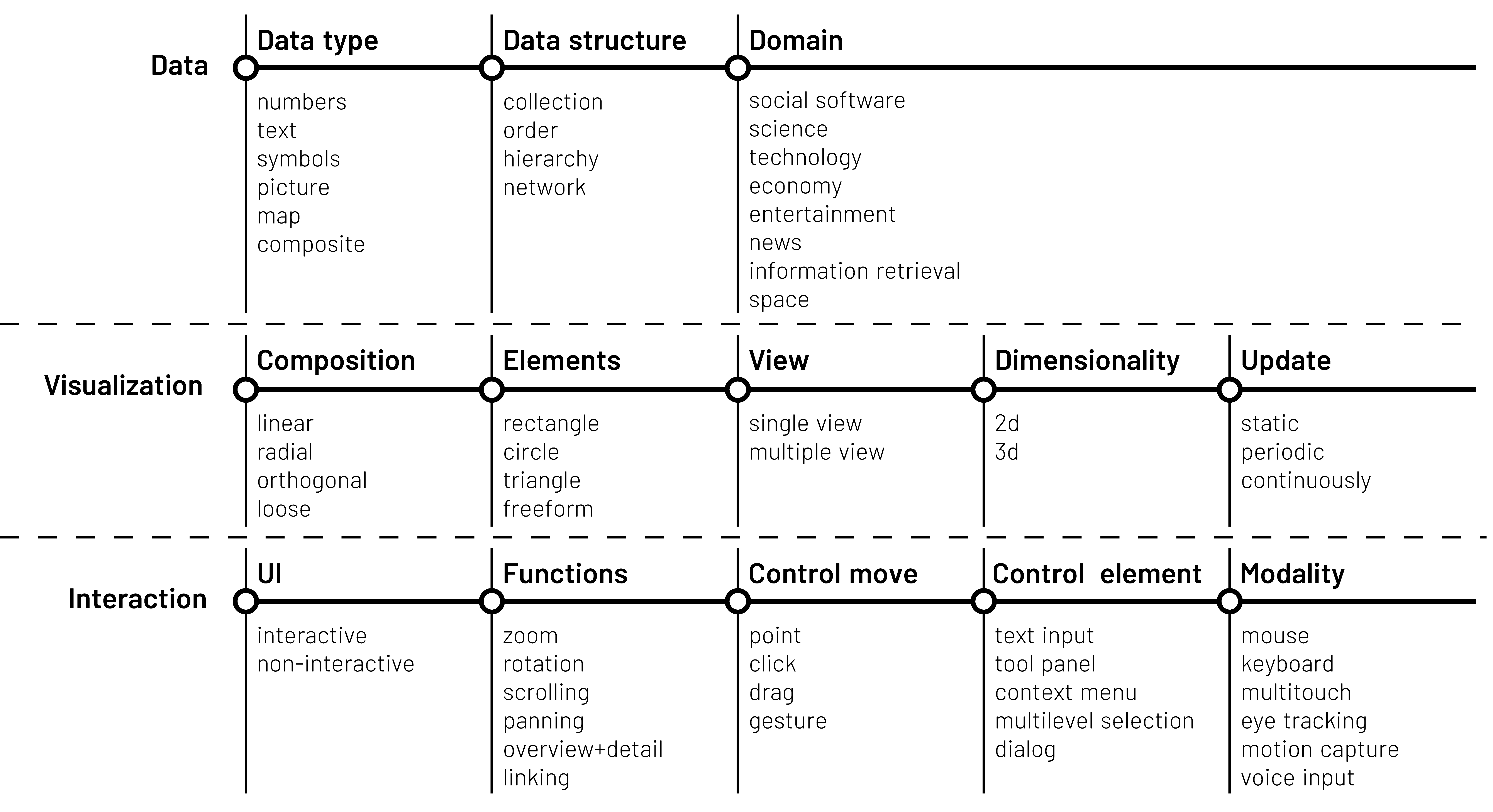
The scenario assumed a researcher looking for a suitable visualization for a dataset. Instead of selecting projects directly at the outset, the researcher explored and weighted tags describing desired data characteristics, representations, or interaction capabilities. Negative weights allowed exclusion criteria.
Exclusion was meaningful because tags were not mutually exclusive. For example, selecting Static while excluding 3D differed from selecting Static and 2D: the latter could also retrieve projects combining 2D and 3D representations.
Interaction Concept: Attraction, Repulsion, and Weighting
Tags appeared as floating elements on the surface. Pushing on a tag attracted associated projects; pulling the surface outward at that tag repelled them, filtering them out of the result set. Projects without that tag were unaffected by its direct selection force.
Selecting several tags combined their forces. A project associated with two equally weighted tags moved towards the midpoint between them; unequal deformation shifted the equilibrium towards the stronger attraction. Other tags also responded, more weakly, according to the relative overlap of their associated project sets. Movement speed reflected deformation strength and the relationships to the active tags.
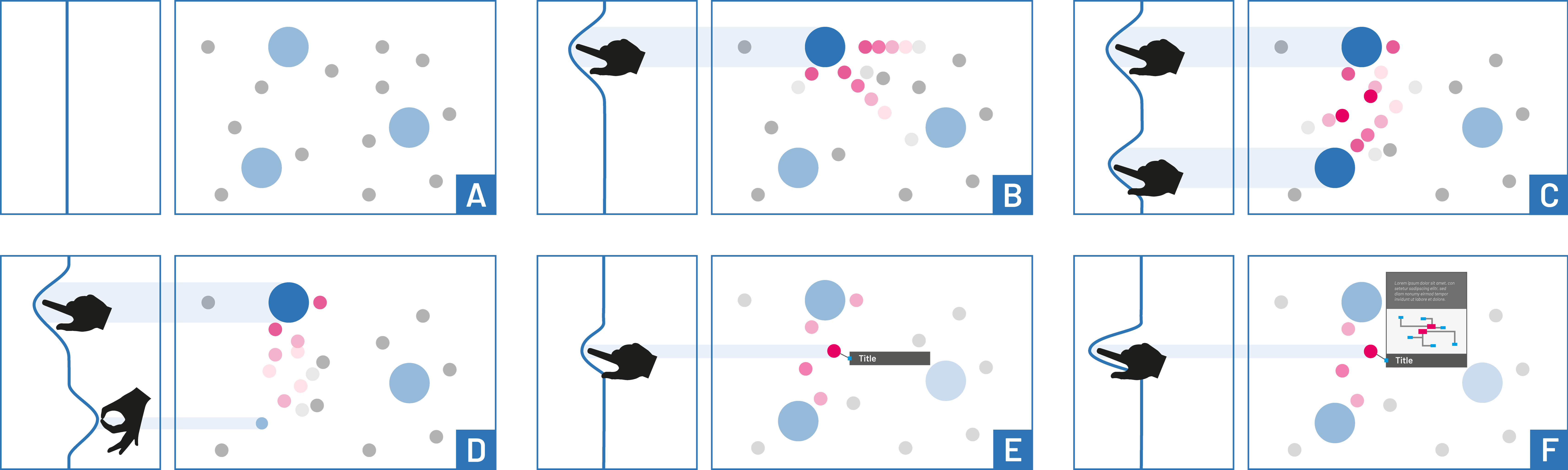
This dynamic arrangement let users explore relationships by adjusting the surface and observing the response. Deformation provided continuous control over weighting, while releasing the surface removed the applied influence and provided a natural reset.
Balancing Motion and Precise Interaction
Global forces kept elements moving, while attraction and repulsion based on similarity and proximity formed groups and prevented collisions. Continuous motion was intended to invite interaction and bring different items towards the centre, where the surface was easier to deform and detection was more accurate.
Iterative trials revealed that moving targets hindered precise selection and reading. Two changes addressed this:
- Tags being pushed or pulled stayed at the interaction position.
- Touching a project and activating its first semantic-zoom level paused the entire simulation. Users could then release other tags and concentrate on that project’s details without distracting movement.
This temporary pause supported detail inspection; it did not provide a general mechanism for saving a weighted selection for later refinement.
Visual Encoding and Progressive Disclosure
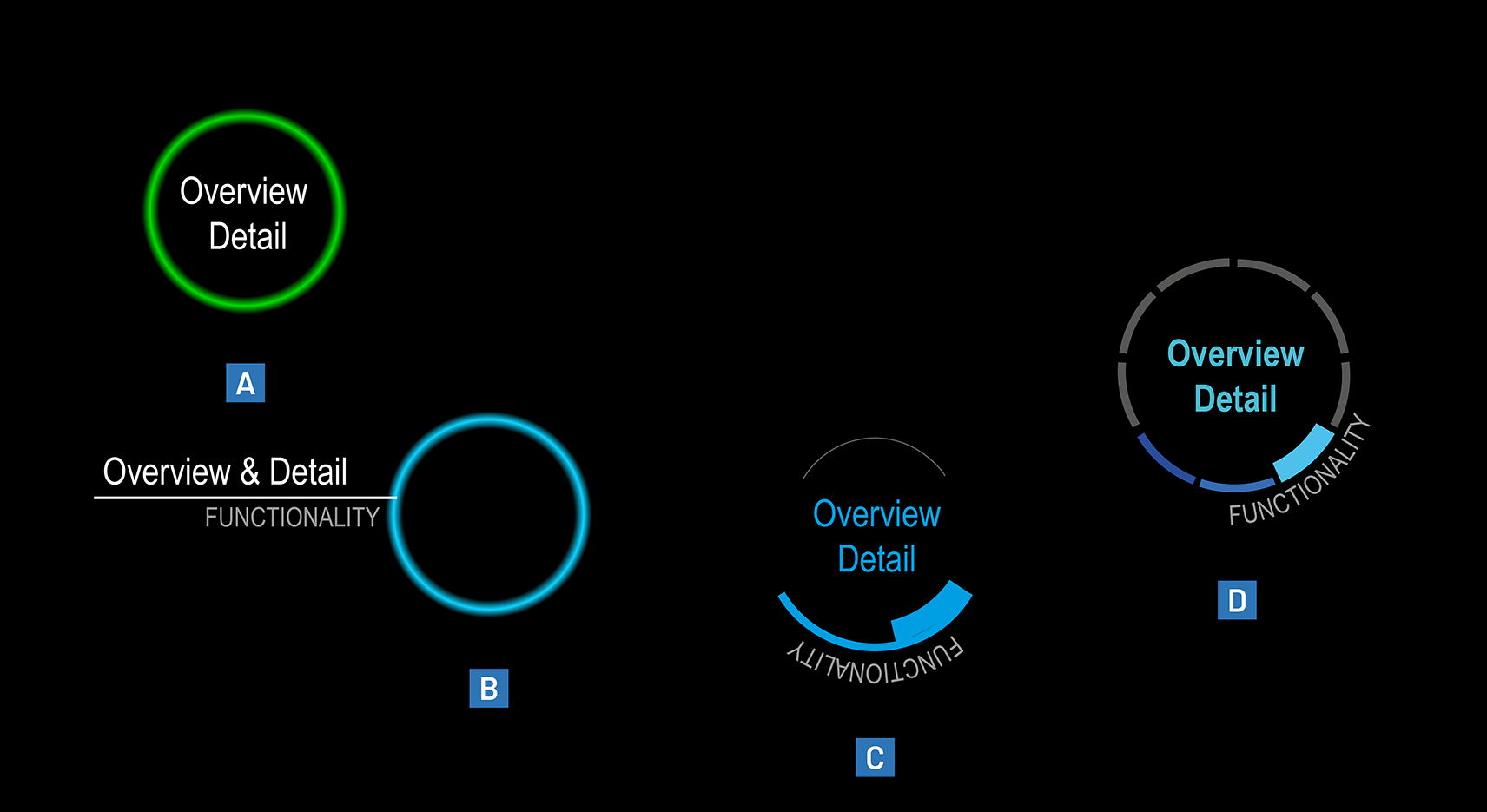
The visualization limited each category to three dimensions to keep their colours distinguishable. Data used green, Visualization red, and Interaction blue, with shades distinguishing dimensions. Circular tags combined coloured labels and ring segments; unused segments remained grey to preserve the circular outline. Project symbols combined a preview image with coloured dimension segments and a highlight suggesting a rounded physical object.
An earlier idea to make inactive dimension segments transparent was discarded: movement, proximity, and connecting lines already communicated influence, while transparency made category colours harder to distinguish.
Initially, only tags were visible. Pressing a tag progressively revealed associated projects:
| Selection strength | Project representation |
|---|---|
| Light deformation | Diffuse glowing points, providing an initial impression of the associated items |
| Increasing deformation | Larger symbols with preview images |
| Stronger deformation | Preview images with associated dimension segments |
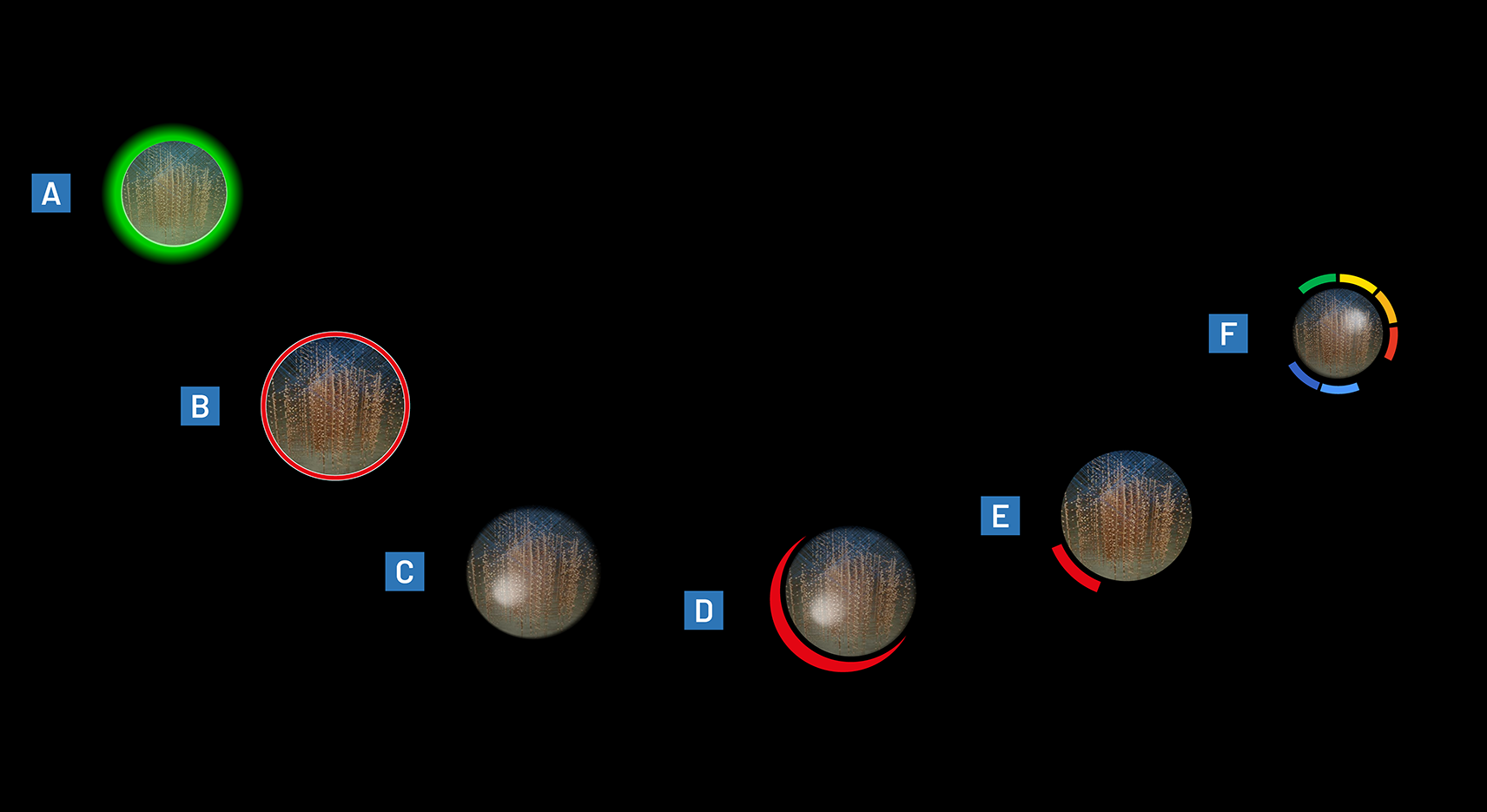
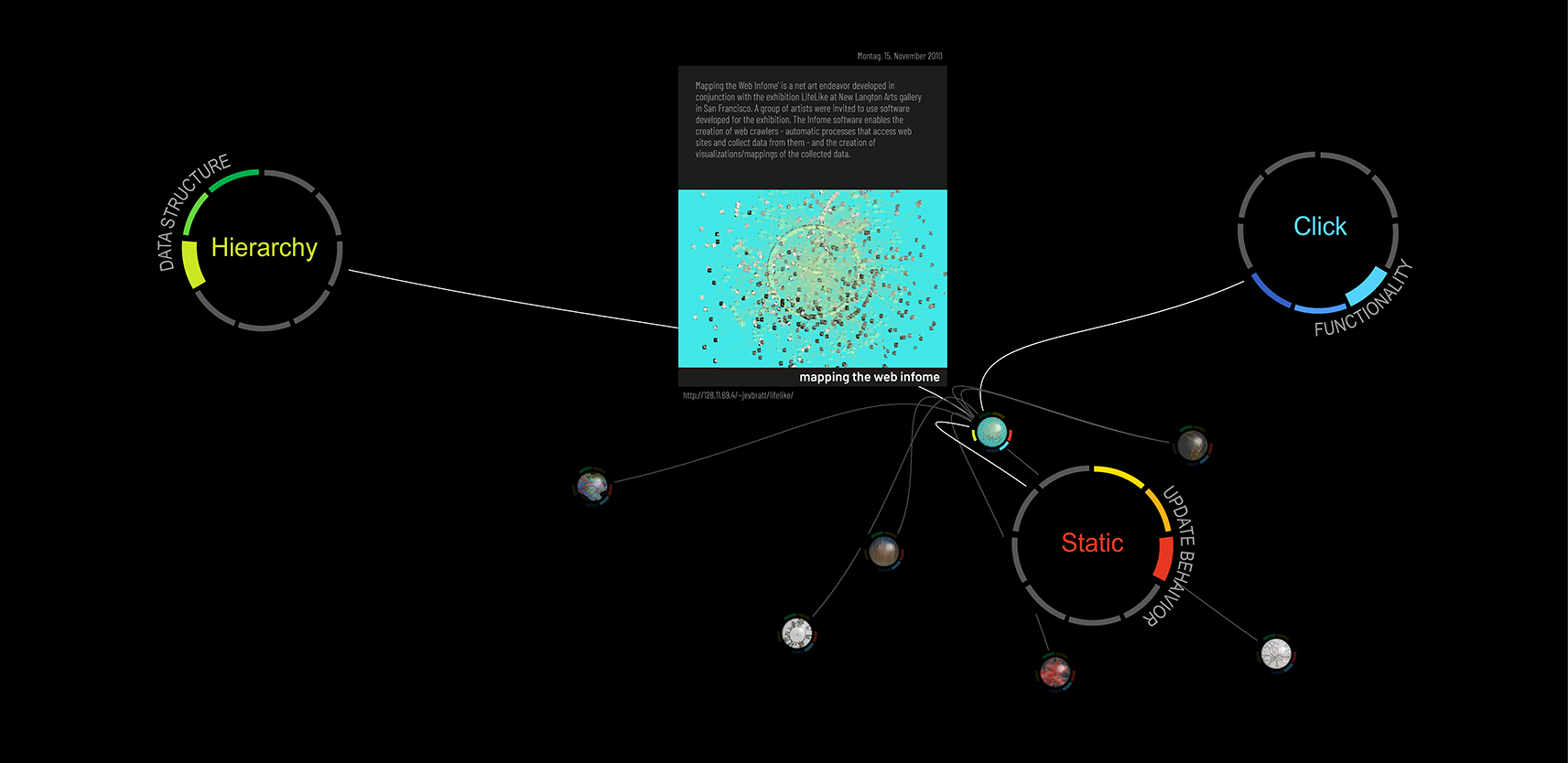
Symbol size and opacity reflected selection strength. Connecting lines identified the influencing tags, with thicker lines indicating stronger influence. Tags themselves had no separate detail levels.
Semantic Zoom on Individual Projects
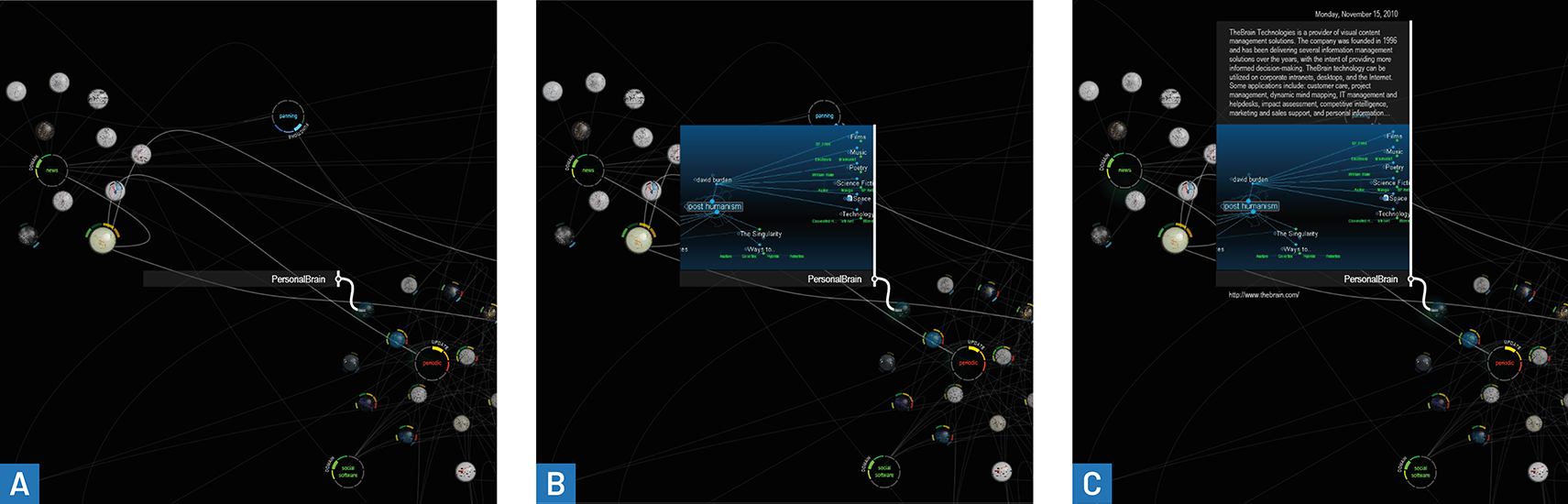
Pressing a project revealed an annotation in three successive stages: its title, an image of the visualization, and finally a description with metadata, including the recorded date and web address. Deformation depth therefore controlled the amount of information displayed rather than simply magnifying the existing image.
Findings and Discussion
The following section provides exploratory observations about the interaction concepts and implementation.
Understandability and Response Time
The physical response of the elements offered an accessible introduction to the interaction concept and helped communicate relationships in the data. However, controlling the strength of an element’s influence through pressure generally required a brief explanation. After familiarization, users found the direct feedback understandable.
Latency was particularly critical because the physical metaphor created an expectation of immediate response. Confidence filtering exposed a central tradeoff: higher confidence requirements stabilized touch points but delayed detection; lower requirements reduced delay while admitting jitter and outliers.
Transient Interaction and Persistent Selections
Returning the surface to rest reset the interaction and encouraged experimentation. Users nevertheless requested a way to freeze selected tags and their weights so they could refine results step by step.
Such persistence raised a conceptual problem: the system could retain a virtual selection without preserving or restoring the corresponding physical deformation. This would weaken the direct relationship between the surface and the simulated forces. How much divergence users could understand remained an open question.
Users also suggested gestures for more complex actions, such as swiping items aside or pinching to zoom. Some expected to move content indirectly by shaping the membrane, as if manipulating sand or liquid, rather than pressing individual interface elements. These were directions for further work, not implemented gesture capabilities.
Selection Accuracy, Occlusion, and Legibility
Camera-lens distortion reduced detection accuracy towards the edges. Increasing deformation also caused projected content and detected interaction positions to diverge. Together, these effects made small project symbols especially difficult to select away from the centre.
Visual feedback about detected touch positions could partly compensate. The prototype also used Iceberg Tips, making an element’s selectable area larger than its visible shape. Selecting the nearest object instead of requiring a hit within a fixed region was proposed as a further improvement, but was not implemented in this study.
Hands could obscure tags during direct selection. Larger, indirect deformation gestures were identified as a possible way to reduce both targeting and occlusion problems. The display size generally supported readable tag and dimension labels, but projection distortion impaired text legibility during semantic zoom.
Implications for Framework Development
DEEP moved beyond FlexiWall’s direct depth-image rendering by exposing pressure-point coordinates to application logic. It also provided concrete experience with sensor abstraction, configurable simulation, data handling, and calibration. For the forthcoming requirements analysis, the study provides evidence for the following areas:
- Interaction data and continuity: Expose multiple positions and deformation depths; support tracking over time where moving contacts or gestures require it.
- Configurable processing: Make the balance between noise suppression, stable detection, and latency explicit.
- Surface configuration: Define the resting plane and minimum-deformation thresholds independently of application-specific visualizations.
- Spatial alignment: Account for deformation depth and off-centre interaction when mapping sensed positions to projected content.
- Hardware abstraction and emulation: Support interchangeable sensors and application development without depending on the physical display or a particular rendering technique.
- Separation of responsibilities: Keep sensing, interaction processing, simulation, data access, and visualization sufficiently independent to support different scenarios.
- Interaction state: Distinguish temporary inspection pauses from persistent selections, and examine how saved state can remain understandable when physical deformation changes.
These implications connect the prototype’s capabilities and limitations to later design decisions. They do not imply that persistent tracking, general gesture recognition, or saved selections were already available in the DEEP implementation.