
Case Study: FlexiWall
Table of Contents
| Profile field | Description |
|---|---|
| Title | FlexiWall |
| Year | 2014 |
| Focus | Implementation |
| Format | Large vertical Elastic Display wall |
| Framework | FlexiWall |
| Sensor | Microsoft Kinect |
| Architecture | Monolithic (.NET, WPF) |
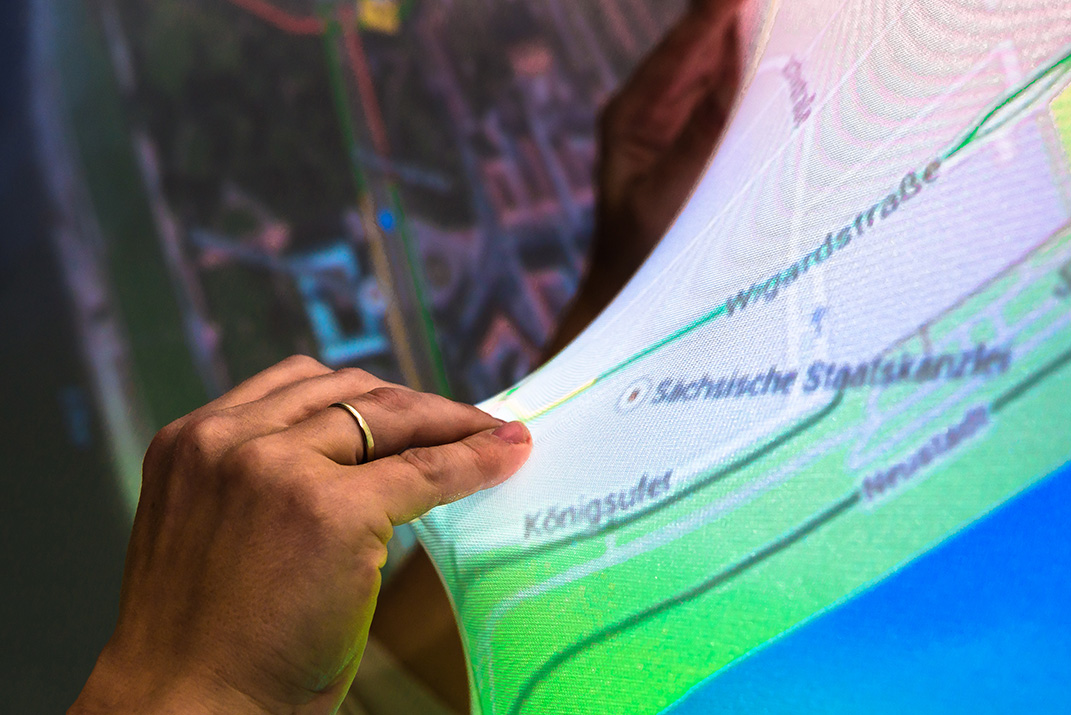
| Scenario | Experimentation environment for rapid prototyping, photography, painting, maps, volumetric data, time series, and clustering algorithms |
| Features | - interaction with data layers - direct use of the depth image - exploration of scenarios through rapid prototyping |
| Publication | Franke, I. S., Müller, M., Gründer, T. & Groh, R. (2014): FlexiWall: Interaction in-between 2D and 3D Interfaces. HCI International 2014, pp. 415–420. DOI: 10.1007/978-3-319-07857-1_73. Müller, M., Knöfel, A., Gründer, T., Franke, I. & Groh, R. (2014): FlexiWall: Exploring Layered Data with Elastic Displays. ITS ‘14, pp. 439–442. DOI: 10.1145/2669485.2669529. Müller, M., Kammer, D. & Groh, R. (2016): Elastische Displays im Einsatz. Mensch und Computer 2016 – Workshopband. DOI: 10.18420/muc2016-ws10-0007. |
| Repository | reflex-flexiwall-legacy-wpf |
The profile describes the historical FlexiWall iteration. As explained in the case study overview, the published repository may include later adaptations.
Research Questions
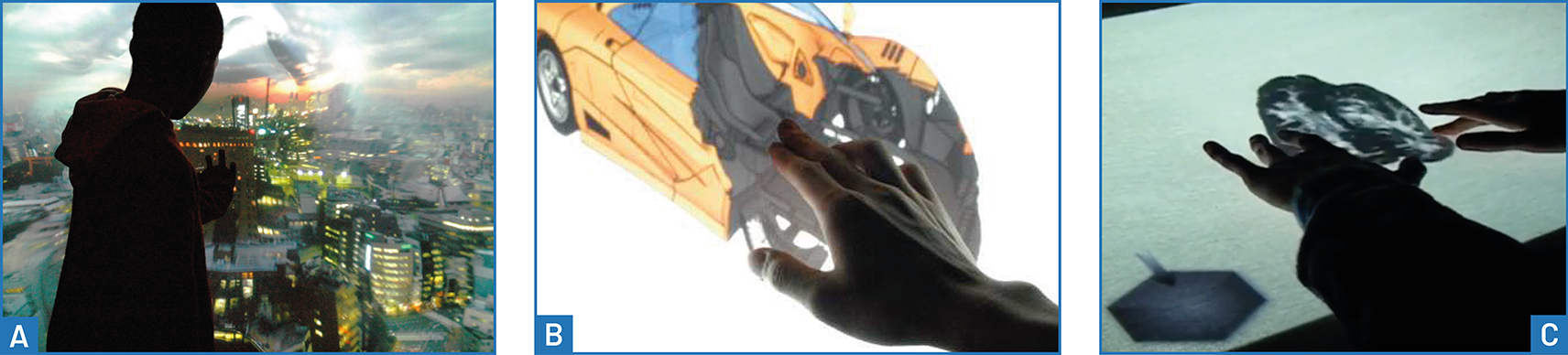
FlexiWall explored how surface deformation could support navigation within a data volume. It built on the DepthTouch prototype and related work on space-time volumes, cross-sections through 3D models, and volumetric medical images, particularly the Khronos Projector (A), Deformable Workspace (B), and eTable (C).
DepthTouch used the camera’s depth image directly, without extracting individual finger positions. This allowed arbitrary surface deformations to affect the visualization, without imposing a fixed number of tracked contact points. FlexiWall investigated the opportunities and limits of this approach:
- In which application contexts is direct interaction with a data volume useful?
- When does meaningful interaction require explicit reconstruction of contact positions?
- How can an experimentation environment support the rapid exploration of different datasets and interaction concepts?
- How does a large vertical Elastic Display differ in use from a tabletop installation?
The resulting display wall, software framework, and experimentation environment all received the name FlexiWall. Its construction extended the exploration of Elastic Displays to a large vertical format; further hardware information is available in the FlexiWall hardware documentation.
Features and Limitations
Mapping Deformation to Data Layers
The implementation used programmable graphics shaders to combine the Kinect depth image with images representing layers of a dataset. For each output pixel, the shader read the corresponding depth value, selected the associated data layer, and sampled its colour at that position. Optionally, it interpolated between the two neighbouring layers according to their distance from the measured depth.
This mapping transferred the shape of the deformed surface directly into the visualization. Different regions could reveal different layers simultaneously, without first identifying individual touches. An optional Gaussian filter smoothed the depth image to reduce visible blocks and edges caused by the different resolutions of the camera and projected image.
Implementation and Configuration
The original application used .NET 4 and WPF, matching the technological basis of the Microsoft Kinect SDK and its examples. This choice supported sensor compatibility and access to established documentation. The implementation formed the first FlexiWall framework iteration.
Datasets were described in XML configuration files containing layer images and metadata. They could be loaded and switched at runtime. The maximum deformation and the normal plane, meaning the data layer displayed when the surface was at rest, were also adjustable at runtime. These capabilities made it possible to explore new content without implementing a separate application for each dataset.
A first depth-image emulator generated synthetic depth images for development and content preparation. It allowed layer mappings and datasets to be explored without input from the physical display. This development tool was integrated into the experimentation environment.
Technical Boundaries
- Seven image layers: The WPF
ShaderEffectimplementation using Shader Model 3 in DirectX 9 allowed eight texture parameters. One was reserved for the depth image, leaving seven for content. A later extension alternatively supported DDS volume textures. - Restricted calibration: Translation and scaling aligned the depth image with the projection. Rotation correction and cropping were not implemented, so the sensor needed careful alignment, with its optical axis perpendicular to the surface.
- Limited sensor processing: Beyond spatial Gaussian smoothing, the original implementation did not remove erroneous depth values or apply temporal smoothing.
- No explicit contact detection: The shader consumed depth values but did not expose pressure-point positions or identities to application logic. This restricted gestures, contextual labels, and lenses associated with individual interactions.
- Transient manipulation: Saving edited results, restoring intermediate states, and comparing saved versions were outside the scope of the study.
Scenario
FlexiWall served as an experimentation environment spanning several application domains. Early examples used images of data slices; later examples also used mockups resembling storyboard frames to approximate interaction sequences. Their purpose was to gather feedback before investing in a more complete implementation.
Tangibles and Collaborative Exploration
Transparent acrylic tangibles provided more control over the shape of the surface. Plates cut from 3 mm acrylic included rectangles measuring 25 × 20 cm, circles with a diameter of 20 cm, and strips measuring 3 × 20 cm. Embedded magnets and counterparts behind the fabric attached them to the display while allowing lateral movement.
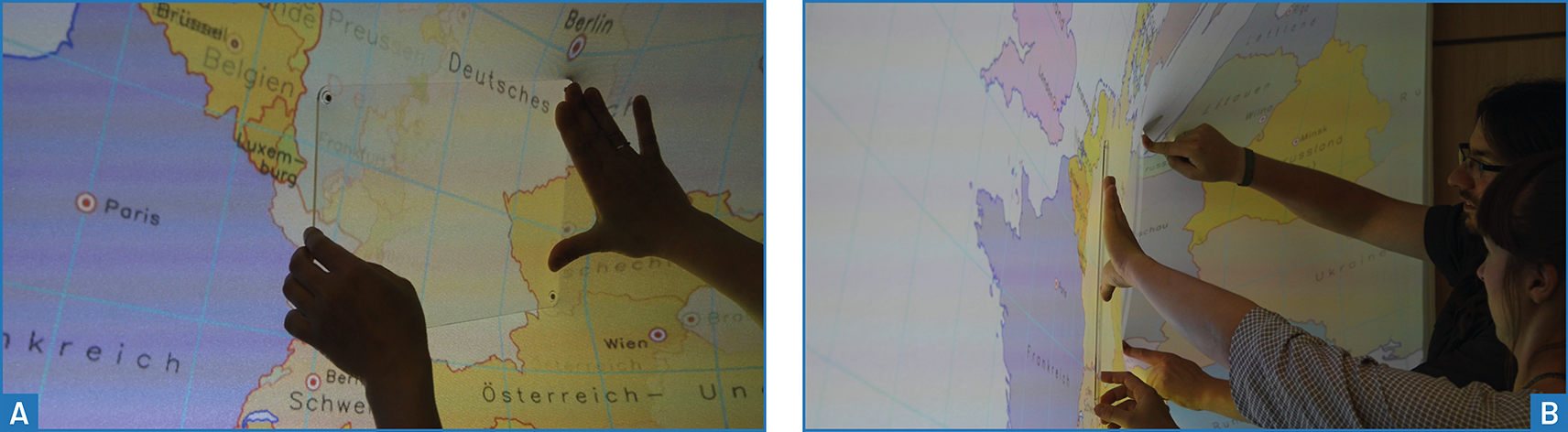
The plates could act as physical lenses and reduce occlusion because users held them at their edges. They also supported collaborative interaction: two people could use separate strips to span a larger cross-section between them.
Photography and Image Editing
Images with different focal planes allowed users to control local focus through deformation. A second example used seven exposure levels: pushing into the surface revealed information from darker exposures in bright regions, while pulling outward revealed brighter exposures in shadow regions.

Both examples treated the depth image as a continuously adjustable layer mask. More generally, deformation could control an image effect’s strength across different regions. Because the prototype did not preserve the resulting manipulation, these scenarios primarily supported exploratory comparison and discussion rather than a complete image-editing workflow.

Painting and Image Analysis
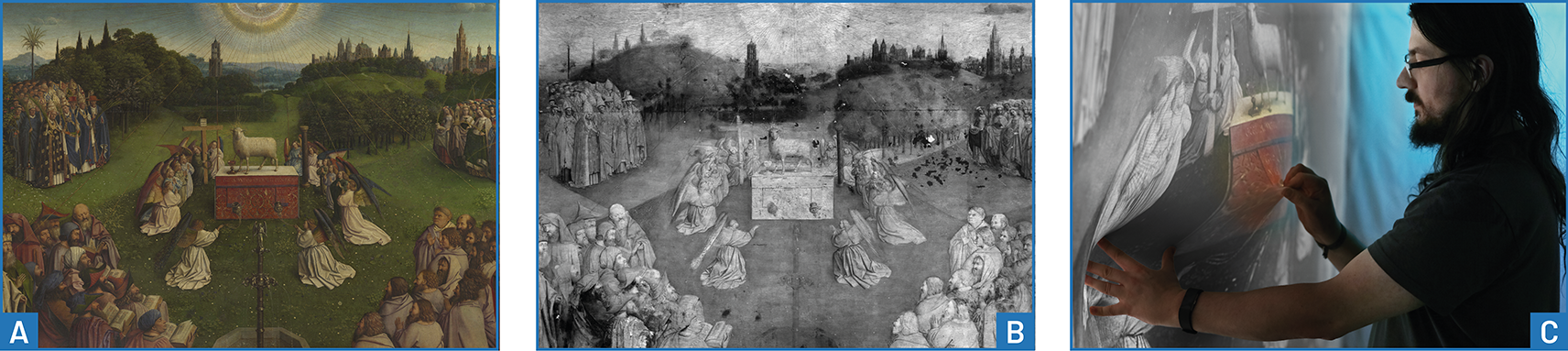
Different versions of Vermeer’s Girl Reading a Letter at an Open Window illustrated how deformation could reveal changes in a painting’s composition. Another example compared photographic and infrared images of the Ghent Altarpiece by Van Eyck to explore differences relevant to art-historical analysis and restoration.
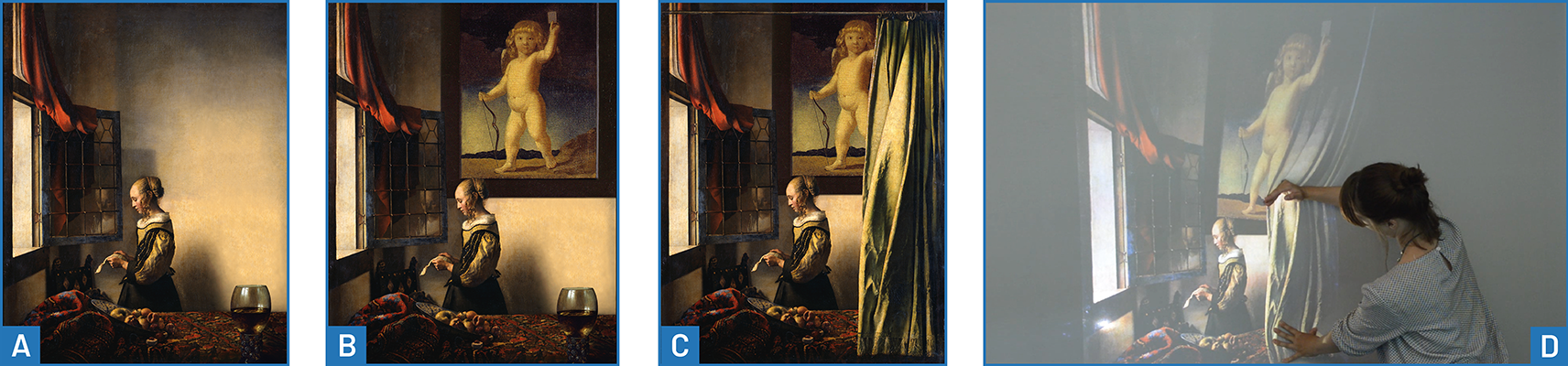
These examples addressed distinct tasks: assessing changes to the overall composition and identifying local differences between imaging techniques. Their differing needs later informed the discussion of global layer switching and bounded comparison lenses.
Maps
Thematic maps placed information such as public transport routes, parking, traffic, and cycling routes over a satellite image. Local deformation exposed additional information while retaining the surrounding map as context.
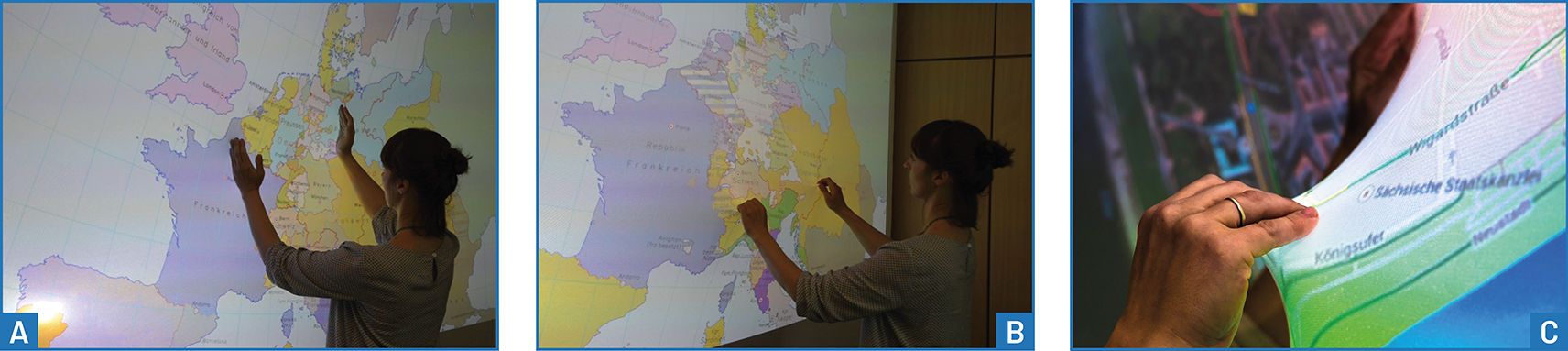
Historical maps instead mapped time to depth. Examples included seven stages of Central European political history from 1500 onward and changes to the Roman Empire’s borders. These datasets exposed the need to distinguish individual periods clearly and to identify the date of the currently displayed region.
Time Series
Image sequences mapped temporal change to deformation. Examples explored objects moving in the same or opposite directions, glacier retreat, and snow-crystal formation. Applying different amounts of pressure, or combining pushing and pulling, could align different objects’ movements and make differences in their speed tangible.

Volumetric Data
MRI slices illustrated navigation through a spatial volume. Surface deformation, optionally shaped by tangibles, could define cross-sections or more arbitrary cutting shapes. However, seven slices were insufficient to approximate a continuous volume or reveal small, spatially confined details reliably. Geological volumes were identified as another possible application, rather than a demonstrated dataset.
Zoomable Interfaces and Concept Prototyping
A gigapixel panorama of Dresden approximated geometric zoom by assigning increasingly magnified views of the image centre to successive layers. This offered an initial impression of depth-controlled zoom but did not support freely choosing a zoom centre. Later experiments investigated shader mappings, while the broader questions were pursued in subsequent case studies.

Image mockups also supported early exploration of semantic zoom. One concept combined sunburst diagrams and edge bundling to show software classes and their relationships. Increasing deformation would reveal progressively more detail, from attribute and method names to types, visibility, and parameters. Another concept explored relationships between publications, authors, and topics. These were prototypes for assessing interaction and visualization ideas, rather than fully implemented information systems.
Comparing Clustering Results
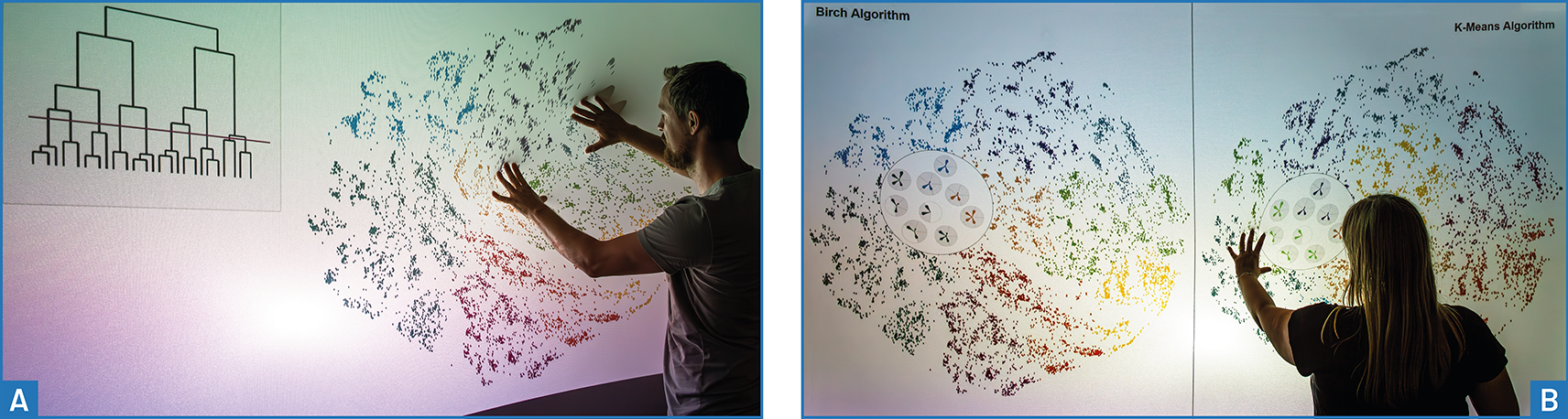
Layers also represented alternative results of clustering multidimensional data, including different parameter settings for BIRCH, DBSCAN, and k-means. Switching between aligned visualizations helped compare how elements were grouped. Later iterations added split views and Magic Lenses. Datasets and further questions connected this work to the Glyphboard case study.
Findings and Discussion
The following section provides exploratory observations about the interaction concepts and implementation.
Exploratory Feedback and Scenario Suitability
Prototyping began in 2013, with demonstrations and iterative refinement continuing through 2017. Observations and feedback from these events informed the assessment of scenarios and generated further research questions. The findings represent exploratory experience; they should not be read as results of a controlled comparative evaluation.
Users saw the greatest value in volumetric data, particularly the direct relationship between physical deformation and cross-sections through MRI images. Geometric zoom also attracted positive responses, although the restricted implementation only allowed a preliminary assessment. Thematic maps were another promising application, provided that lenses, additional interaction techniques, and contextual information could be added. Users also requested the exploration of abstract datasets.
Painting variants and historical maps revealed more substantial limitations. Local changes could obscure the overall effect of a painting variant, and some users were reluctant to touch an apparent painting. Historical maps suffered from distortion, reduced text legibility, large differences between the few available time steps, and missing date information. Technical suitability alone did not guarantee added value: time series are well suited to the layer mechanism but are providing very little additional benefit.
Choosing How Layers Are Displayed
The study showed that layer interaction needs to reflect the task. Two decisions are particularly relevant: whether to blend or separate layers, and whether to reveal content in a freely deformed region, a bounded lens, or across the entire display.
| Task | Main design implication |
|---|---|
| Local focus, exposure adjustment, and volumetric exploration | Continuous blending and freely shaped regions support gradual transitions. |
| Comparing imaging techniques or historical periods | Discrete switching avoids ambiguous mixtures; bounded lenses and labels help identify the displayed content. |
| Exploring thematic maps | Blending can reveal relationships between themes while preserving a stable surrounding context. |
| Comparing overall painting variants | Global switching based on maximum deformation better preserves the composition, but reduces the value of local deformation. |
| Comparing clustering results | Discrete views, lenses, or global switching help distinguish alternative results; zoom and touch input can extend exploration. |
| Geometric and semantic zoom | Image-layer blending alone is insufficient; dedicated zoom behaviour and context-dependent representations are needed. |
For geometric zoom, blending differently scaled images produced duplicated elements and other artefacts. These could appear visually coherent while making it harder to locate enlarged details within the overall image. Positive reactions to the demonstration therefore did not establish that the layer mechanism was an adequate zoom implementation.
Hardware, Projection, and Perception
The installation provided practical experience in balancing projector field of view, installation depth, projection offset, focus under deformation, and hand occlusion. Ambient lighting also affected both projection and tracking. The vertical wall produced a different interaction setting from the earlier tabletop, making display format an important design consideration.
Projection distortion was noticeable but often less objectionable to the person actively deforming the surface than to spectators. A possible explanation was perceptual compensation during action, alongside differences in viewing angle; this remained a hypothesis. Text was especially vulnerable to distortion, and blending between layers further reduced legibility, particularly on maps.
Implications for Framework Development
The environment helped identify suitable data categories and basic interaction metaphors. It also made the limits of direct depth-image rendering explicit: users repeatedly requested labels, metadata, feedback about their position in the layer stack, and gestures, all of which required information beyond the shader’s per-pixel layer selection.
For the forthcoming requirements analysis, the case study provides evidence for several areas of framework development:
- Interaction extraction: Expose contact positions and their association over time to support contextual feedback, gestures, and interaction-dependent lenses.
- Configurable visualization: Support discrete and continuous transitions, local and global views, and combinations of layers with zoom and pan.
- Depth-data quality and calibration: Address invalid measurements, temporal stability, and alignment beyond the original translation-and-scaling configuration.
- Content and prototyping support: Preserve easy dataset exchange and runtime configuration while overcoming the original layer-count restriction.
- Depth-image emulation: Provide synthetic surface data for developing and preparing content without requiring the physical installation.
These implications combine development support already implemented in FlexiWall, such as depth-image emulation, with requirements motivated by its limitations and user feedback. They establish a basis for later requirements and design decisions without implying that all listed capabilities were present in the original implementation.