
Case Study: DisPlay - Game Concepts
Table of Contents
| Profile field | Description |
|---|---|
| Title | DisPlay |
| Year | 2018 |
| Focus | Implementation, Integration |
| Format | Elastic Display tabletop |
| Framework | dSense |
| Sensor | Microsoft Kinect 2 |
| Architecture | Client-server (.NET/WPF + Unreal Engine 4) |
| Scenario | Game concepts for physics-based interaction |
| Features | - plugin for Unreal Engine 4 - exhibition operation - development tools |
The seventh case study explored surface deformation as a means of influencing virtual environments through physical forces. The profile describes the historical dSense implementation, following the conventions in the case study overview.
Research Questions
DisPlay returned to the playful exploration of physical effects introduced by DepthTouch. Studies such as DEEP and the Zoomable Product Browser had mapped simulated forces to abstract actions such as selection and filtering. DisPlay instead investigated how deformation could influence objects in a virtual environment, ideally making simple physical principles understandable through interaction.
The case study addressed four main questions:
- How can gravity, friction, inertia, velocity, and acceleration support interaction in spatial environments?
- Does the simulation require an accurate vector field derived from the surface relief, or can detected deformation extrema provide a sufficient approximation?
- How can the framework integrate with a game engine for complex applications beyond web visualizations?
- Which development tools, setup procedures, and user guidance are needed for an application intended for public exhibitions?
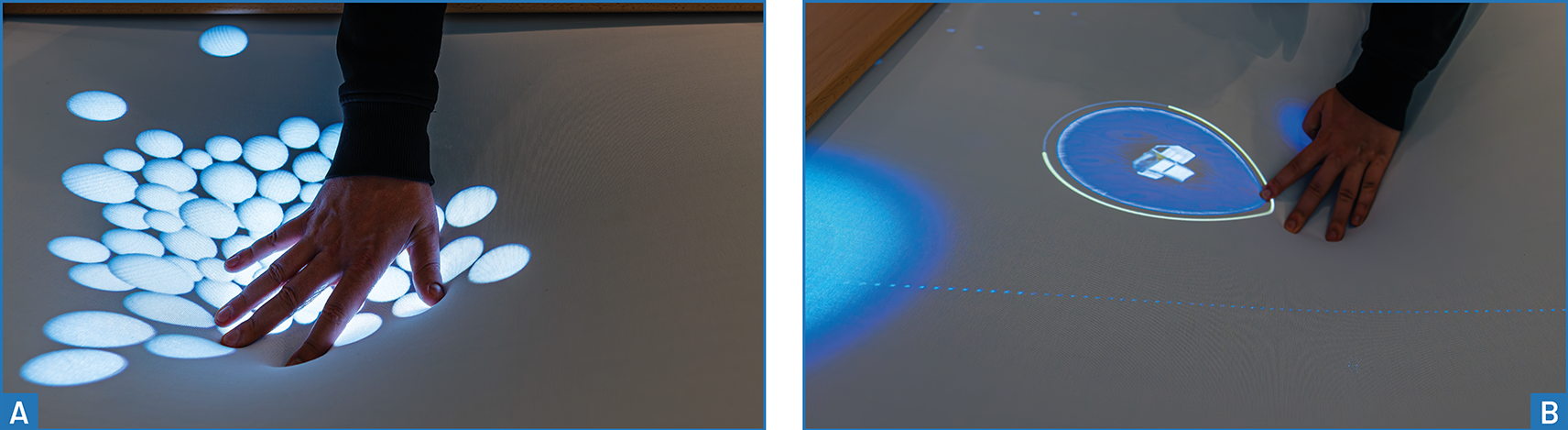
The tabletop format connected pressing into a horizontal surface with gravity-like attraction. The scenarios were designed to support collaboration around the table while remaining usable by one person.
Features and Limitations
Integrating Unreal Engine 4
The implementation combined a .NET/WPF server using dSense with a client built in Unreal Engine 4. A plugin connected detected depth interactions to the engine’s integrated physics simulation. Microsoft Kinect 2 captured surface deformation, and multi-touch processing was optimized for stability and performance: an immediate response was important for making the relationship between deformation and physical effects understandable.
Communication used WebSockets, with an additional intermediary layer to support the Socket.IO interface. This extended the separation of tracking and application logic explored in Glyphboard and DeepZoom to a game-engine client.
Approximating Deformation with Point Forces
The Unreal Engine integration did not offer a native way to feed dynamic vector fields into the physics simulation. The implementation therefore approximated deformation through radial force actors: point-force sources positioned at detected contacts, with their strength determined by deformation depth.
This exposed multiple contacts to the simulation without reconstructing the full surface relief. It also imposed a conceptual boundary: the resulting force field did not necessarily match the shape or combined effects of the physical deformation.
Emulation, Debugging, and Configuration
A simple mouse-based emulator generated depth-interaction events to make development more efficient. The Unreal Engine client included a debugging overlay showing connection status, received interactions, and their coordinates. A separate configuration overlay exposed game parameters, which were stored as a saved game and restored when the application started.
These tools supported testing and diagnosis across the tracking and visualization boundary, alongside adjustment of application behaviour.
The framework also gained a tracking-configuration user interface for configuring the sensor and persisting a startup configuration. This interface was separate from the client’s game-parameter overlay and the utility used to launch the installation’s programs.
Viewport configuration supplied parameters defining the portion of the projected surface used by an application. These parameters allowed detected positions to be transformed into the correct application coordinates when the client used only part of the surface.
Automated Startup
An autostart function had already been implemented for the monolithic application in Interactive Animations. DisPlay’s client-server architecture introduced further requirements: startup now had to coordinate separate tracking and visualization applications and, in particular, support client-driven parameterization of the tracking server. The earlier automatic startup was therefore extended to accommodate configuration across application boundaries.
Starting the server loaded the selected sensor, resolution, filtering and processing settings, and connection configuration, then started the corresponding components.
A separate utility with a simple configuration interface launched the programs in the correct order, including the communication intermediary. Framework startup and application settings therefore addressed different parts of the installation’s setup.
Scenario
Tabletop Interaction and Exhibition Flow
Three scenarios were implemented as separate Unreal Engine levels. They switched after a configurable interval, but only when no interaction was detected. Active interaction postponed a transition by 30 seconds, allowing visitors to continue without an immediate interruption.
Idle overlays invited visitors to interact, and the space-game overlay explained its mechanics through animation. In the ball simulation, the simulation continued beneath a blur effect, with a countdown indicating the next level transition.
Apart from short idle-screen texts, the scenarios had no fixed reading direction, allowing people to gather around the table. Although outward pulling was detected, all levels were designed to work through inward pressing alone. Collaboration was intended to add possibilities without being required.
Ball Simulation: Revisiting DepthTouch
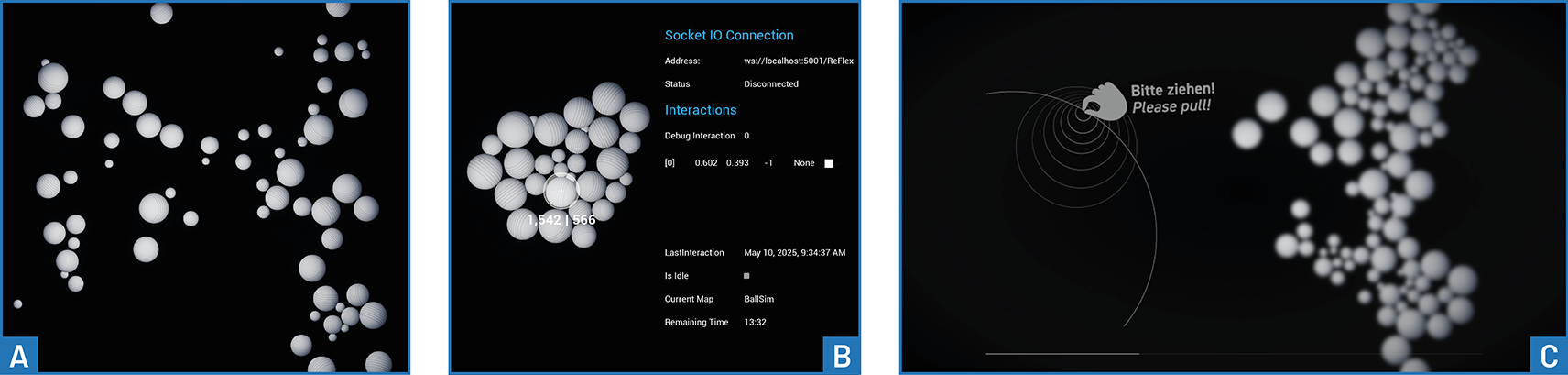
The first level adapted DepthTouch’s circles into three-dimensional balls. Shading made their volume visible, while textures revealed rotation. The physics engine added size-dependent mass, inertia, friction, and more complex collisions.
Moving to a three-dimensional simulation also allowed balls to move vertically and stack. Invisible boundaries formed a virtual glass box: a floor and side walls contained the balls, while a ceiling slightly above the diameter of the largest ball limited vertical movement. This reduced excessive stacking while retaining some of the additional behaviour introduced by the engine.
The scenario thus explored both the visual appeal and interaction consequences of replacing a simplified simulation with richer physical behaviour.
Particle Simulation
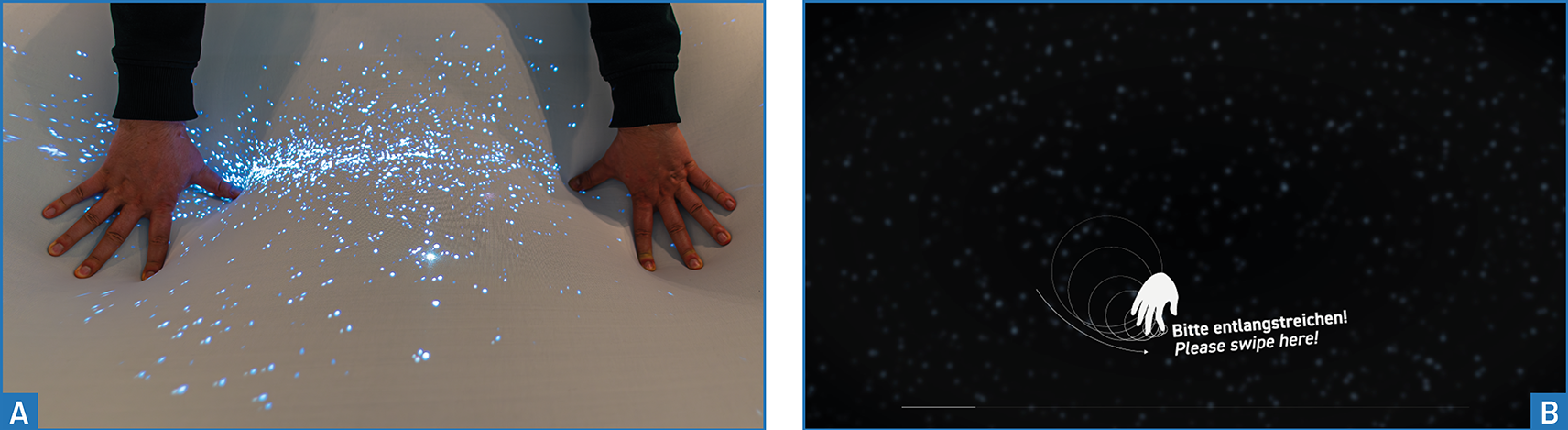
The second level used a particle effect as a proof of concept for interactive force-field visualization. Pressing created a force source at the hand position, and deformation depth controlled its strength. Particles responded by changing their trajectories, producing an interactive snowstorm-like effect.
Magnetic fields and interactions between them motivated the concept, but the prototype did not simulate magnetic field lines. Producing those patterns would have required additional constraints on particle motion, which remained outside the implemented scenario.
Spaceship Game: Steering Objects through Forces
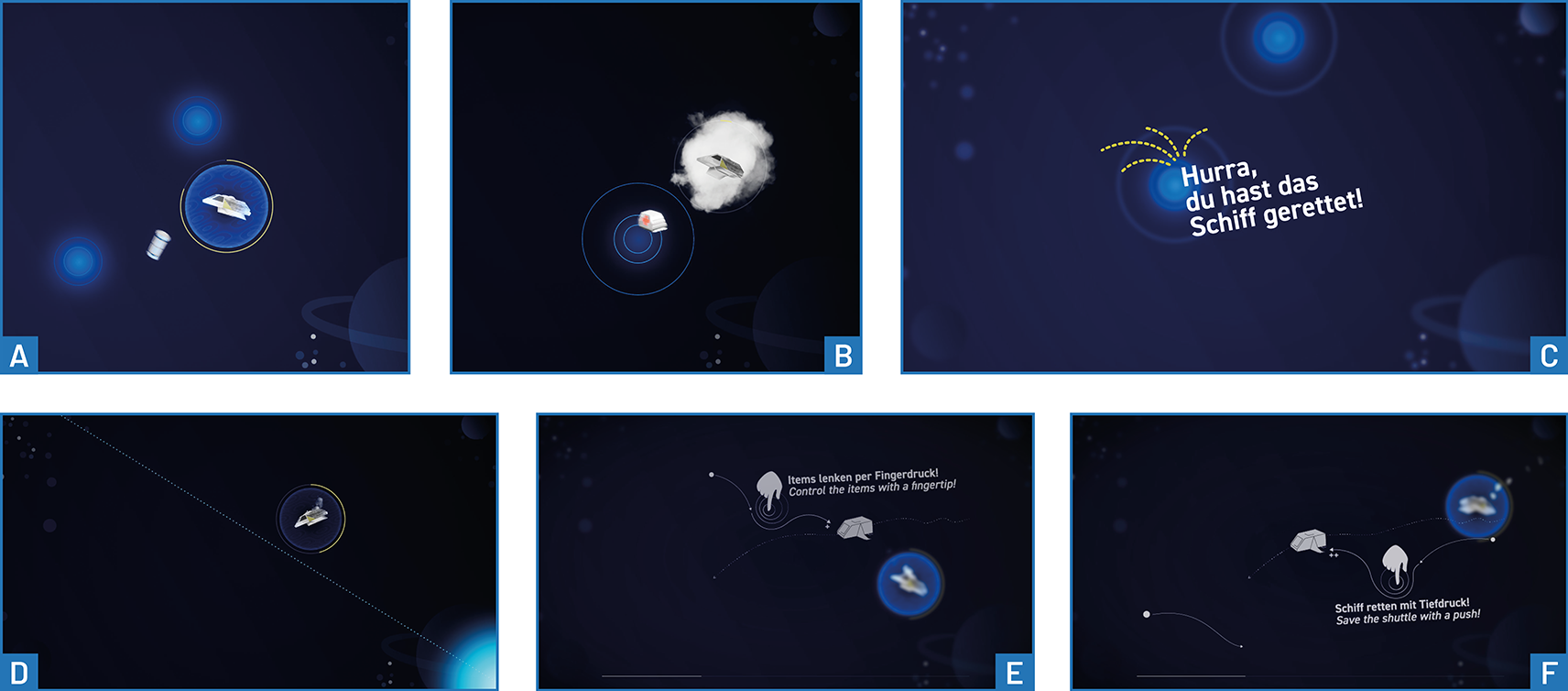
The third level developed a game around indirect control. An initial projectile concept would have mapped pressure to launch speed and contact position to firing direction. It was set aside because it favoured single-touch interaction and fitted the idea of simultaneous gravitational sources less well.
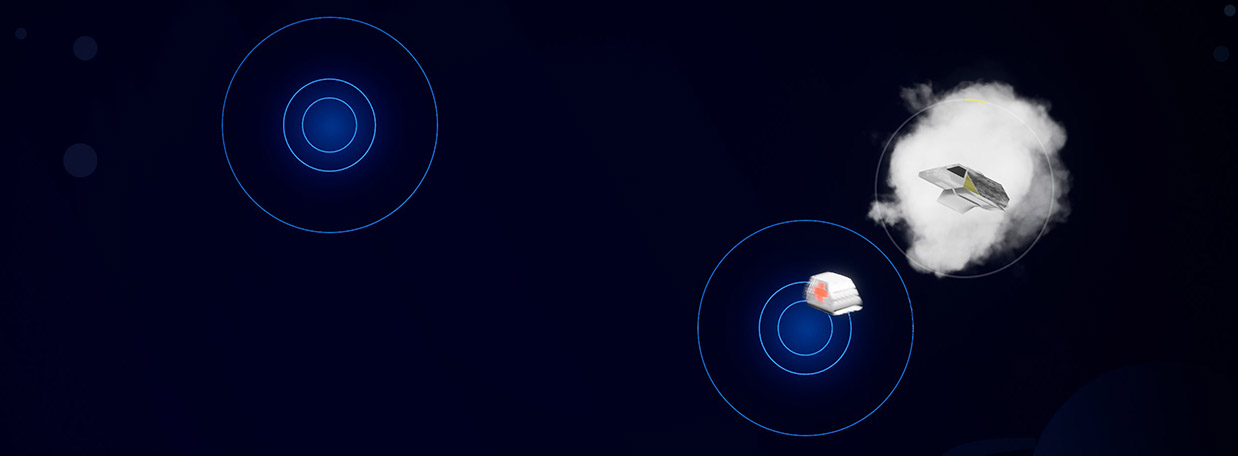
The implemented game instead featured a spaceship moving along a predefined, irregular path while continuously losing energy. Power-ups entered from the screen edges at regular intervals with random directions and speeds. Players created force fields to steer these objects towards the ship and replenish its energy. The ship itself was unaffected by the fields, and all game elements occupied a single depth plane.
| Interaction | Effect in the game |
|---|---|
| Press inward | Attract power-ups towards the contact position. |
| Pull outward | Repel power-ups from the contact position. |
| Vary deformation depth | Adjust force strength to redirect, accelerate, or capture objects. |
| Combine several contacts | Influence trajectories through multiple force sources, including trapping objects between them. |
Visual feedback identified contact positions, highlighted incoming power-ups and their directions, and represented declining ship energy through increasing smoke. Restoring full energy triggered a success message. Players influenced power-ups through forces rather than directly dragging them onto the ship.
Findings and Discussion
The following section provides exploratory observations about the interaction concepts and implementation.
Physical Realism and Interaction Efficiency
The balls appeared less agile than DepthTouch’s circles because of friction and inertia, although their rendering and collisions were more convincing. Stacking offered an additional effect, but greater physical realism did not automatically improve interaction.
For abstract tasks such as selection and filtering, the study judged simplified physical metaphors sufficiently understandable and more efficient. Detailed simulation was most appropriate when the physical behaviour itself mattered to the scenario.
Limits of the Point-Force Approximation
Point forces were not an adequate general replacement for a surface-derived vector field. Their strength decreased with distance differently from the actual surface deformation. Multiple sources could also overlap and reinforce one another in ways that did not reflect the membrane’s shape. Extended surface features, such as an inclined plane, could not be represented by this approach.
These differences were particularly problematic for balls intended to behave as though they were rolling over the deformed surface. For particles and the space game, however, the same transformation offered useful additional interactions, such as trapping objects between several sources. The suitability of the approximation therefore depended on whether the application sought to reproduce surface behaviour or use deformation to control an independent simulation.
Learning Indirect Control
In the space game, users initially tried to push objects directly onto the ship. Influencing trajectories indirectly required familiarization. The delayed effect of forces also made control difficult and could catapult power-ups out of the play area.
A boundary preventing objects from escaping was proposed, but would weaken the consistency of the space setting. Further possibilities included obstacles around which power-ups would need to be guided and additional object types with different, potentially negative effects. These remained proposed extensions.
Implications for Framework Development
For the forthcoming requirements analysis, the study provides evidence for the following areas:
- Integration across technologies: Deliver interaction data to game-engine clients through a clear communication boundary, accounting for protocol adapters and dependent processes.
- Stable, responsive multi-touch: Preserve multiple contact positions and deformation depths so applications can map them to simultaneous forces with little delay.
- Development and diagnosis: Provide emulated interaction input and visibility into connection state, received events, and coordinate mappings.
- Reproducible exhibition setup: Restore sensor, processing, and connection settings automatically and coordinate startup across components.
- Tracking and viewport configuration: Provide a configuration interface with persistent startup settings and coordinate mapping for clients that use only part of the projected surface.
- Application configuration and guidance: Persist game parameters, explain unfamiliar interactions, and make automatic transitions sensitive to ongoing input.
- Explicit limits of input representations: Distinguish contact-based force control from full-surface reconstruction when choosing how to connect deformation to a simulation.
These implications connect implemented tools and observed limitations to later framework decisions. They do not imply that accurate surface-derived force fields, magnetic-field simulation, or the proposed game extensions were implemented in this case study.